# Custom Draw | WinForms Controls | DevExpress Documentation
The Custom Painting technology lets you customize appearances of individual elements to any extent you like.
## Related API
The Pivot Grid offers you a set of events that can be handled to paint desired elements manually.
- [PivotGridControl.CustomDrawCell](/WindowsForms/DevExpress.XtraPivotGrid.PivotGridControl.CustomDrawCell)
- Applies to: [Cell](/WindowsForms/1681/controls-and-libraries/pivot-grid/ui-elements/cell)
- [PivotGridControl.CustomDrawEmptyArea](/WindowsForms/DevExpress.XtraPivotGrid.PivotGridControl.CustomDrawEmptyArea)
- Applies to: [Empty Area](/WindowsForms/1678/controls-and-libraries/pivot-grid/ui-elements/empty-area)
- [PivotGridControl.CustomDrawFieldHeader](/WindowsForms/DevExpress.XtraPivotGrid.PivotGridControl.CustomDrawFieldHeader)
- Applies to: [Field Header](/WindowsForms/1680/controls-and-libraries/pivot-grid/ui-elements/field-header)
- [PivotGridControl.CustomDrawFieldHeaderArea](/WindowsForms/DevExpress.XtraPivotGrid.PivotGridControl.CustomDrawFieldHeaderArea)
- Applies to: [Header Area](/WindowsForms/1682/controls-and-libraries/pivot-grid/ui-elements/header-area)
- [PivotGridControl.CustomDrawFieldValue](/WindowsForms/DevExpress.XtraPivotGrid.PivotGridControl.CustomDrawFieldValue)
- Applies to: [Field Value](/WindowsForms/1694/controls-and-libraries/pivot-grid/ui-elements/field-value)
## Example
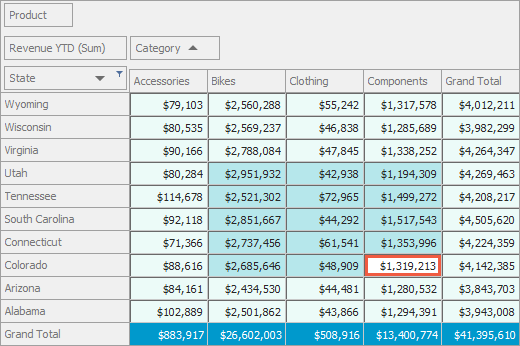
The following example shows how to handle the `PivotGridControl.CustomDrawCell` event to paint Pivot Grid cells according to the cell’s state (selected or unselected) and the cell’s type (data cells or grand total cells).
The following image illustrates the resulting UI:
- C#
- VB.NET
using DevExpress.XtraPivotGrid;
using System.Drawing;
using System.Windows.Forms;

namespace PivotCustomDraw {
    public partial class Form1 : Form {
        public Form1() {
            InitializeComponent();
            // This line of code is generated by Data Source Configuration Wizard
            // Fill the ExcelDataSource
            excelDataSource1.Fill();
        }
        private void pivotGridControl1_CustomDrawCell(object sender, PivotCustomDrawCellEventArgs e) {
            Rectangle r;
            // Paints Row Grand Totals.
            if (e.RowValueType == PivotGridValueType.GrandTotal) {
                Brush brushFillTotals;
                brushFillTotals = e.GraphicsCache.GetSolidBrush(ColorTranslator.FromHtml("#0099cc"));
                r = e.Bounds;
                e.GraphicsCache.FillRectangle(brushFillTotals, e.Bounds);
                r.Inflate(-4, -4);
                e.GraphicsCache.DrawString(e.DisplayText, e.Appearance.Font,
                Brushes.White, r, e.Appearance.GetStringFormat());
                e.Handled = true;
                return;
            }
            // Paints the data cells.
            Brush brushFill;
            r = e.Bounds;
            if (e.Focused)
                // Initializes the brush used to paint the focused cell.
                brushFill = e.GraphicsCache.GetSolidBrush(Color.White);
            else
                if (e.Selected)
                // Initializes the brush used to paint selected cells.
                brushFill = e.GraphicsCache.GetSolidBrush(ColorTranslator.FromHtml("#b6e7eb"));
            else
                // Initializes the brush used to paint data cells.
                brushFill = e.GraphicsCache.GetSolidBrush(ColorTranslator.FromHtml("#ecfbf8"));

            e.GraphicsCache.DrawRectangle(Pens.DimGray, r);
            r.Inflate(-1, -1);
            e.GraphicsCache.FillRectangle(brushFill, r);
            if (e.Focused) {
                r.Inflate(-1, -1);
                e.GraphicsCache.DrawRectangle(e.GraphicsCache.GetPen(ColorTranslator.FromHtml("#f05b41"),
                    3), r);
            }
            r.Inflate(-4, -4);
            e.Appearance.DrawString(e.GraphicsCache, e.DisplayText, r);
            e.Handled = true;
        }
    }
}
Imports DevExpress.XtraPivotGrid
Imports System.Drawing
Imports System.Windows.Forms

Namespace PivotCustomDraw

    Public Partial Class Form1
        Inherits Form

        Public Sub New()
            InitializeComponent()
            ' This line of code is generated by Data Source Configuration Wizard
            ' Fill the ExcelDataSource
            excelDataSource1.Fill()
        End Sub

        Private Sub pivotGridControl1_CustomDrawCell(ByVal sender As Object, ByVal e As PivotCustomDrawCellEventArgs)
            Dim r As Rectangle
            ' Paints Row Grand Totals.
            If e.RowValueType = PivotGridValueType.GrandTotal Then
                Dim brushFillTotals As Brush
                brushFillTotals = e.GraphicsCache.GetSolidBrush(ColorTranslator.FromHtml("#0099cc"))
                r = e.Bounds
                e.GraphicsCache.FillRectangle(brushFillTotals, e.Bounds)
                r.Inflate(-4, -4)
                e.GraphicsCache.DrawString(e.DisplayText, e.Appearance.Font, Brushes.White, r, e.Appearance.GetStringFormat())
                e.Handled = True
                Return
            End If

            ' Paints the data cells.
            Dim brushFill As Brush
            r = e.Bounds
            If e.Focused Then
                ' Initializes the brush used to paint the focused cell.
                brushFill = e.GraphicsCache.GetSolidBrush(Color.White)
            ElseIf e.Selected Then
                ' Initializes the brush used to paint selected cells.
                brushFill = e.GraphicsCache.GetSolidBrush(ColorTranslator.FromHtml("#b6e7eb"))
            Else
                ' Initializes the brush used to paint data cells.
                brushFill = e.GraphicsCache.GetSolidBrush(ColorTranslator.FromHtml("#ecfbf8"))
            End If

            e.GraphicsCache.DrawRectangle(Pens.DimGray, r)
            r.Inflate(-1, -1)
            e.GraphicsCache.FillRectangle(brushFill, r)
            If e.Focused Then
                r.Inflate(-1, -1)
                e.GraphicsCache.DrawRectangle(e.GraphicsCache.GetPen(ColorTranslator.FromHtml("#f05b41"), 3), r)
            End If

            r.Inflate(-4, -4)
            e.Appearance.DrawString(e.GraphicsCache, e.DisplayText, r)
            e.Handled = True
        End Sub
    End Class
End Namespace
## More Examples
Refer to the following section for more examples: [Appearance](/WindowsForms/1970/controls-and-libraries/pivot-grid/examples#appearance)
See Also
[How to get colors that correspond to the currently used skin](https://supportcenter.devexpress.com/ticket/details/ak9476/how-to-get-colors-that-correspond-to-the-currently-used-skin)
[How to obtain the color of a particular control's element when skins are used](/WindowsForms/2399/build-an-application/skins)
[How to get skin images at runtime](https://supportcenter.devexpress.com/ticket/details/a2966/how-to-get-skin-images-at-runtime)