# Save and Restore Layout | WinForms Controls | DevExpress Documentation
DevExpress controls allow you to save their layout information to data stores (XML file, stream and system registry) and restore the layout later. Refer to the following article for information about the common concept: [Save and Restore Layouts of DevExpress controls](/WindowsForms/2404/common-features/saving-and-restoring-layouts-to-a-file-stream-and-system-registry).
The [Pivot Grid layout](/WindowsForms/1854/controls-and-libraries/pivot-grid/layout) determines the position and appearance of its [visual elements](/WindowsForms/1821/controls-and-libraries/pivot-grid/ui-elements). You can modify the Pivot Grid layout in the [PivotGrid Designer](/WindowsForms/1825/controls-and-libraries/pivot-grid/design-time-features/pivotgrid-designer) and in code.
The control saves the layout to an XML file, a system registry path, or to a stream, and subsequently restores it. You can customize and save the current Pivot Grid control’s layout and apply the same settings to other Pivot Grid controls. Pivot Grid uses a field’s [Name](/CoreLibraries/DevExpress.XtraPivotGrid.PivotGridFieldBase.Name) property value to determine fields in a stored layout.
Important
Deserializing layout settings from untrusted resources may create security issues. Review the following help topic for additional information: [Safe Deserialization](/GeneralInformation/404441/security/safe-deserialization).
## Save and Restore Layout at Design Time
The Layout page of the [PivotGrid Designer](/WindowsForms/1825/controls-and-libraries/pivot-grid/design-time-features/pivotgrid-designer) allows you to modify, save, and restore the Pivot Grid control layout. See the [Layout Page](/WindowsForms/1828/controls-and-libraries/pivot-grid/design-time-features/pivotgrid-designer/layout-page) topic for details.
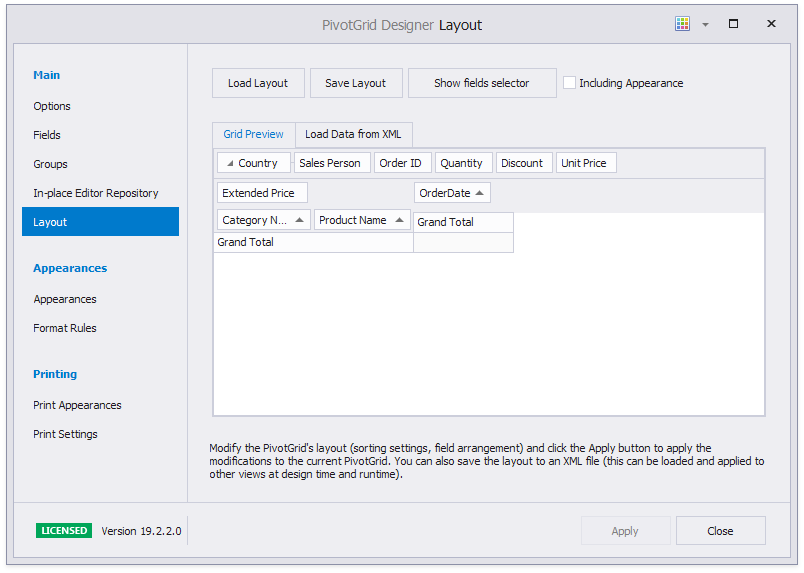
To restore the Pivot Grid’s layout from an existing XML file, click the **Load Layout…** button. To apply the created or loaded layout to the current Pivot Grid control, click the **Apply** button.
## Save and Restore Layout in Code
The Pivot Grid control has API methods to save a control layout and restore it from the following data stores:
- XML file
- Windows Registry
- Stream
The following list illustrates methods that you can use to save and restore the Pivot Grid’s layout:
- [PivotGridControl.SaveLayoutToRegistry](/WindowsForms/DevExpress.XtraPivotGrid.PivotGridControl.SaveLayoutToRegistry.overloads)
- Saves a Pivot Grid Control’s layout to a system registry path.
- [PivotGridControl.SaveLayoutToStream](/WindowsForms/DevExpress.XtraPivotGrid.PivotGridControl.SaveLayoutToStream.overloads)
- Saves a Pivot Grid Control’s layout to the specified stream.
- [PivotGridControl.SaveLayoutToXml](/WindowsForms/DevExpress.XtraPivotGrid.PivotGridControl.SaveLayoutToXml.overloads)
- Saves a Pivot Grid Control’s layout to an XML file.
- [PivotGridControl.SaveLayoutToJson](/WindowsForms/DevExpress.XtraPivotGrid.PivotGridControl.SaveLayoutToJson.overloads)
- Saves the Pivot Grid’s layout settings specified by the [OptionsLayout](/WindowsForms/DevExpress.XtraPivotGrid.PivotGridControl.OptionsLayout) property to a file in JSON format.
- [PivotGridControl.RestoreLayoutFromRegistry](/WindowsForms/DevExpress.XtraPivotGrid.PivotGridControl.RestoreLayoutFromRegistry.overloads)
- Restores the layout stored at the specified system registry path.
- [PivotGridControl.RestoreLayoutFromStream](/WindowsForms/DevExpress.XtraPivotGrid.PivotGridControl.RestoreLayoutFromStream.overloads)
- Restores a Pivot Grid Control’s layout from the specified stream.
- [PivotGridControl.RestoreLayoutFromXml](/WindowsForms/DevExpress.XtraPivotGrid.PivotGridControl.RestoreLayoutFromXml.overloads)
- Restores a Pivot Grid Control’s layout from the specified XML file.
- [PivotGridControl.RestoreLayoutFromJson](/WindowsForms/DevExpress.XtraPivotGrid.PivotGridControl.RestoreLayoutFromJson.overloads)
- Loads the Pivot Grid’s layout settings specified by the [OptionsLayout](/WindowsForms/DevExpress.XtraPivotGrid.PivotGridControl.OptionsLayout) property from a file in JSON format.
Call the following methods to save and restore the collapsed field state in the Pivot Grid layout. Otherwise, the fields are saved and restored expanded.
- [PivotGridControl.SaveCollapsedStateToFile](/WindowsForms/DevExpress.XtraPivotGrid.PivotGridControl.SaveCollapsedStateToFile%28System.String%29)
- Saves the collapsed state of field values to the specified file.
- [PivotGridControl.SaveCollapsedStateToStream](/WindowsForms/DevExpress.XtraPivotGrid.PivotGridControl.SaveCollapsedStateToStream%28System.IO.Stream%29)
- Saves the collapsed state of field values to the specified stream.
- [PivotGridControl.LoadCollapsedStateFromFile](/WindowsForms/DevExpress.XtraPivotGrid.PivotGridControl.LoadCollapsedStateFromFile%28System.String%29)
- Restores the collapsed state of field values from the specified file.
- [PivotGridControl.LoadCollapsedStateFromStream](/WindowsForms/DevExpress.XtraPivotGrid.PivotGridControl.LoadCollapsedStateFromStream%28System.IO.Stream%29)
- Restores the collapsed state of field values from the specified stream.
## Layout Options
The **SaveLayoutTo…** or **RestoreLayoutFrom…** methods without the *options* parameter save or restore only a subset of the control’s settings. These settings include:
- Visibility state, position and size of the fields.
- Data settings (grouping, sorting, filtering settings and summaries).
- All settings grouped within the control’s [PivotGridControl.OptionsView](/WindowsForms/DevExpress.XtraPivotGrid.PivotGridControl.OptionsView) object.
The **SaveLayoutTo… or RestoreLayoutFrom…** methods with the *options* parameter save or restore the specified settings. To create a parameter, instantiate the [PivotGridOptionsLayout](/CoreLibraries/DevExpress.XtraPivotGrid.PivotGridOptionsLayout) class and set the required properties. To save all settings, pass **null** (**Nothing** in Visual Basic) or a static [OptionsLayoutBase.FullLayout](/CoreLibraries/DevExpress.Utils.OptionsLayoutBase.FullLayout) property as the options parameter.
Settings, such as [appearance](/WindowsForms/1843/controls-and-libraries/pivot-grid/appearance) and [format rules](/WindowsForms/1883/controls-and-libraries/pivot-grid/data-analysis/conditional-formatting), are not saved/restored unless explicitly specified. Use the [PivotGridControl.OptionsLayout](/WindowsForms/DevExpress.XtraPivotGrid.PivotGridControl.OptionsLayout) property to specify the settings to save or restore.
### Manage Fields in Restored Layout
The [PivotGridOptionsLayout.Columns.AddNewColumns](/CoreLibraries/DevExpress.Utils.OptionsColumnLayout.AddNewColumns) and [PivotGridOptionsLayout.Columns.RemoveOldColumns](/CoreLibraries/DevExpress.Utils.OptionsColumnLayout.RemoveOldColumns) settings determine the resulting combination of fields in the restored layout. New columns are fields in the control, old columns are fields in the saved layout. The field’s [Name](/CoreLibraries/DevExpress.XtraPivotGrid.PivotGridFieldBase.Name) property determines fields in a stored layout.
When old and new fields have the same [Name](/CoreLibraries/DevExpress.XtraPivotGrid.PivotGridFieldBase.Name), the control applies the saved layout changes to the fields in the control.
When old and new fields have a different `Name`, the behavior is as follows:
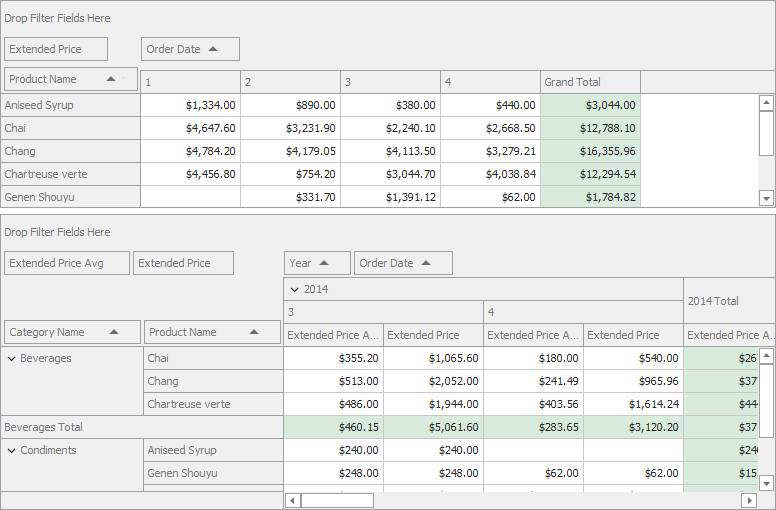
For example, the image below displays two Pivot Grid controls with the following fields:
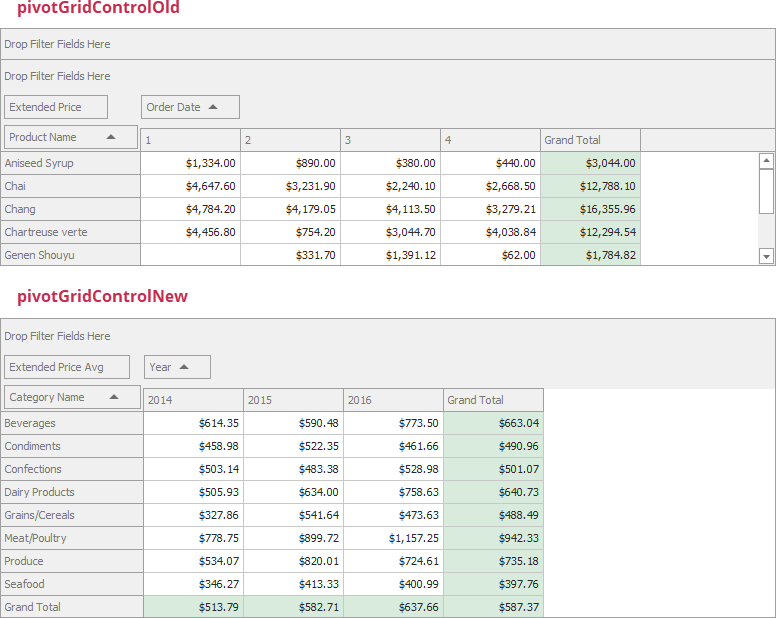
| pivotGridControlOld | pivotGridControlNew |
| --- | --- |
| Field: `Extended Price`
Name: `fieldExtendedPrice` | Field: `Extended Price Avg`
Name: `fieldExtendedPriceNew` |
| Field: `Product Name`
Name: `fieldProductName` | Field: `Category Name`
Name: `fieldCategoryName` |
| Field: `Order Date`
Name: `fieldQuarter` | Field: `Year`
Name: `fieldYear` |
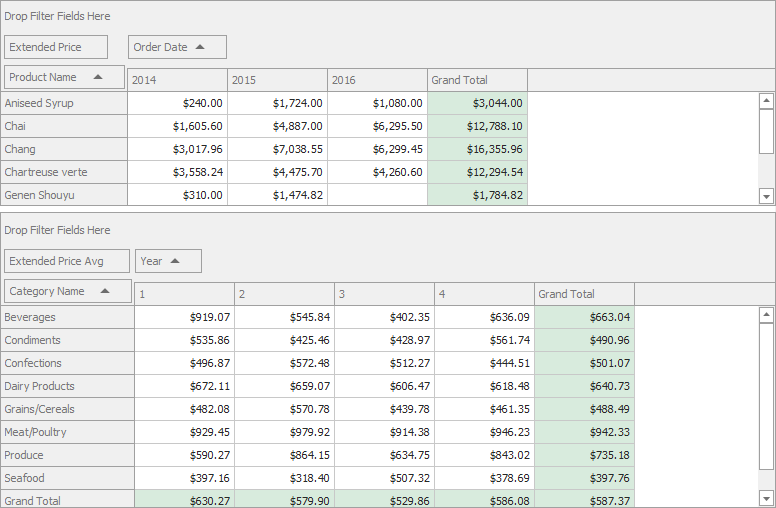
- If both properties are `true`, the Pivot Grid removes the fields from the saved layout and keeps the fields in the control.
- C#
- VB.NET
using System.Windows.Forms;

namespace WinPivotUpgradeLayout {
    public partial class Form1 : Form {
        MemoryStream layoutStream = new MemoryStream();
        public Form1() {
            pivotGridControlNew.OptionsLayout.Columns.AddNewColumns = true;
            pivotGridControlNew.OptionsLayout.Columns.RemoveOldColumns = true;
        }

        private void simpleButton1_Click(object sender, EventArgs e) {
            pivotGridControlOld.SaveLayoutToStream(layoutStream);
        }

        private void simpleButton2_Click(object sender, EventArgs e) {
            if (layoutStream.Length > 0) {
                layoutStream.Seek(0, SeekOrigin.Begin);
                pivotGridControlNew.RestoreLayoutFromStream(layoutStream);
            }
        }
    }
}
Imports System.Windows.Forms

Namespace WinPivotUpgradeLayout
    Partial Public Class Form1
        Inherits Form

        Private layoutStream As New MemoryStream()
        Public Sub New()
            pivotGridControlNew.OptionsLayout.Columns.AddNewColumns = True
            pivotGridControlNew.OptionsLayout.Columns.RemoveOldColumns = True
        End Sub

        Private Sub simpleButton1_Click(ByVal sender As Object, ByVal e As EventArgs)
            pivotGridControlOld.SaveLayoutToStream(layoutStream)
        End Sub

        Private Sub simpleButton2_Click(ByVal sender As Object, ByVal e As EventArgs)
            If layoutStream.Length > 0 Then
                layoutStream.Seek(0, SeekOrigin.Begin)
                pivotGridControlNew.RestoreLayoutFromStream(layoutStream)
            End If
        End Sub
    End Class
End Namespace
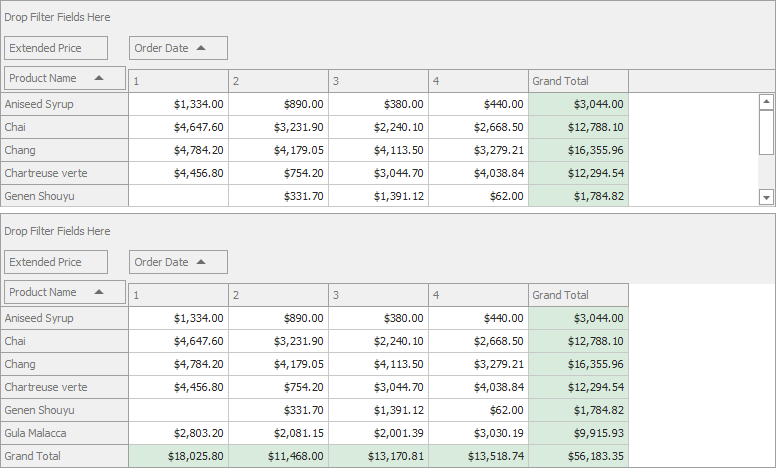
- If both properties are `false`, the Pivot Grid restores the fields from the layout and removes the fields from the control.
- C#
- VB.NET
// …
pivotGridControlNew.OptionsLayout.Columns.AddNewColumns = false;
pivotGridControlNew.OptionsLayout.Columns.RemoveOldColumns = false;
// …
' …
pivotGridControlNew.OptionsLayout.Columns.AddNewColumns = False
pivotGridControlNew.OptionsLayout.Columns.RemoveOldColumns = False
' …
- If `AddNewColumns` is `true` and `RemoveOldColumns` is `false`, the Pivot Grid restores the fields from the layout and keeps the fields in the control.
- C#
- VB.NET
// …
pivotGridControlNew.OptionsLayout.Columns.AddNewColumns = true;
pivotGridControlNew.OptionsLayout.Columns.RemoveOldColumns = false;
// …
' …
pivotGridControlNew.OptionsLayout.Columns.AddNewColumns = True
pivotGridControlNew.OptionsLayout.Columns.RemoveOldColumns = False
' …
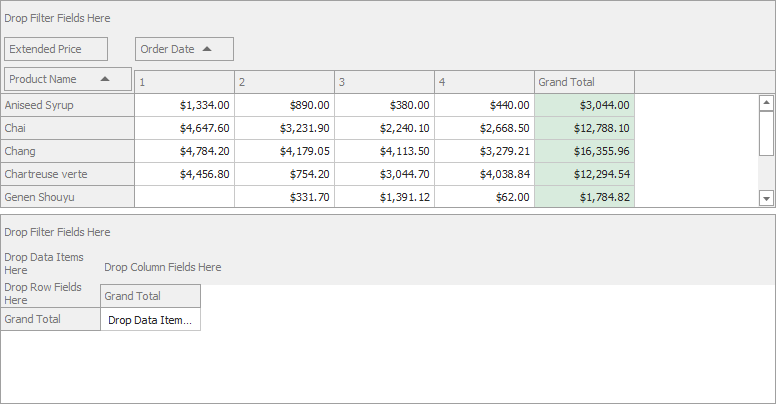
- If `AddNewColumns` is `false` and `RemoveOldColumns` is `true`, the Pivot Grid removes the fields from the layout and control.
- C#
- VB.NET
// …
pivotGridControlNew.OptionsLayout.Columns.AddNewColumns = false;
pivotGridControlNew.OptionsLayout.Columns.RemoveOldColumns = true;
// …
' …
pivotGridControlNew.OptionsLayout.Columns.AddNewColumns = False
pivotGridControlNew.OptionsLayout.Columns.RemoveOldColumns = True
' …
Use the [OptionsLayoutBase.FullLayout](/CoreLibraries/DevExpress.Utils.OptionsLayoutBase.FullLayout) property to clear all the fields and restore all fields from the layout.
For [field groups](/WindowsForms/1958/controls-and-libraries/pivot-grid/layout/field-groups), use the [PivotGridOptionsLayout.AddNewGroups](/CoreLibraries/DevExpress.XtraPivotGrid.PivotGridOptionsLayout.AddNewGroups) property.
## Upgrade Layout
When a layout is restored and its version differs from the current Pivot Grid layout version, the [PivotGridControl.LayoutUpgrade](/WindowsForms/DevExpress.XtraPivotGrid.PivotGridControl.LayoutUpgrade) event occurs.
The current layout version is specified with the [OptionsLayoutBase.LayoutVersion](/CoreLibraries/DevExpress.Utils.OptionsLayoutBase.LayoutVersion) property. You can handle the **LayoutUpgrade** event and use this property and the [PivotLayoutUpgradeEventArgs.PreviousVersion](/WPF/DevExpress.Xpf.PivotGrid.PivotLayoutUpgradeEventArgs.PreviousVersion) value to decide whether to overwrite the current layout.
When you load or restore a layout, the [PivotGridControl.BeforeLoadLayout](/WindowsForms/DevExpress.XtraPivotGrid.PivotGridControl.BeforeLoadLayout) event occurs. You can handle this event and set the [LayoutAllowEventArgs.Allow](/CoreLibraries/DevExpress.Utils.LayoutAllowEventArgs.Allow) property to **false** to cancel loading.
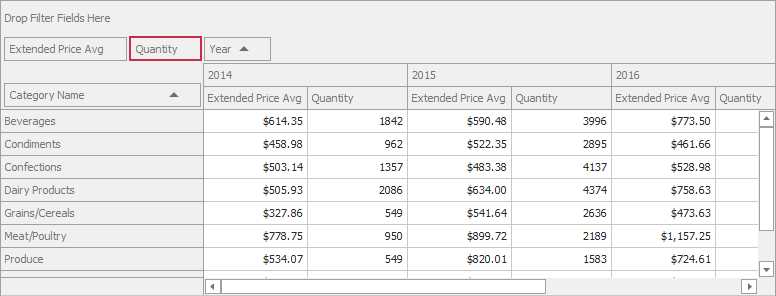
The following example handles `LayoutUpgrade` to add the *Quantity* field to the data area of `pivotGridControlNew`:
- C#
- VB.NET
using System.Windows.Forms;

namespace WinPivotUpgradeLayout {
    public partial class Form1 : Form {
        MemoryStream layoutStream = new MemoryStream();
        public Form1() {
            InitializeComponent();
            sqlDataSource1.Fill();
            sqlDataSource1.FillAsync();
            pivotGridControlOld.OptionsLayout.LayoutVersion = "1.0";
            pivotGridControlNew.OptionsLayout.LayoutVersion = "2.0";

        }

        private void simpleButton1_Click(object sender, EventArgs e) {
            pivotGridControlOld.SaveLayoutToStream(layoutStream);
        }

        private void simpleButton2_Click(object sender, EventArgs e) {
            if (layoutStream.Length > 0) {
                layoutStream.Seek(0, SeekOrigin.Begin);
                pivotGridControlNew.RestoreLayoutFromStream(layoutStream);
            }
        }

        private void pivotGridControlNew_LayoutUpgrade(object sender, DevExpress.Utils.LayoutUpgradeEventArgs e) {
            if (e.PreviousVersion == "1.0") {
                var newField = new PivotGridField() {
                    FieldName = "Quantity",
                    Caption = "Quantity",
                    Name = "fieldQuantity",
                    Area = DevExpress.XtraPivotGrid.PivotArea.DataArea
                };
                pivotGridControlNew.Fields.Add(newField);
            };
        }
    }
}
Imports System.Windows.Forms

Namespace WinPivotUpgradeLayout
    Partial Public Class Form1
        Inherits Form

        Private layoutStream As New MemoryStream()
        Public Sub New()
            InitializeComponent()
            sqlDataSource1.Fill()
            sqlDataSource1.FillAsync()c
            pivotGridControlOld.OptionsLayout.LayoutVersion = "1.0"
            pivotGridControlNew.OptionsLayout.LayoutVersion = "2.0"

        End Sub

            Private Sub simpleButton1_Click(ByVal sender As Object, ByVal e As EventArgs)
            pivotGridControlOld.SaveLayoutToStream(layoutStream)
            End Sub

        Private Sub simpleButton2_Click(ByVal sender As Object, ByVal e As EventArgs)
            If layoutStream.Length > 0 Then
                layoutStream.Seek(0, SeekOrigin.Begin)
                pivotGridControlNew.RestoreLayoutFromStream(layoutStream)
            End If
        End Sub

        Private Sub pivotGridControlNew_LayoutUpgrade(ByVal sender As Object, ByVal e As DevExpress.Utils.LayoutUpgradeEventArgs)
            If e.PreviousVersion = "1.0" Then
                Dim newField = New PivotGridField() With {
                    .FieldName = "Quantity",
                    .Caption = "Quantity",
                    .Name = "fieldQuantity",
                    .Area = DevExpress.XtraPivotGrid.PivotArea.DataArea
                }
                pivotGridControlNew.Fields.Add(newField)
            End If
        End Sub
        End Class
End Namespace
## Example: Save and Restore Pivot Grid Layout with the Row and Column State
This example demonstrates how to restore the Pivot Grid layout and row/column state.
[View Example](https://github.com/DevExpress-Examples/winforms-pivotgrid-save-restore-state-and-layout)
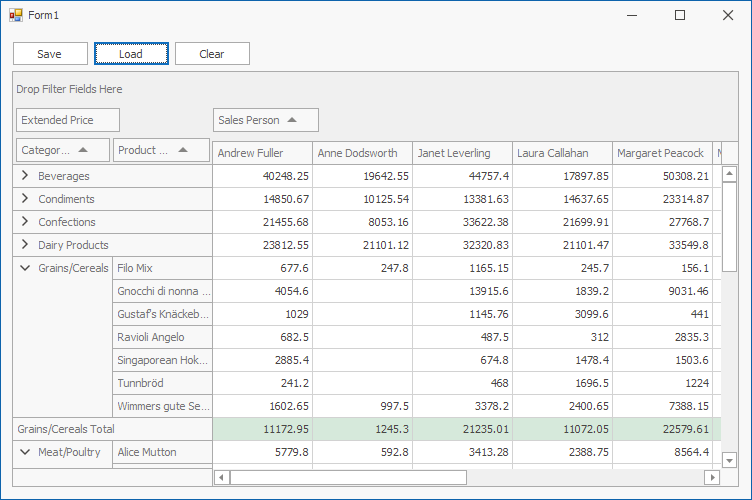
The **Save** button uses the [PivotGridControl.SaveLayoutToStream](/WindowsForms/DevExpress.XtraPivotGrid.PivotGridControl.SaveLayoutToStream.overloads) and [PivotGridControl.SaveCollapsedStateToStream](/WindowsForms/DevExpress.XtraPivotGrid.PivotGridControl.SaveCollapsedStateToStream%28System.IO.Stream%29) methods to save the layout and field values’ collapsed state to memory streams.
The **Load** button uses the [PivotGridControl.RestoreLayoutFromStream](/WindowsForms/DevExpress.XtraPivotGrid.PivotGridControl.RestoreLayoutFromStream.overloads) and [PivotGridControl.LoadCollapsedStateFromStream](/WindowsForms/DevExpress.XtraPivotGrid.PivotGridControl.LoadCollapsedStateFromStream%28System.IO.Stream%29) methods to restore the saved layout and column/row state.
The **Clear** button clears the field collection.
- C#
- VB.NET
using System;
using System.IO;
using System.Windows.Forms;
using DevExpress.Utils;

namespace XtraPivotGrid_RestoreLayoutExample {
    public partial class Form1 : DevExpress.XtraEditors.XtraForm {
        MemoryStream layoutStream = new MemoryStream();
        MemoryStream collapseStateStream = new MemoryStream();
        public Form1() {
            InitializeComponent();
            btnClear.Enabled = false;
        }
        private void Form1_Load(object sender, EventArgs e) {
            excelDataSource1.FileName = "SalesPerson.xlsx";
            excelDataSource1.Fill();
            pivotGridControl1.DataSource = excelDataSource1;
        }
        private void btnSave_Click(object sender, EventArgs e) {
            if (pivotGridControl1.Fields.Count > 0) {
                layoutStream.Dispose();
                layoutStream = new MemoryStream();
                pivotGridControl1.SaveLayoutToStream(layoutStream, OptionsLayoutBase.FullLayout);
                collapseStateStream.Dispose();
                collapseStateStream = new MemoryStream();
                pivotGridControl1.SaveCollapsedStateToStream(collapseStateStream);
                btnClear.Enabled = true;
            }
        }
        private void btnLoad_Click(object sender, EventArgs e) {
            if (layoutStream.Length > 0 && collapseStateStream.Length > 0) {
                layoutStream.Seek(0, SeekOrigin.Begin);
                pivotGridControl1.RestoreLayoutFromStream(layoutStream, OptionsLayoutBase.FullLayout);
                collapseStateStream.Seek(0, SeekOrigin.Begin);
                pivotGridControl1.LoadCollapsedStateFromStream(collapseStateStream);
            }
        }
        private void btnClear_Click(object sender, EventArgs e) {
            if (layoutStream.Length > 0 && collapseStateStream.Length > 0) {
                pivotGridControl1.Fields.Clear();
            }
        }
    }
}
Imports System
Imports System.IO
Imports System.Windows.Forms
Imports DevExpress.Utils

Namespace XtraPivotGrid_RestoreLayoutExample
    Partial Public Class Form1
        Inherits DevExpress.XtraEditors.XtraForm

        Private layoutStream As New MemoryStream()
        Private collapseStateStream As New MemoryStream()
        Public Sub New()
            InitializeComponent()
            btnClear.Enabled = False
        End Sub
        Private Sub Form1_Load(ByVal sender As Object, ByVal e As EventArgs) Handles Me.Load
            excelDataSource1.FileName = "SalesPerson.xlsx"
            excelDataSource1.Fill()
            pivotGridControl1.DataSource = excelDataSource1
        End Sub
        Private Sub btnSave_Click(ByVal sender As Object, ByVal e As EventArgs) Handles btnSave.Click
            If pivotGridControl1.Fields.Count > 0 Then
                layoutStream.Dispose()
                layoutStream = New MemoryStream()
                pivotGridControl1.SaveLayoutToStream(layoutStream, OptionsLayoutBase.FullLayout)
                collapseStateStream.Dispose()
                collapseStateStream = New MemoryStream()
                pivotGridControl1.SaveCollapsedStateToStream(collapseStateStream)
                btnClear.Enabled = True
            End If
        End Sub
        Private Sub btnLoad_Click(ByVal sender As Object, ByVal e As EventArgs) Handles btnLoad.Click
            If layoutStream.Length > 0 AndAlso collapseStateStream.Length > 0 Then
                layoutStream.Seek(0, SeekOrigin.Begin)
                pivotGridControl1.RestoreLayoutFromStream(layoutStream, OptionsLayoutBase.FullLayout)
                collapseStateStream.Seek(0, SeekOrigin.Begin)
                pivotGridControl1.LoadCollapsedStateFromStream(collapseStateStream)
            End If
        End Sub
        Private Sub btnClear_Click(ByVal sender As Object, ByVal e As EventArgs) Handles btnClear.Click
            If layoutStream.Length > 0 AndAlso collapseStateStream.Length > 0 Then
                pivotGridControl1.Fields.Clear()
            End If
        End Sub
    End Class
End Namespace
## Example: Update Pivot Grid Layout on Restore
The example below shows how to manage Pivot Grid layout on restore.
The example contains two Pivot Grid controls with the following fields:
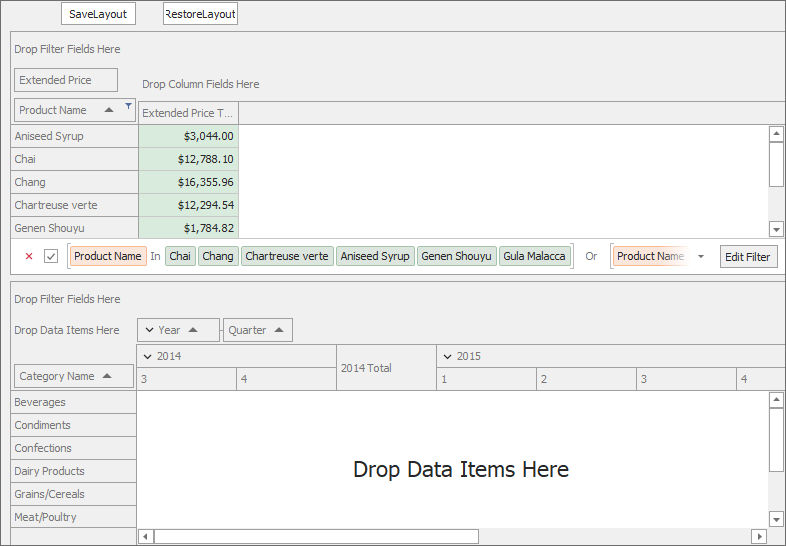
The **SaveLayout** button uses the [PivotGridControl.SaveLayoutToStream](/WindowsForms/DevExpress.XtraPivotGrid.PivotGridControl.SaveLayoutToStream%28System.IO.Stream%29) method to save the `pivotGridControlOld` layout to memory streams.
The **RestoreLayout** button uses the [PivotGridControl.RestoreLayoutFromStream](/WindowsForms/DevExpress.XtraPivotGrid.PivotGridControl.RestoreLayoutFromStream%28System.IO.Stream%29) method to restore the saved layout to `pivotGridControlNew`.
The following options allows you to combine fields from different Pivot Grid controls on restore:
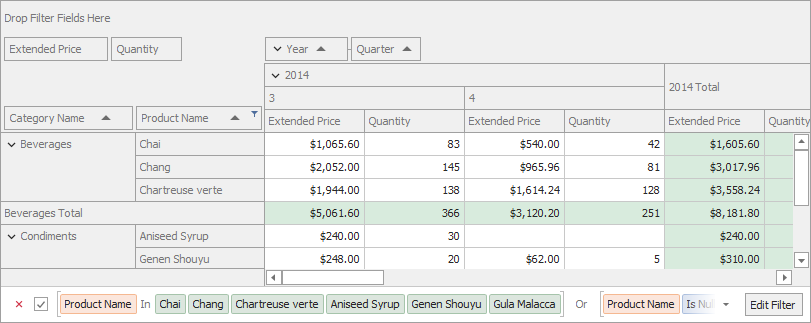
- [PivotGridOptionsLayout.Columns.AddNewColumns](/CoreLibraries/DevExpress.Utils.OptionsColumnLayout.AddNewColumns) set to `true` keeps the field in the `pivotGridControlNew` control when you restore the layout.
- [PivotGridOptionsLayout.Columns.RemoveOldColumns](/CoreLibraries/DevExpress.Utils.OptionsColumnLayout.RemoveOldColumns) set to `false` adds fields from `pivotGridControlOld` to `pivotGridControlNew`.
- [PivotGridOptionsLayout.AddNewGroups](/CoreLibraries/DevExpress.XtraPivotGrid.PivotGridOptionsLayout.AddNewGroups) set to `true` keeps the Year-Quarter group of the `pivotGridControlNew` when you restore the layout.
- [PivotGridControl.LayoutUpgrade](/WindowsForms/DevExpress.XtraPivotGrid.PivotGridControl.LayoutUpgrade) event adds the “Quantity” field to `pivotGridControlNew`‘s data area when you restore the layout.
The following image shows the resulting layout when you save the `pivotGridControlOld` layout and restore it to `pivotGridControlNew`:
- C#
- VB.NET
using DevExpress.Utils;
using DevExpress.XtraPivotGrid;
using System;
using System.Collections.Generic;
using System.ComponentModel;
using System.Data;
using System.Drawing;
using System.IO;
using System.Linq;
using System.Text;
using System.Threading.Tasks;
using System.Windows.Forms;

namespace WinPivotUpgradeLayout{
    public partial class Form1 : Form{
        MemoryStream layoutStream = new MemoryStream();
        public Form1(){
            InitializeComponent();
            // Fill the SqlDataSource
            sqlDataSource1.Fill();
            // Fill the SqlDataSource asynchronously
            sqlDataSource1.FillAsync();
            pivotGridControlNew.OptionsLayout.Columns.AddNewColumns = true;
            pivotGridControlNew.OptionsLayout.Columns.RemoveOldColumns = false;
            pivotGridControlNew.OptionsLayout.AddNewGroups = true;
            pivotGridControlOld.OptionsLayout.LayoutVersion = "1.0";
            pivotGridControlNew.OptionsLayout.LayoutVersion = "2.0";
        }
        private void Form1_Load(object sender, EventArgs e){
            PivotGridField fieldProductName = pivotGridControlOld.Fields["fieldProductName"];
            pivotGridControlOld.BeginUpdate();
            try{
                fieldProductName.FilterValues.Clear();
                fieldProductName.FilterValues.Add("Chai");
                fieldProductName.FilterValues.Add("Chang");
                fieldProductName.FilterValues.Add("Chartreuse verte");
                fieldProductName.FilterValues.Add("Aniseed Syrup");
                fieldProductName.FilterValues.Add("Genen Shouyu");
                fieldProductName.FilterValues.Add("Gula Malacca");
                fieldProductName.FilterValues.FilterType = DevExpress.XtraPivotGrid.PivotFilterType.Included;

            }
            finally{
                pivotGridControlOld.EndUpdate();
            }
        }
        private void simpleButton1_Click(object sender, EventArgs e){
            pivotGridControlOld.SaveLayoutToStream(layoutStream);
        }
        private void simpleButton2_Click(object sender, EventArgs e){
            if (layoutStream.Length > 0) {
                layoutStream.Seek(0, SeekOrigin.Begin);
                pivotGridControlNew.RestoreLayoutFromStream(layoutStream);
            }
        }
        private void pivotGridControlNew_LayoutUpgrade(object sender, DevExpress.Utils.LayoutUpgradeEventArgs e){
            if (e.PreviousVersion == "1.0"){
                var newField = new PivotGridField(){
                    FieldName = "Quantity",
                    Caption = "Quantity",
                    Name = "fieldQuantity",
                    Area = DevExpress.XtraPivotGrid.PivotArea.DataArea
                };
                pivotGridControlNew.Fields.Add(newField);
            };
        }
    }
}
Imports DevExpress.Utils
Imports DevExpress.XtraPivotGrid
Imports System
Imports System.Collections.Generic
Imports System.ComponentModel
Imports System.Data
Imports System.Drawing
Imports System.IO
Imports System.Linq
Imports System.Text
Imports System.Threading.Tasks
Imports System.Windows.Forms

Namespace WinPivotUpgradeLayout
    Partial Public Class Form1
        Inherits Form

        Private layoutStream As New MemoryStream()
        Public Sub New()
            InitializeComponent()
            ' Fill the SqlDataSource
            sqlDataSource1.Fill()
            ' Fill the SqlDataSource asynchronously
            sqlDataSource1.FillAsync()
            pivotGridControlNew.OptionsLayout.Columns.AddNewColumns = True
            pivotGridControlNew.OptionsLayout.Columns.RemoveOldColumns = False
            pivotGridControlNew.OptionsLayout.AddNewGroups = True
            pivotGridControlOld.OptionsLayout.LayoutVersion = "1.0"
            pivotGridControlNew.OptionsLayout.LayoutVersion = "2.0"
        End Sub
        Private Sub Form1_Load(ByVal sender As Object, ByVal e As EventArgs)
            Dim fieldProductName As PivotGridField = pivotGridControlOld.Fields("fieldProductName")
            pivotGridControlOld.BeginUpdate()
            Try
                fieldProductName.FilterValues.Clear()
                fieldProductName.FilterValues.Add("Chai")
                fieldProductName.FilterValues.Add("Chang")
                fieldProductName.FilterValues.Add("Chartreuse verte")
                fieldProductName.FilterValues.Add("Aniseed Syrup")
                fieldProductName.FilterValues.Add("Genen Shouyu")
                fieldProductName.FilterValues.Add("Gula Malacca")
                fieldProductName.FilterValues.FilterType = DevExpress.XtraPivotGrid.PivotFilterType.Included

            Finally
                pivotGridControlOld.EndUpdate()
            End Try
        End Sub
        Private Sub simpleButton1_Click(ByVal sender As Object, ByVal e As EventArgs)
            pivotGridControlOld.SaveLayoutToStream(layoutStream)
        End Sub
        Private Sub simpleButton2_Click(ByVal sender As Object, ByVal e As EventArgs)
            If layoutStream.Length > 0 Then
                layoutStream.Seek(0, SeekOrigin.Begin)
                pivotGridControlNew.RestoreLayoutFromStream(layoutStream)
            End If
        End Sub
        Private Sub pivotGridControlNew_LayoutUpgrade(ByVal sender As Object, ByVal e As DevExpress.Utils.LayoutUpgradeEventArgs)
            If e.PreviousVersion = "1.0" Then
                Dim newField = New PivotGridField() With {
                    .FieldName = "Quantity",
                    .Caption = "Quantity",
                    .Name = "fieldQuantity",
                    .Area = DevExpress.XtraPivotGrid.PivotArea.DataArea
                }
                pivotGridControlNew.Fields.Add(newField)
            End If
        End Sub
    End Class
End Namespace
See Also
[Save and Restore Layouts of DevExpress Controls](/WindowsForms/2404/common-features/saving-and-restoring-layouts-to-a-file-stream-and-system-registry)
[Layout Options (Grid, Pivot Grid, TreeList, Vertical Grid)](/WindowsForms/1875/common-features/save-and-restore-layouts/layout-options-xtragrid-xtrapivotgrid)
[Upgrading Layout](/WindowsForms/2383/common-features/save-and-restore-layouts/upgrading-layout)