# Asynchronous Mode | WPF Controls | DevExpress Documentation
[PivotGridControl](/WPF/DevExpress.Xpf.PivotGrid.PivotGridControl) can perform data-aware operations (retrieving data from the server, sorting, grouping, filtering data and calculating summaries) in a background thread, allowing the entire application to stay responsive while these operations are in progress.
## Overview
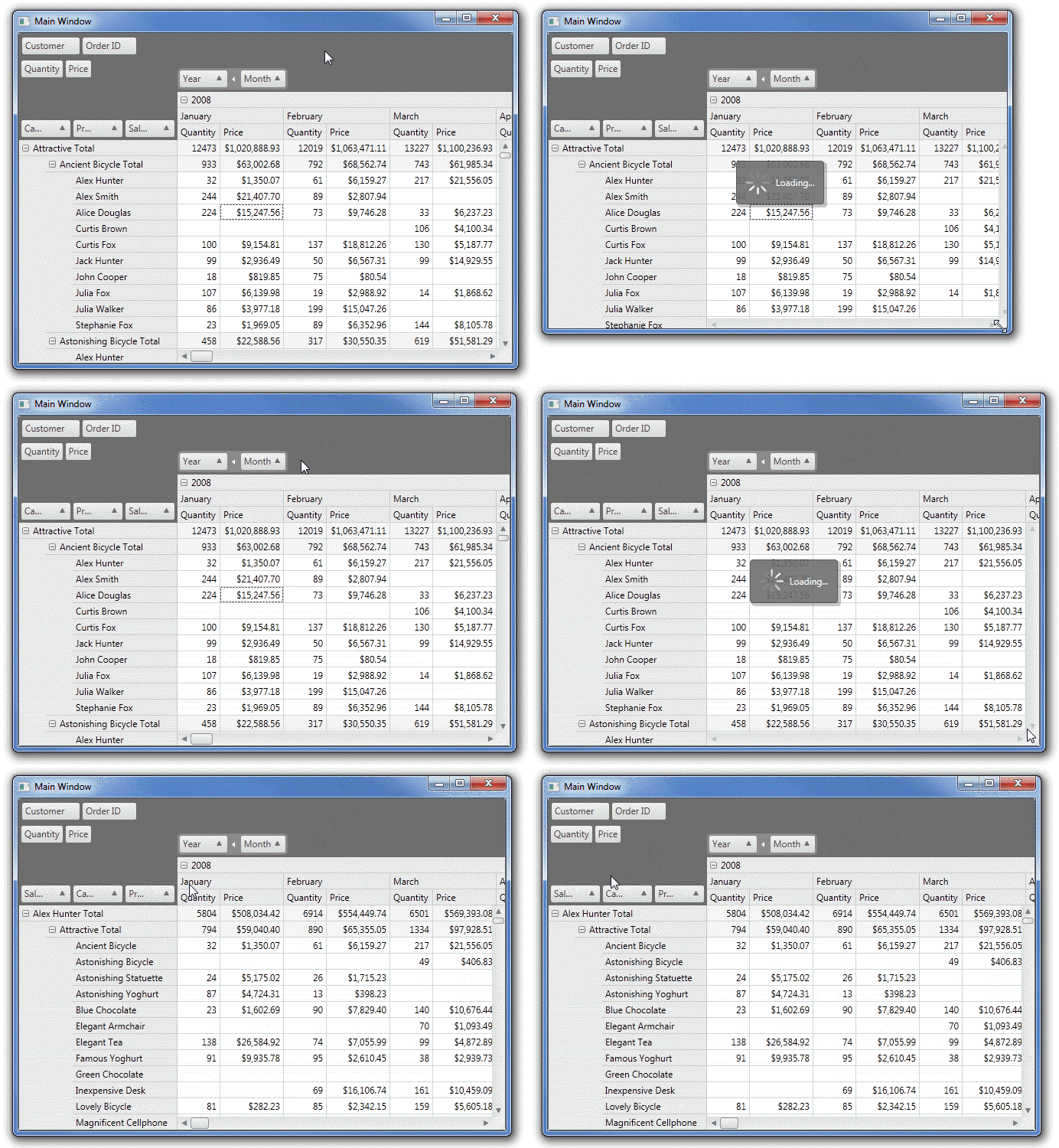
If PivotGridControl is working with a large dataset, retrieving data from a data source, as well as performing various data-aware operations, such as sorting or filtering data, may take a considerable amount of time. In a standard (**synchronous**) mode, the entire application would not respond to user actions until PivotGridControl completes the required operations, since the primary UI thread is busy. End-users can notice a small or considerable application freeze.
In an **asynchronous** mode, only PivotGridControl is frozen. The application continues interacting with an end-user, while the control is processing data in a background thread. While processing data, PivotGridControl displays a loading panel to indicate that this control is busy and would not respond to user actions until the operation is completed.
## Asynchronous Operations
### End-User Operations
You can specify whether data-aware operations caused by end-user actions run synchronously or asynchronously. To do this, use the [PivotGridControl.UseAsyncMode](/WPF/DevExpress.Xpf.PivotGrid.PivotGridControl.UseAsyncMode) property. If this property is set to **true**, all operations performed via the UI are asynchronous.
### Operations Run In Code
In code, you can perform both synchronous and asynchronous operations, regardless of the UI settings. All methods whose names end with **…Async** are asynchronous, i.e., they start executing the related operation in a background thread and return control.
Note
You can perform a data-aware operation asynchronously even if there is no special **…Async** method implemented. The PivotGridControl provides the [PivotGridControl.EndUpdateAsync](/WPF/DevExpress.Xpf.PivotGrid.PivotGridControl.EndUpdateAsync) method that allows you to apply the changes made to the control in a background thread. For instance, you can customize the PivotGridControl via its properties, wrap the code in the [PivotGridControl.BeginUpdate](/WPF/DevExpress.Xpf.PivotGrid.PivotGridControl.BeginUpdate) and [PivotGridControl.EndUpdateAsync](/WPF/DevExpress.Xpf.PivotGrid.PivotGridControl.EndUpdateAsync) method calls, and the control will be updated asynchronously.
To ensure that the [PivotGridControl.EndUpdateAsync](/WPF/DevExpress.Xpf.PivotGrid.PivotGridControl.EndUpdateAsync) method is executed even if an exception occurs, wrap calls to the [PivotGridControl.BeginUpdate](/WPF/DevExpress.Xpf.PivotGrid.PivotGridControl.BeginUpdate) and [PivotGridControl.EndUpdateAsync](/WPF/DevExpress.Xpf.PivotGrid.PivotGridControl.EndUpdateAsync) methods in a **try..finally** statement.
Note that you cannot start a data-aware operation in code while another operation is running in a background thread.
### Execution of Asynchronous Operations
The PivotGridControl performs the following actions after an asynchronous operation has been triggered:
1. Closes all popup menus and windows, disables the UI and loses focus (if it was focused);
2. Raises the [PivotGridControl.AsyncOperationStarting](/WPF/DevExpress.Xpf.PivotGrid.PivotGridControl.AsyncOperationStarting) event;
3. Locks access to pivot grid data through API, shows a loading panel and runs background calculations.
After background calculations are finished, the PivotGridControl does the following:
1. Unlocks access to pivot grid data through API, hides the loading panel and activates the UI;
2. Raises the [PivotGridControl.AsyncOperationCompleted](/WPF/DevExpress.Xpf.PivotGrid.PivotGridControl.AsyncOperationCompleted) event;
3. Performs internal handling of the operation results;
## Event Handling Specifics
In an asynchronous mode, events that allow you to control summary calculation are handled in a background thread. This regards the following events:
- [PivotGridControl.CustomUnboundFieldData](/WPF/DevExpress.Xpf.PivotGrid.PivotGridControl.CustomUnboundFieldData)
- [PivotGridControl.CustomFieldSort](/WPF/DevExpress.Xpf.PivotGrid.PivotGridControl.CustomFieldSort)
- [PivotGridControl.CustomFieldValueCells](/WPF/DevExpress.Xpf.PivotGrid.PivotGridControl.CustomFieldValueCells)
- [PivotGridControl.CustomGroupInterval](/WPF/DevExpress.Xpf.PivotGrid.PivotGridControl.CustomGroupInterval)
- [PivotGridControl.CustomSummary](/WPF/DevExpress.Xpf.PivotGrid.PivotGridControl.CustomSummary)
- [PivotGridControl.FieldValueDisplayText](/WPF/DevExpress.Xpf.PivotGrid.PivotGridControl.FieldValueDisplayText) (handled in a background thread if a field’s [PivotGridField.SortMode](/WPF/DevExpress.Xpf.PivotGrid.PivotGridField.SortMode) property is set to [FieldSortMode.DisplayText](/WPF/DevExpress.Xpf.PivotGrid.FieldSortMode))
For thread safety, you cannot use event parameter properties that return [PivotGridField](/WPF/DevExpress.Xpf.PivotGrid.PivotGridField) objects in an asynchronous mode, since it is not safe to access pivot grid fields from a background thread. Each of these properties has a thread-safe counterpart whose name starts with the prefix **ThreadSafe**. These properties return objects that implement the [IThreadSafeField](/WPF/DevExpress.Xpf.PivotGrid.IThreadSafeField) interface, which provides thread-safe read-only access to pivot grid fields, allowing you to obtain the required information.
## Member Tables
This section lists methods exposed by PivotGridControl that perform various operations asynchronously.
**Data Binding**
- [PivotGridControl.ReloadDataAsync](/WPF/DevExpress.Xpf.PivotGrid.PivotGridControl.ReloadDataAsync)
- Reloads data from the control data source and recalculates summaries [asynchronously](/WPF/9776/controls-and-libraries/pivot-grid/binding-to-data/asynchronous-mode).
- [PivotGridControl.RetrieveFieldsAsync](/WPF/DevExpress.Xpf.PivotGrid.PivotGridControl.RetrieveFieldsAsync.overloads)
- Creates [PivotGridField](/WPF/DevExpress.Xpf.PivotGrid.PivotGridField) objects for all columns in the bound data source [asynchronously](/WPF/9776/controls-and-libraries/pivot-grid/binding-to-data/asynchronous-mode).
- [PivotGridControl.SetDataSourceAsync](/WPF/DevExpress.Xpf.PivotGrid.PivotGridControl.SetDataSourceAsync%28System.Object%29)
- Sets a data source for PivotGridControl and loads data [asynchronously](/WPF/9776/controls-and-libraries/pivot-grid/binding-to-data/asynchronous-mode).
- [PivotGridControl.SetOlapConnectionStringAsync](/WPF/DevExpress.Xpf.PivotGrid.PivotGridControl.SetOlapConnectionStringAsync%28System.String%29)
- Sets a connection string to a cube in an MS Analysis Services database, and loads data from the cube [asynchronously](/WPF/9776/controls-and-libraries/pivot-grid/binding-to-data/asynchronous-mode).
**Sorting**
- [PivotGridControl.ChangeFieldSortOrderAsync](/WPF/DevExpress.Xpf.PivotGrid.PivotGridControl.ChangeFieldSortOrderAsync%28DevExpress.Xpf.PivotGrid.PivotGridField%29)
- Toggles the sort order of the specified field [asynchronously](/WPF/9776/controls-and-libraries/pivot-grid/binding-to-data/asynchronous-mode).
- [PivotGridControl.SetFieldSortingAsync](/WPF/DevExpress.Xpf.PivotGrid.PivotGridControl.SetFieldSortingAsync%28DevExpress.Xpf.PivotGrid.PivotGridField-DevExpress.Xpf.PivotGrid.FieldSortOrder%29)
- Sets the specified sort order for the specified field [asynchronously](/WPF/9776/controls-and-libraries/pivot-grid/binding-to-data/asynchronous-mode).
**Layout Operations**
- [PivotGridControl.ChangeFieldExpandedAsync](/WPF/DevExpress.Xpf.PivotGrid.PivotGridControl.ChangeFieldExpandedAsync%28DevExpress.Xpf.PivotGrid.PivotGridField-System.Boolean%29)
- Expands or collapses all values of the specified field [asynchronously](/WPF/9776/controls-and-libraries/pivot-grid/binding-to-data/asynchronous-mode).
- [PivotGridControl.CollapseAllAsync](/WPF/DevExpress.Xpf.PivotGrid.PivotGridControl.CollapseAllAsync)
- Collapses all columns and rows in PivotGridControl [asynchronously](/WPF/9776/controls-and-libraries/pivot-grid/binding-to-data/asynchronous-mode).
- [PivotGridControl.CollapseAllColumnsAsync](/WPF/DevExpress.Xpf.PivotGrid.PivotGridControl.CollapseAllColumnsAsync)
- Collapses all columns [asynchronously](/WPF/9776/controls-and-libraries/pivot-grid/binding-to-data/asynchronous-mode).
- [PivotGridControl.CollapseAllRowsAsync](/WPF/DevExpress.Xpf.PivotGrid.PivotGridControl.CollapseAllRowsAsync)
- Collapses all rows [asynchronously](/WPF/9776/controls-and-libraries/pivot-grid/binding-to-data/asynchronous-mode).
- [PivotGridControl.CollapseValueAsync](/WPF/DevExpress.Xpf.PivotGrid.PivotGridControl.CollapseValueAsync%28System.Boolean-System.Object--%29)
- Collapses the specified column or row [asynchronously](/WPF/9776/controls-and-libraries/pivot-grid/binding-to-data/asynchronous-mode).
- [PivotGridControl.ExpandAllAsync](/WPF/DevExpress.Xpf.PivotGrid.PivotGridControl.ExpandAllAsync)
- Expands all columns and rows in the PivotGridControl [asynchronously](/WPF/9776/controls-and-libraries/pivot-grid/binding-to-data/asynchronous-mode).
- [PivotGridControl.ExpandAllColumnsAsync](/WPF/DevExpress.Xpf.PivotGrid.PivotGridControl.ExpandAllColumnsAsync)
- Expands all columns [asynchronously](/WPF/9776/controls-and-libraries/pivot-grid/binding-to-data/asynchronous-mode).
- [PivotGridControl.ExpandAllRowsAsync](/WPF/DevExpress.Xpf.PivotGrid.PivotGridControl.ExpandAllRowsAsync)
- Expands all rows [asynchronously](/WPF/9776/controls-and-libraries/pivot-grid/binding-to-data/asynchronous-mode).
- [PivotGridControl.ExpandValueAsync](/WPF/DevExpress.Xpf.PivotGrid.PivotGridControl.ExpandValueAsync%28System.Boolean-System.Object--%29)
- Expands the specified column or row [asynchronously](/WPF/9776/controls-and-libraries/pivot-grid/binding-to-data/asynchronous-mode).
**Serialization**
- [PivotGridControl.RestoreCollapsedStateFromStreamAsync](/WPF/DevExpress.Xpf.PivotGrid.PivotGridControl.RestoreCollapsedStateFromStreamAsync%28System.IO.Stream%29)
- Restores the collapsed state of field values from the specified stream [asynchronously](/WPF/9776/controls-and-libraries/pivot-grid/binding-to-data/asynchronous-mode).
- [PivotGridControl.RestoreLayoutFromStreamAsync](/WPF/DevExpress.Xpf.PivotGrid.PivotGridControl.RestoreLayoutFromStreamAsync%28System.IO.Stream%29)
- Restores the pivot grid layout from the specified stream [asynchronously](/WPF/9776/controls-and-libraries/pivot-grid/binding-to-data/asynchronous-mode).
- [PivotGridControl.RestoreLayoutFromXmlAsync](/WPF/DevExpress.Xpf.PivotGrid.PivotGridControl.RestoreLayoutFromXmlAsync%28System.String%29)
- Restores the pivot grid’s layout from the specified XML file [asynchronously](/WPF/9776/controls-and-libraries/pivot-grid/binding-to-data/asynchronous-mode).
**Drill-Down Operations**
- [PivotGridControl.CreateDrillDownDataSourceAsync](/WPF/DevExpress.Xpf.PivotGrid.PivotGridControl.CreateDrillDownDataSourceAsync.overloads)
- Returns a list of records used to calculate a summary value for the specified cell [asynchronously](/WPF/9776/controls-and-libraries/pivot-grid/binding-to-data/asynchronous-mode).
**Control Update**
- [PivotGridControl.EndUpdateAsync](/WPF/DevExpress.Xpf.PivotGrid.PivotGridControl.EndUpdateAsync)
- Unlocks the PivotGridControl after the [PivotGridControl.BeginUpdate](/WPF/DevExpress.Xpf.PivotGrid.PivotGridControl.BeginUpdate) method call, and starts an [asynchronous](/WPF/9776/controls-and-libraries/pivot-grid/binding-to-data/asynchronous-mode) update.
## Example
This example demonstrates how to obtain records from the control’s underlying data source for a selected cell or multiple selected cells asynchronously.
[View Example: Pivot Grid for WPF - How to Display Underlying Records Asynchronously](https://github.com/DevExpress-Examples/wpf-pivotgrid-how-to-display-underlying-data-asynchronously)
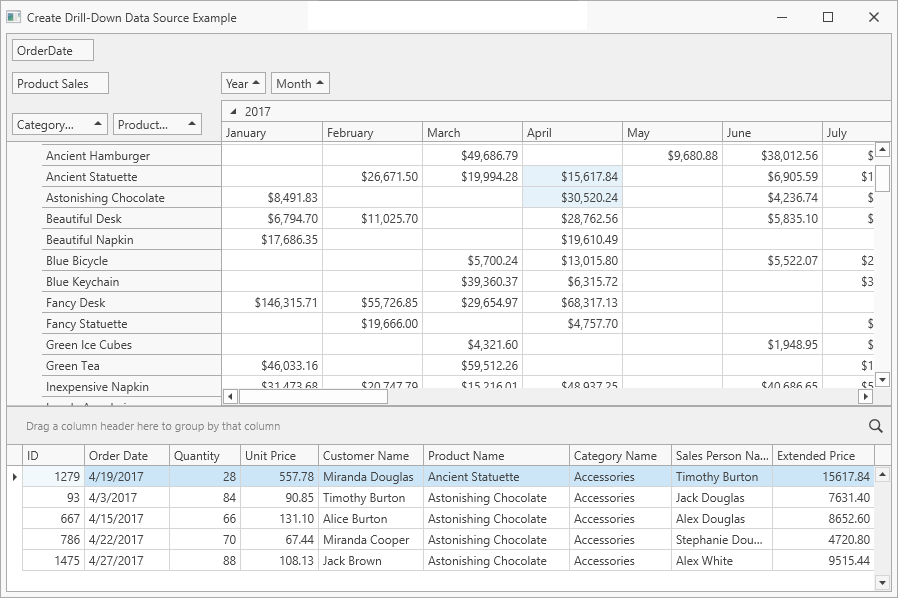
The [PivotGridControl.CellClick](/WPF/DevExpress.Xpf.PivotGrid.PivotGridControl.CellClick) event raises when you click the Pivot Grid cell. The [PivotGridControl.CreateDrillDownDataSourceAsync](/WPF/DevExpress.Xpf.PivotGrid.PivotGridControl.CreateDrillDownDataSourceAsync%28System.Int32-System.Int32%29) method returns the [PivotDrillDownDataSource](/WPF/DevExpress.Xpf.PivotGrid.PivotDrillDownDataSource) instance that contains underlying data for the current cell. The `PivotDrillDownDataSource` object is used as the Grid Control’s data source (it is assigned to the [GridControl.ItemsSource](/WPF/DevExpress.Xpf.Grid.DataControlBase.ItemsSource) property).
The [PivotGridControl.CellSelectionChanged](/WPF/DevExpress.Xpf.PivotGrid.PivotGridControl.CellSelectionChanged) event raises when you select several Pivot Grid cells. The coordinates of the selected cells are obtained with the [PivotGridControl.MultiSelection.SelectedCells](/CoreLibraries/DevExpress.XtraPivotGrid.Selection.IMultipleSelection.SelectedCells) notation. For each (X, Y) pair of cell coordinates, the [PivotGridControl.CreateDrillDownDataSourceAsync](/WPF/DevExpress.Xpf.PivotGrid.PivotGridControl.CreateDrillDownDataSourceAsync%28System.Int32-System.Int32%29) method yields the [PivotDrillDownDataSource](/WPF/DevExpress.Xpf.PivotGrid.PivotDrillDownDataSource) object. The `PivotDrillDownDataSource` exposes an enumerator and supports an iteration over a collection of [PivotDrillDownDataRow](/CoreLibraries/DevExpress.XtraPivotGrid.PivotDrillDownDataRow) objects. The [PivotDrillDownDataRow.ListSourceRowIndex](/CoreLibraries/DevExpress.XtraPivotGrid.PivotDrillDownDataRow.ListSourceRowIndex) property value is an index of the record in the original data source, so the source record is also available and can be added to a collection. The resulting collection is bound to [GridControl](/WPF/DevExpress.Xpf.Grid.GridControl) for display.
- MainWindow.xaml.cs
- MainWindow.xaml.vb
using DevExpress.Xpf.Core;
using DevExpress.Xpf.PivotGrid;
using System.Collections.ObjectModel;
using System.Linq;
using System.Threading.Tasks;
using System.Windows;

namespace WpfDrillDownDataSourceExample {
    /// <summary>
    /// Interaction logic for MainWindow.xaml
    /// </summary>

    public partial class MainWindow : ThemedWindow {
        public ObservableCollection<MyOrderRow> OrderSourceList { get; set; }
        public ObservableCollection<MyOrderRow> OrderDrillDownList { get; set; }
        public MainWindow() {
            InitializeComponent();
            OrderSourceList = DatabaseHelper.CreateData();
            pivotGridControl1.DataSource = OrderSourceList;
        }
        private async void PivotGridControl1_CellSelectionChanged(object sender, RoutedEventArgs e) {
            OrderDrillDownList = new ObservableCollection<MyOrderRow>();
            var selectionCopy =
                pivotGridControl1.MultiSelection.SelectedCells.Cast<System.Drawing.Point>().ToList();
            foreach (var cellPoint in selectionCopy) {
                foreach (PivotDrillDownDataRow record in
                         await pivotGridControl1.CreateDrillDownDataSourceAsync(cellPoint.X, cellPoint.Y)) {

                    OrderDrillDownList.Add(OrderSourceList[record.ListSourceRowIndex]);
                }
            }
            gridControl1.ItemsSource = OrderDrillDownList;
        }
        private void ThemedWindow_Loaded(object sender, RoutedEventArgs e) {
            pivotGridControl1.BestFitArea = DevExpress.Xpf.PivotGrid.FieldBestFitArea.FieldHeader;
            pivotGridControl1.BestFit();
        }

        private async void pivotGridControl1_CellClick(object sender, PivotCellEventArgs e) {
            gridControl1.ItemsSource =
                await pivotGridControl1.CreateDrillDownDataSourceAsync(e.ColumnIndex, e.RowIndex);
        }
    }
}
Imports DevExpress.Xpf.Core
Imports DevExpress.Xpf.PivotGrid
Imports System.Collections.ObjectModel
Imports System.Linq
Imports System.Windows

Namespace WpfDrillDownDataSourceExample

    ''' <summary>
    ''' Interaction logic for MainWindow.xaml
    ''' </summary>
    '''
    Public Partial Class MainWindow
        Inherits ThemedWindow

        Public Property OrderSourceList As ObservableCollection(Of MyOrderRow)

        Public Property OrderDrillDownList As ObservableCollection(Of MyOrderRow)

        Public Sub New()
            Me.InitializeComponent()
            OrderSourceList = CreateData()
            Me.pivotGridControl1.DataSource = OrderSourceList
        End Sub

        Private Async Sub PivotGridControl1_CellSelectionChanged(ByVal sender As Object, ByVal e As RoutedEventArgs)
            OrderDrillDownList = New ObservableCollection(Of MyOrderRow)()
            Dim selectionCopy = pivotGridControl1.MultiSelection.SelectedCells.Cast(Of System.Drawing.Point)().ToList()
            For Each cellPoint In selectionCopy
                For Each record As PivotDrillDownDataRow In Await pivotGridControl1.CreateDrillDownDataSourceAsync(cellPoint.X, cellPoint.Y)

                    OrderDrillDownList.Add(OrderSourceList(record.ListSourceRowIndex))
                Next record
            Next cellPoint
            gridControl1.ItemsSource = OrderDrillDownList
        End Sub

        Private Sub ThemedWindow_Loaded(ByVal sender As Object, ByVal e As RoutedEventArgs)
            Me.pivotGridControl1.BestFitArea = FieldBestFitArea.FieldHeader
            Me.pivotGridControl1.BestFit()
        End Sub
        Private Async Sub pivotGridControl1_CellClick(ByVal sender As Object, ByVal e As PivotCellEventArgs)
            gridControl1.ItemsSource = Await pivotGridControl1.CreateDrillDownDataSourceAsync(e.ColumnIndex, e.RowIndex)
        End Sub

    End Class
- MainWindow.xaml
<dx:ThemedWindow
    x:Class="WpfDrillDownDataSourceExample.MainWindow"
    xmlns="http://schemas.microsoft.com/winfx/2006/xaml/presentation"
    xmlns:x="http://schemas.microsoft.com/winfx/2006/xaml"
    xmlns:d="http://schemas.microsoft.com/expression/blend/2008"
    xmlns:dx="http://schemas.devexpress.com/winfx/2008/xaml/core"
    xmlns:dxg="http://schemas.devexpress.com/winfx/2008/xaml/grid"
    xmlns:dxpg="http://schemas.devexpress.com/winfx/2008/xaml/pivotgrid"
    xmlns:mc="http://schemas.openxmlformats.org/markup-compatibility/2006"
    Width="800"
    Height="600"
    mc:Ignorable="d"
    Loaded="ThemedWindow_Loaded"
    Title="Create Drill-Down Data Source Example">

    <Grid>
    <!-- ... -->
        <dxpg:PivotGridControl
            x:Name="pivotGridControl1"
            Grid.Row="0"
            Grid.ColumnSpan="2"
            UseAsyncMode="true"
            CellClick="pivotGridControl1_CellClick"
            CellSelectionChanged="PivotGridControl1_CellSelectionChanged"
            DataProcessingEngine="Optimized">
            <!-- ... -->
        </dxpg:PivotGridControl>
        <!-- ... -->
    </Grid>

</dx:ThemedWindow>