# Merge Bars and Ribbons in MDI Mode | WPF Controls | DevExpress Documentation
You can implement **Multiple-Document Interface (MDI) mode** in your applications that use the [DocumentGroup](/WPF/DevExpress.Xpf.Docking.DocumentGroup) and [DocumentPanel](/WPF/DevExpress.Xpf.Docking.DocumentPanel) objects.
The [DocumentGroup](/WPF/DevExpress.Xpf.Docking.DocumentGroup) and each of its child [DocumentPanels](/WPF/DevExpress.Xpf.Docking.DocumentPanel) can have its own [menus, bars](/WPF/6194/controls-and-libraries/ribbon-bars-and-menu/bars) and [ribbons](/WPF/7895/controls-and-libraries/ribbon-bars-and-menu/ribbon). To avoid duplicating these toolbars/ribbons, you can merge them from child into parent windows.
[Run Demo: MDI Ribbon Merging Demo](dxdemo://Wpf/DXDocking/MainDemo/MDIMenuMerging)
## Merge Bars
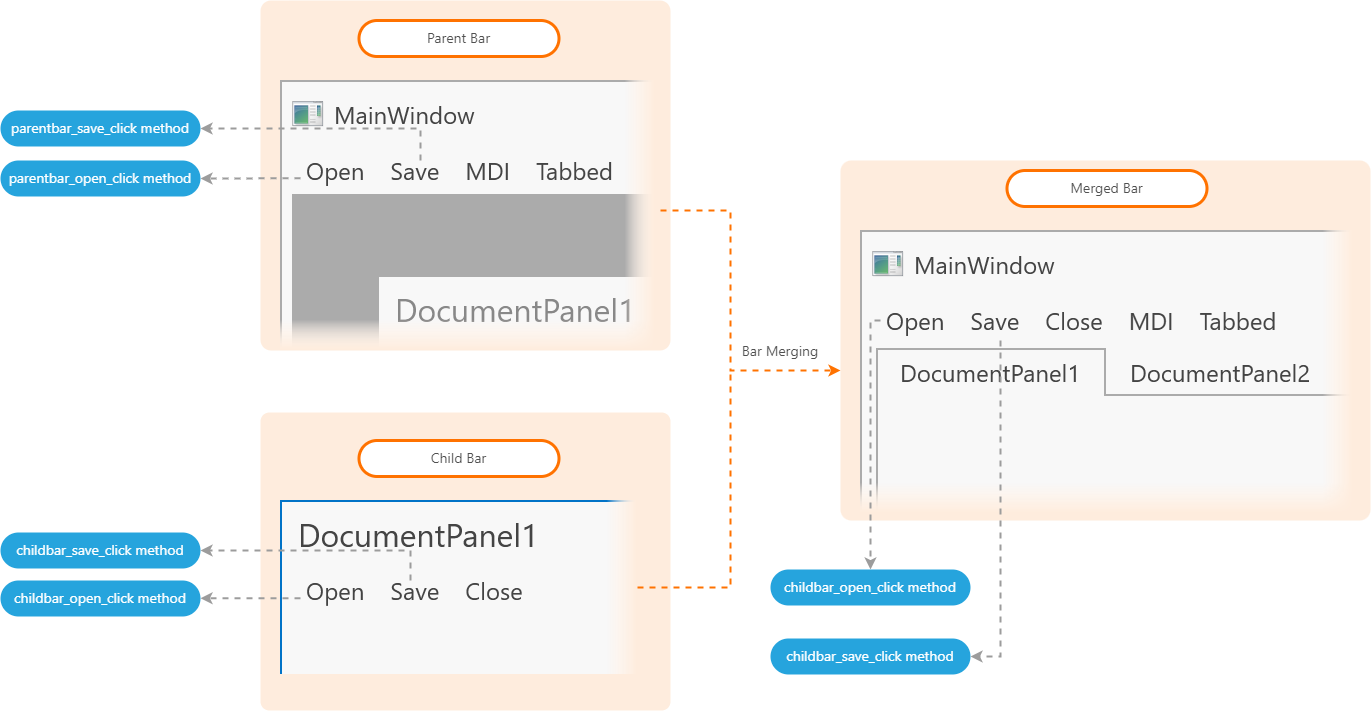
As an example, the [DocumentGroup](/WPF/DevExpress.Xpf.Docking.DocumentGroup)‘s menu can have general commands that work with files, windows, and its child panels can have bars and menus that perform panel-specific actions. In this case, you can merge a child panel’s menus and bars into the parent’s menus and bars when the panel is expanded.
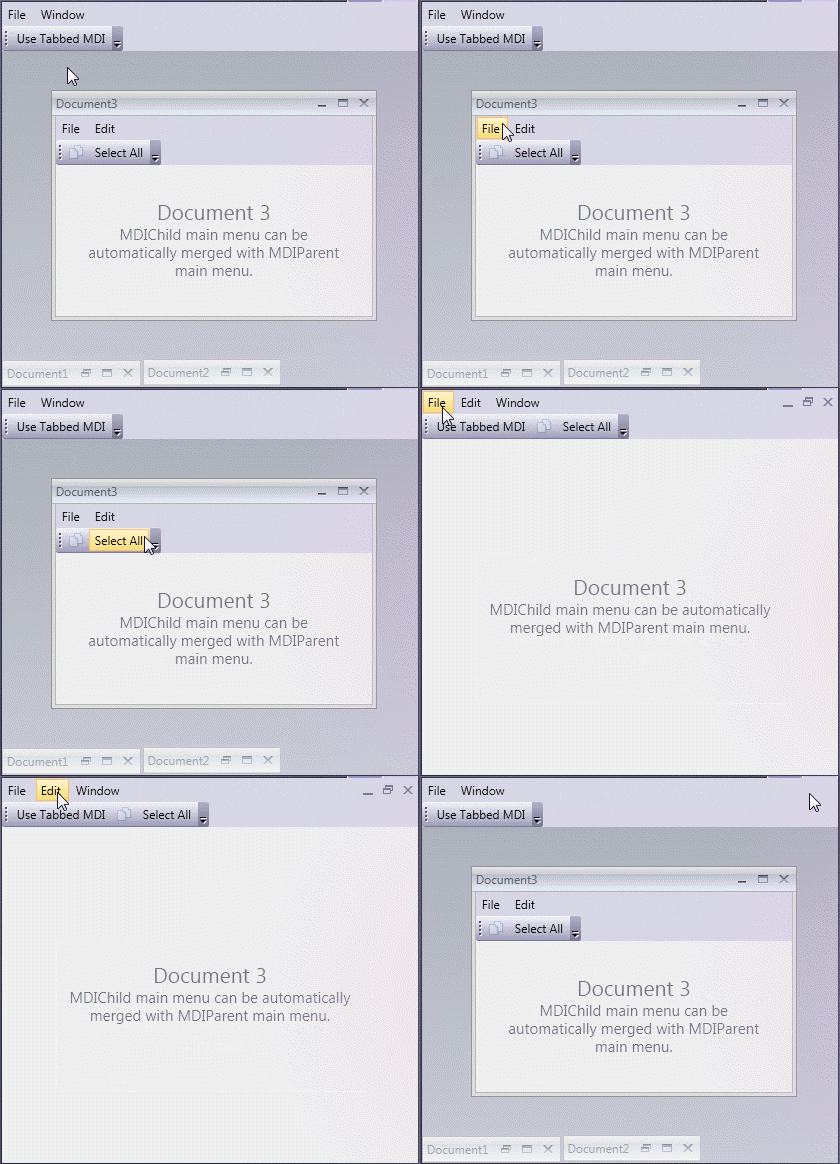
[View Example: Merge Bars in MDI Mode](https://github.com/DevExpress-Examples/wpf-docklayoutmanager-merge-bars-in-controls-that-support-automatic-merging)
### Merge Names
The merging mechanism uses the following item’s properties to match items from the parent and child bars:
1. [MergingProperties.Name](/WPF/DevExpress.Xpf.Bars.MergingProperties.Name)
2. [x:Name](https://docs.microsoft.com/en-us/dotnet/desktop/xaml-services/xname-directive) that is mapped to a [BarItemLink](/WPF/DevExpress.Xpf.Bars.BarItemLink)‘s [BarItemName](/WPF/DevExpress.Xpf.Bars.BarItemLinkBase.BarItemName) property.
3. [BarItem.Content](/WPF/DevExpress.Xpf.Bars.BarItem.Content)
### Merge Type
Use the [BarItemLinkBase.MergeType](/WPF/DevExpress.Xpf.Bars.BarItemLinkBase.MergeType) property to select a merge type. You should specify this property only for a **child BarManager’s items and links** that you want to merge. You can choose one of the following merge types:
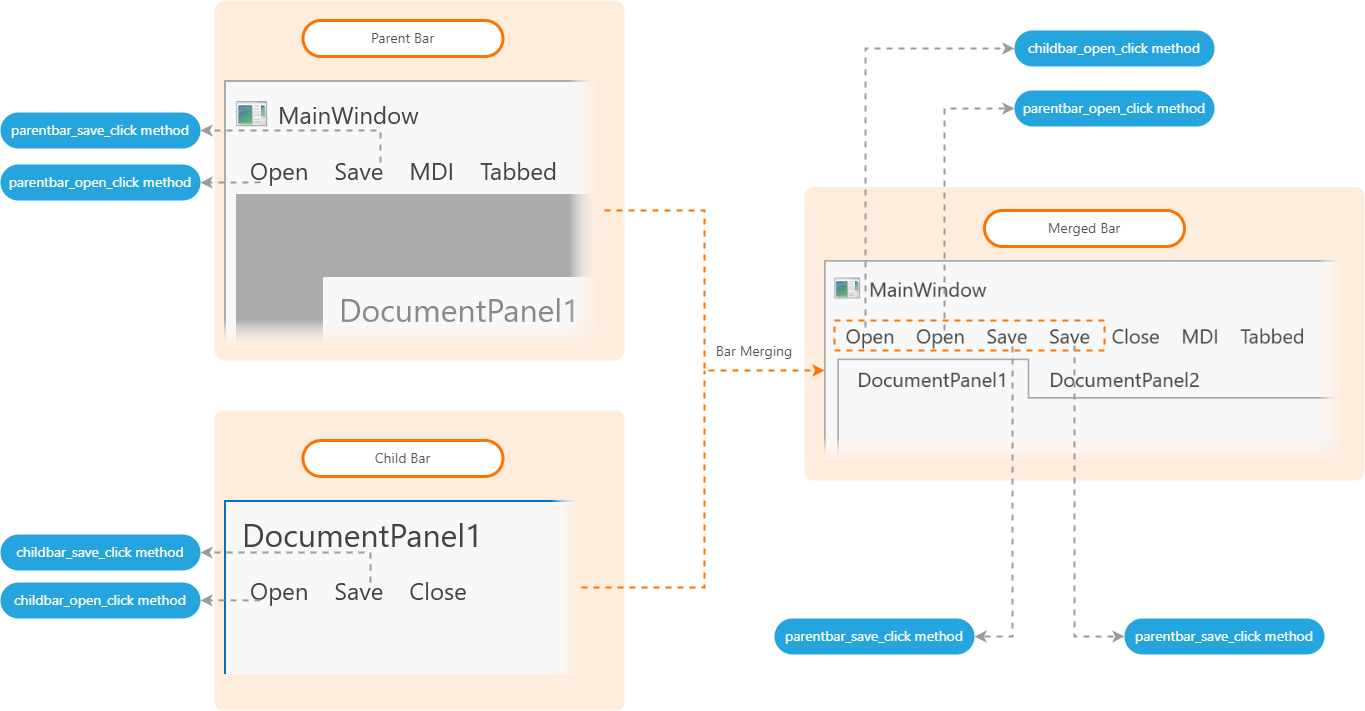
- [Add](/WPF/DevExpress.Xpf.Bars.BarItemMergeType)
- The bar item links of a child BarManager’s bar/link container are added to the parent BarManager’s bar/link container (the default behavior).
Show Code
- XAML
<Grid>
    <DockPanel>
        <!-- Parent Bar Items -->
        <dxb:MainMenuControl Caption="File" DockPanel.Dock="Top">
            <dxb:MainMenuControl.Items>
                <dxb:BarButtonItem
                    Content="Open"
                    ItemClick="parent_bar_open"
                    MergeOrder="0" />
                <dxb:BarButtonItem
                    Content="Save"
                    ItemClick="parent_bar_save"
                    MergeOrder="1" />
                <dxb:BarButtonItem
                    Content="MDI"
                    ItemClick="biMDI_ItemClick"
                    MergeOrder="3" />
                <dxb:BarButtonItem
                    Content="Tabbed"
                    ItemClick="biTabbed_ItemClick"
                    MergeOrder="4" />
            </dxb:MainMenuControl.Items>
        </dxb:MainMenuControl>
        <Grid>
            <dxdo:DockLayoutManager x:Name="dlManager">
                <dxdo:LayoutGroup>
                    <dxdo:DocumentGroup>
                        <dxdo:DocumentPanel>
                            <Grid>
                                <DockPanel>
                                    <!-- Child Bar Items -->
                                    <dxb:MainMenuControl Caption="File" DockPanel.Dock="Top">
                                        <dxb:BarButtonItem Content="Open"
                                        MergeOrder="0" MergeType="Add" />
                                        <dxb:BarButtonItem Content="Save"
                                        MergeOrder="1" MergeType="Add" />
                                        <dxb:BarButtonItem Content="Close" MergeOrder="2" />
                                    </dxb:MainMenuControl>
                                       <!-- ... -->
                                </DockPanel>
                            </Grid>
                        </dxdo:DocumentPanel>
                    </dxdo:DocumentGroup>
                </dxdo:LayoutGroup>
            </dxdo:DockLayoutManager>
        </Grid>
    </DockPanel>
</Grid>
- [MergeItems](/WPF/DevExpress.Xpf.Bars.BarItemMergeType)
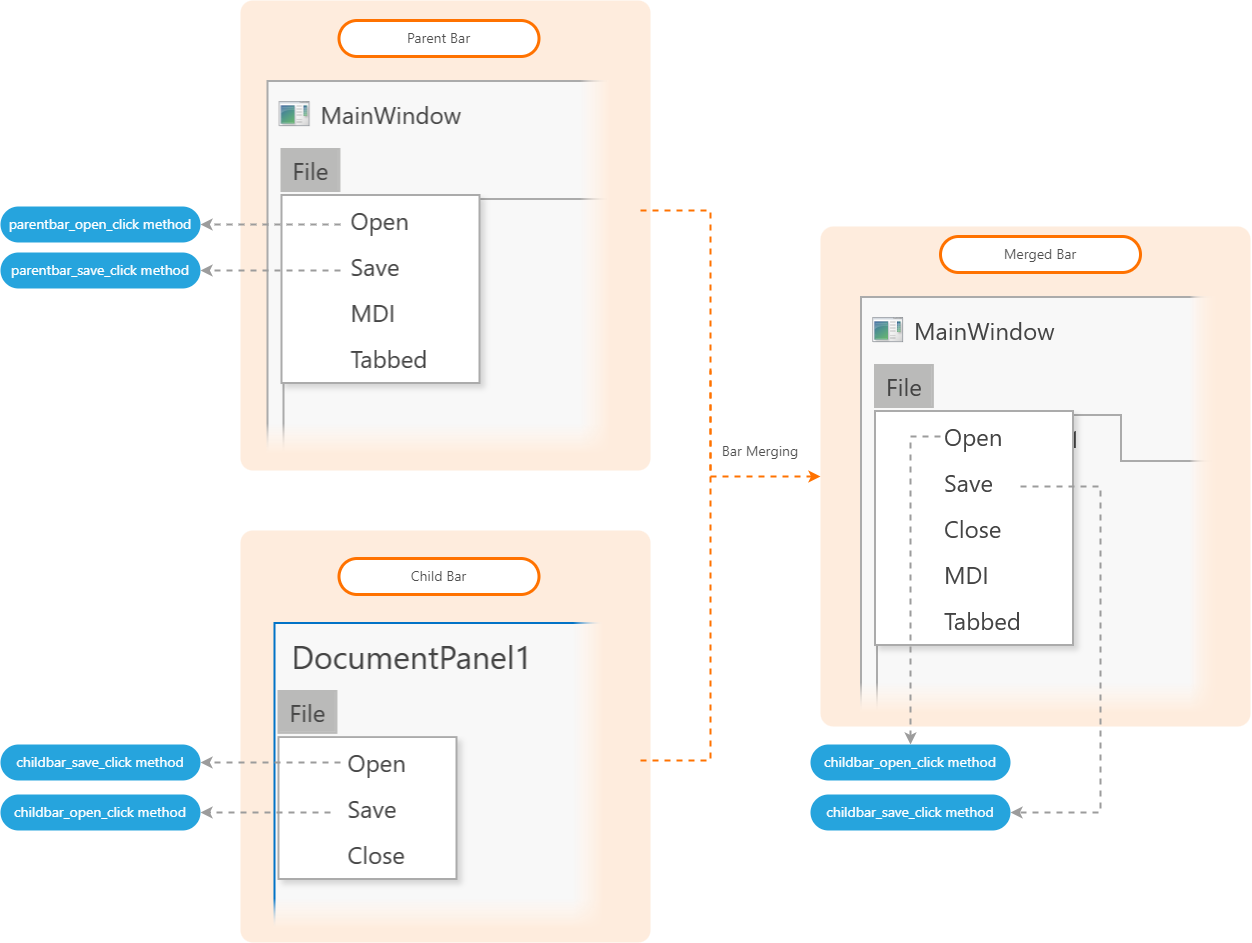
- This setting is applied to link the following containers: [Bar](/WPF/DevExpress.Xpf.Bars.Bar), [BarSubItem](/WPF/DevExpress.Xpf.Bars.BarSubItem), [PopupMenu](/WPF/DevExpress.Xpf.Bars.PopupMenu), [BarLinkContainerItem](/WPF/DevExpress.Xpf.Bars.BarLinkContainerItem).
When this setting is applied, the child container’s links are merged into the parent container with the same caption. If the captions of these containers are different, the child container’s links are added to the parent container (similar to the [Add](/WPF/DevExpress.Xpf.Bars.BarItemMergeType) setting).
Show Code
- XAML
<Grid>
    <DockPanel>
        <!-- Parent Bar Items -->
        <dxb:MainMenuControl Caption="File" DockPanel.Dock="Top">
            <dxb:MainMenuControl.Items>
                <dxb:BarSubItem Content="File">
                    <dxb:BarSubItem.Items>
                        <dxb:BarButtonItem
                            Content="Open"
                            ItemClick="parent_bar_open"
                            MergeOrder="0" />
                        <dxb:BarButtonItem
                            Content="Save"
                            ItemClick="parent_bar_save"
                            MergeOrder="1" />
                        <dxb:BarButtonItem Content="MDI" MergeOrder="3" />
                        <dxb:BarButtonItem Content="Tabbed" MergeOrder="4" />
                    </dxb:BarSubItem.Items>
                </dxb:BarSubItem>
            </dxb:MainMenuControl.Items>
        </dxb:MainMenuControl>
        <Grid>
            <dxdo:DockLayoutManager x:Name="dlManager">
                <dxdo:LayoutGroup>
                    <dxdo:DocumentGroup>
                        <dxdo:DocumentPanel>
                            <Grid>
                                <DockPanel>
                                    <!-- Child Bar Items -->
                                    <dxb:MainMenuControl Caption="File" DockPanel.Dock="Top">
                                        <dxb:MainMenuControl.Items>
                                            <dxb:BarSubItem Content="File" MergeType="MergeItems">
                                                <dxb:BarButtonItem
                                                    Content="Open"
                                                    ItemClick="child_bar_open"
                                                    MergeOrder="0"
                                                    MergeType="Replace" />
                                                <dxb:BarButtonItem
                                                    Content="Save"
                                                    ItemClick="child_bar_save"
                                                    MergeOrder="1"
                                                    MergeType="Replace" />
                                                <dxb:BarButtonItem Content="Close" MergeOrder="2" />
                                            </dxb:BarSubItem>
                                        </dxb:MainMenuControl.Items>
                                    </dxb:MainMenuControl>
                                       <!-- ... -->
                                </DockPanel>
                            </Grid>
                        </dxdo:DocumentPanel>
                    </dxdo:DocumentGroup>
                </dxdo:LayoutGroup>
            </dxdo:DockLayoutManager>
        </Grid>
    </DockPanel>
</Grid>
- [Remove](/WPF/DevExpress.Xpf.Bars.BarItemMergeType)
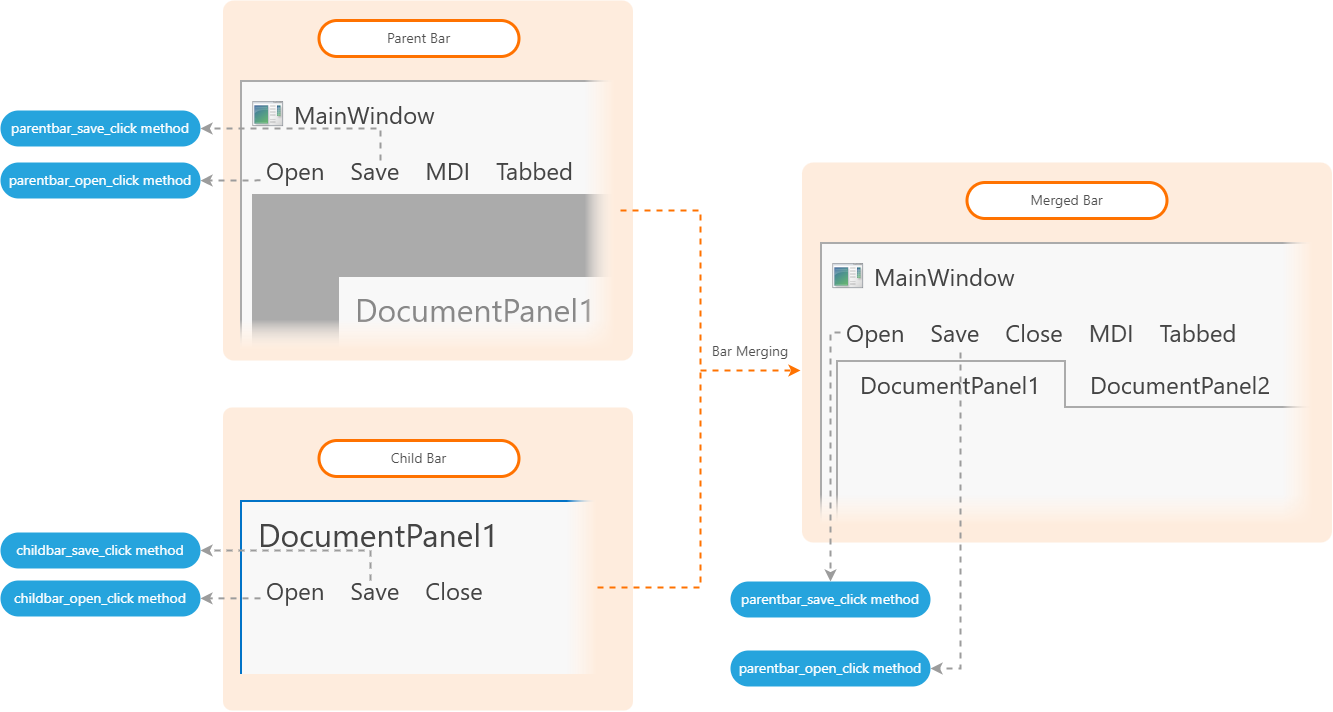
- The bar item links of a child BarManager’s bar/link container with identical captions are removed from the parent bar.
Show Code
- XAML
<Grid>
    <DockPanel>
        <!-- Parent Bar Items -->
        <dxb:MainMenuControl Caption="File" DockPanel.Dock="Top">
            <dxb:MainMenuControl.Items>
                <dxb:BarButtonItem Content="Open" MergeOrder="0" ItemsClick="parent_bar_open" />
                <dxb:BarButtonItem Content="Save" MergeOrder="1" ItemsClick="parent_bar_save" />
                <dxb:BarButtonItem Content="MDI" MergeOrder="3" />
                <dxb:BarButtonItem Content="Tabbed" MergeOrder="4" />
            </dxb:MainMenuControl.Items>
        </dxb:MainMenuControl>
        <Grid>
            <dxdo:DockLayoutManager x:Name="dlManager">
                <dxdo:LayoutGroup>
                    <dxdo:DocumentGroup>
                        <dxdo:DocumentPanel>
                            <Grid>
                                <DockPanel>
                                    <!-- Child Bar Items -->
                                    <dxb:MainMenuControl Caption="File" DockPanel.Dock="Top">
                                        <dxb:BarButtonItem Content="Open"
                                        ItemsClick="child_bar_open" MergeOrder="0" MergeType="Remove" />
                                        <dxb:BarButtonItem Content="Save"
                                        ItemsClick="child_bar_save" MergeOrder="1" MergeType="Remove" />
                                        <dxb:BarButtonItem Content="Close" MergeOrder="2" />
                                    </dxb:MainMenuControl>
                                       <!-- ... -->
                                </DockPanel>
                            </Grid>
                        </dxdo:DocumentPanel>
                    </dxdo:DocumentGroup>
                </dxdo:LayoutGroup>
            </dxdo:DockLayoutManager>
        </Grid>
    </DockPanel>
</Grid>
- [Replace](/WPF/DevExpress.Xpf.Bars.BarItemMergeType)
- The bar item links of a child BarManager’s bar/link container replace item links on the parent bar with identical captions.
Show Code
- XAML
<Grid>
    <DockPanel>
        <!-- Parent Bar Items -->
        <dxb:MainMenuControl Caption="File" DockPanel.Dock="Top">
            <dxb:MainMenuControl.Items>
                <dxb:BarButtonItem Content="Open" MergeOrder="0" ItemClick="parent_bar_open" />
                <dxb:BarButtonItem Content="Save" MergeOrder="1" ItemClick="parent_bar_save" />
                <dxb:BarButtonItem Content="MDI" MergeOrder="3" />
                <dxb:BarButtonItem Content="Tabbed" MergeOrder="4" />
            </dxb:MainMenuControl.Items>
        </dxb:MainMenuControl>
        <Grid>
            <dxdo:DockLayoutManager x:Name="dlManager">
                <dxdo:LayoutGroup>
                    <dxdo:DocumentGroup>
                        <dxdo:DocumentPanel>
                            <Grid>
                                <DockPanel>
                                    <!-- Child Bar Items -->
                                    <dxb:MainMenuControl Caption="File" DockPanel.Dock="Top">
                                        <dxb:BarButtonItem Content="Open"
                                        ItemsClick="child_bar_open"  MergeOrder="0" MergeType="Replace" />
                                        <dxb:BarButtonItem Content="Save"
                                        ItemsClick="child_bar_save"  MergeOrder="1" MergeType="Replace" />
                                        <dxb:BarButtonItem Content="Close" MergeOrder="2" />
                                    </dxb:MainMenuControl>
                                       <!-- ... -->
                                </DockPanel>
                            </Grid>
                        </dxdo:DocumentPanel>
                    </dxdo:DocumentGroup>
                </dxdo:LayoutGroup>
            </dxdo:DockLayoutManager>
        </Grid>
    </DockPanel>
</Grid>
### Merge Order
Each merged bar/menu link has the [MergeOrder](/WPF/DevExpress.Xpf.Bars.BarItemLinkBase.MergeOrder) property that specifies the order in which parent and child bar elements are displayed in the merged bar.
Links with the lowest [MergeOrder](/WPF/DevExpress.Xpf.Bars.BarItemLinkBase.MergeOrder) are displayed first. The last few links are those that have the greatest [MergeOrder](/WPF/DevExpress.Xpf.Bars.BarItemLinkBase.MergeOrder) value.
If a parent and child BarManager’s links have equal [MergeOrder](/WPF/DevExpress.Xpf.Bars.BarItemLinkBase.MergeOrder) values, the parent BarManager’s links are placed first, and then the child BarManager’s links are placed.
### Merge a Panel’s Bars with ThemedWindow ToolbarItems/HeaderItems
A panel’s bar items can be embedded into the a [ThemedWindow](/WPF/DevExpress.Xpf.Core.ThemedWindow)‘s [ToolbarItems](/WPF/DevExpress.Xpf.Core.ThemedWindow.ToolbarItems) / [HeaderItems](/WPF/DevExpress.Xpf.Core.ThemedWindow.HeaderItems) bar collections. If a [ThemedWindow](/WPF/DevExpress.Xpf.Core.ThemedWindow)‘s bar is defined in [ToolbarItems](/WPF/DevExpress.Xpf.Core.ThemedWindow.ToolbarItems) **or** [HeaderItems](/WPF/DevExpress.Xpf.Core.ThemedWindow.HeaderItems), the panel merges its control box buttons with this bar. If a [ThemedWindow](/WPF/DevExpress.Xpf.Core.ThemedWindow) contains a bar both in [ToolbarItems](/WPF/DevExpress.Xpf.Core.ThemedWindow.ToolbarItems) **and** [HeaderItems](/WPF/DevExpress.Xpf.Core.ThemedWindow.HeaderItems), the panel merges its control box buttons with [HeaderItems](/WPF/DevExpress.Xpf.Core.ThemedWindow.HeaderItems).
### Merge/Unmerge Bar Manually
Handle the following events to merge or unmerge a bar/menu:
| Event | Description |
| --- | --- |
| [DockLayoutManager.Merge](/WPF/DevExpress.Xpf.Docking.DockLayoutManager.Merge) | Allows you to customize menus and bars when the merging mechanism is invoked. |
| [DockLayoutManager.UnMerge](/WPF/DevExpress.Xpf.Docking.DockLayoutManager.UnMerge) | Allows you to undo bars customizations performed via the [DockLayoutManager.Merge](/WPF/DevExpress.Xpf.Docking.DockLayoutManager.Merge) event. This event also allows you to undo the results of the manual merge operation that you performed with the [DockLayoutManager.Merge](/WPF/DevExpress.Xpf.Docking.DockLayoutManager.Merge) event handler. |
When you populate a bar with items from a ViewModel collection, you should populate a bar and then merge another bar with it. To do this, disable the automatic merging and manually merge bars when they are loaded.
#### Merge/Restore Two Bars that Belong to Different BarManagers
Call the parent bar’s [Merge](/WPF/DevExpress.Xpf.Bars.Bar.Merge%28DevExpress.Xpf.Bars.Bar%29) method to merge two bars that belong to different BarManagers.
After bars are merged, you can call any of the [Bar.UnMerge](/WPF/DevExpress.Xpf.Bars.Bar.UnMerge.overloads) methods to restore the original bars/menus layout.
##### Merge Sub Menus and Their Items
Call the [ILinksHolder.Merge](/WPF/DevExpress.Xpf.Bars.ILinksHolder.Merge%28DevExpress.Xpf.Bars.ILinksHolder%29) and [ILinksHolder.UnMerge](/WPF/DevExpress.Xpf.Bars.ILinksHolder.UnMerge.overloads) methods to merge/unmerge menus of containers that implement the [ILinksHolder](/WPF/DevExpress.Xpf.Bars.ILinksHolder) interface.
### Disable a Panel’s Toolbar Merging
Set the panel’s [ElementMergingBehavior](/WPF/DevExpress.Xpf.Bars.MergingProperties.ElementMergingBehavior) attached property to [None](/WPF/DevExpress.Xpf.Bars.ElementMergingBehavior) to disable toolbar merging for the panel:
- XAML
<Window ...
    xmlns:dxdo="http://schemas.devexpress.com/winfx/2008/xaml/docking">
    <dxdo:DockLayoutManager>
        <dxdo:LayoutGroup>
            <dxdo:DocumentGroup>
                <dxdo:DocumentPanel Caption="Document1" dxb:MergingProperties.ElementMergingBehavior="None">
                    <!-- ... -->
                </dxdo:DocumentPanel>
                <dxdo:DocumentPanel Caption="Document2"/>
            </dxdo:DocumentGroup>
            </dxdo:LayoutGroup>
    </dxdo:DockLayoutManager>
</Window>
### Customize Merging
#### Toolbar Merge
You can use the following properties to customize a toolbar merge:
- [ElementMergingBehavior](/WPF/DevExpress.Xpf.Bars.MergingProperties.ElementMergingBehavior)
- Gets or sets whether the current container’s elements are merged with elements of outside containers or elements of the same container or both. Also allows you to disable merging. This is an attached property.
- [ToolBarMergeStyle](/WPF/DevExpress.Xpf.Bars.MergingProperties.ToolBarMergeStyle)
- Gets or sets the type of controls for which automatic merging is enabled. This is an attached property.
- [Name](/WPF/DevExpress.Xpf.Bars.MergingProperties.Name)
- Gets or sets a “merge name”. This is an attached property.
## Merge Ribbons
As with the bars and menus, you can merge a child panel with a parent group’s RibbonControls.
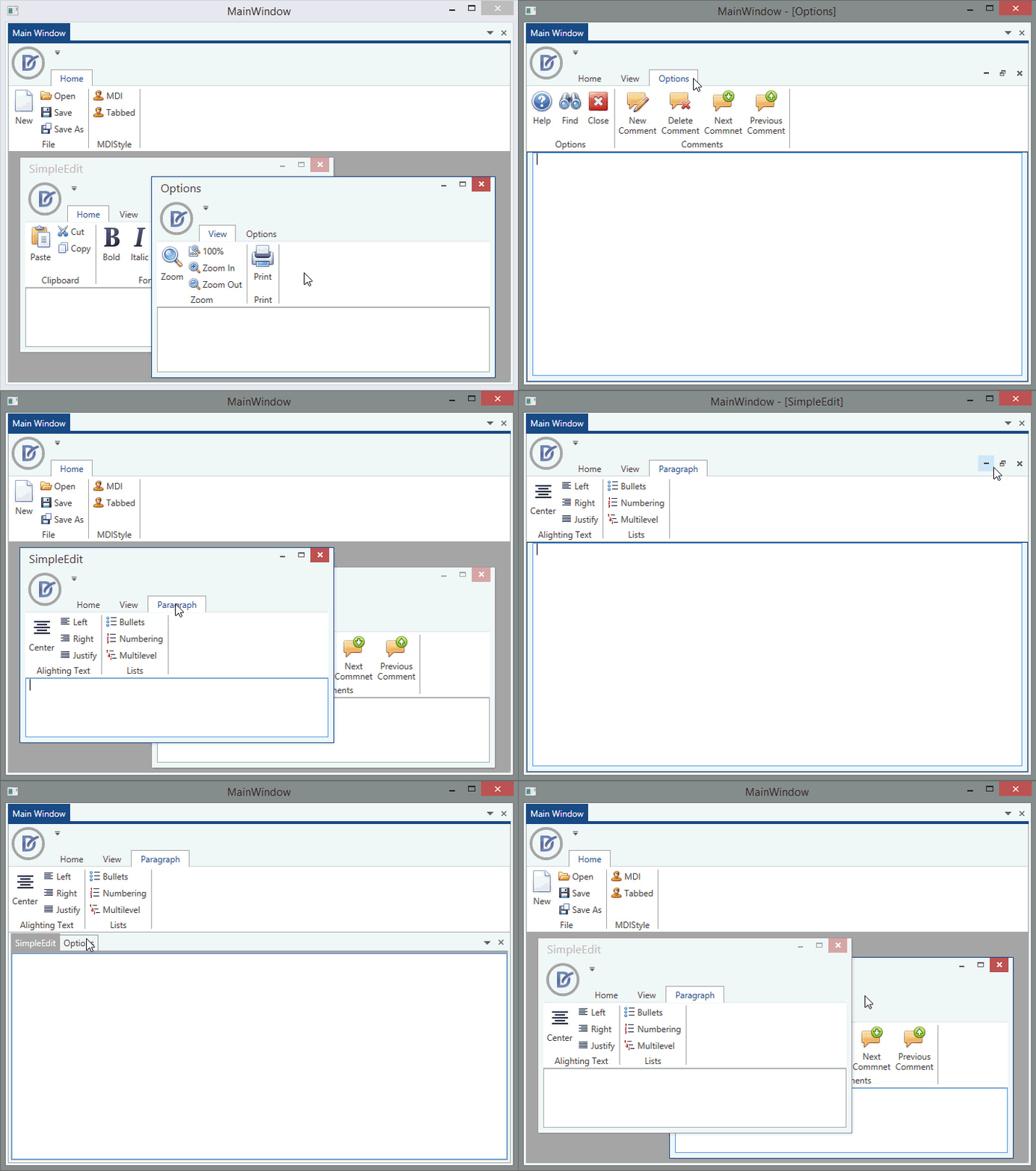
You can merge the following elements:
- [RibbonPageCategory](/WPF/DevExpress.Xpf.Ribbon.RibbonPageCategory) items
- [RibbonPages](/WPF/DevExpress.Xpf.Ribbon.RibbonPage)
- [RibbonPageGroups](/WPF/DevExpress.Xpf.Ribbon.RibbonPageGroup)
- [BarItems](/WPF/DevExpress.Xpf.Bars.BarItem) within page groups, quick access toolbars, and ribbon status bar controls. These elements are added from a child [RibbonControl](/WPF/DevExpress.Xpf.Ribbon.RibbonControl)/[RibbonStatusBarControl](/WPF/DevExpress.Xpf.Ribbon.RibbonStatusBarControl) to the parent [RibbonControl](/WPF/DevExpress.Xpf.Ribbon.RibbonControl)/[RibbonStatusBarControl](/WPF/DevExpress.Xpf.Ribbon.RibbonStatusBarControl).
[View Example: Merge Ribbon Controls in MDI Mode](https://github.com/DevExpress-Examples/wpf-docklayoutmanager-merge-ribbon-controls)
### Merge Names
The Merging mechanism uses the following item’s properties to match items from the parent and child ribbons:
1. [MergingProperties.Name](/WPF/DevExpress.Xpf.Bars.MergingProperties.Name)
2. [x:Name](https://docs.microsoft.com/en-us/dotnet/desktop/xaml-services/xname-directive) that is mapped to a [BarItemLink](/WPF/DevExpress.Xpf.Bars.BarItemLink)‘s [BarItemName](/WPF/DevExpress.Xpf.Bars.BarItemLinkBase.BarItemName) property.
3. [BarItem.Content](/WPF/DevExpress.Xpf.Bars.BarItem.Content)
### Merge Type
Use the `MergeType` property to select a merge type. You should specify this property only for a **child ribbon’s items and links** that you want to merge. You can choose one of the following merge types:
| Ribbon Element | Property |
| --- | --- |
| [RibbonPageCategory](/WPF/DevExpress.Xpf.Ribbon.RibbonPageCategory) | [RibbonPageCategoryBase.MergeType](/WPF/DevExpress.Xpf.Ribbon.RibbonPageCategoryBase.MergeType) |
| [RibbonPage](/WPF/DevExpress.Xpf.Ribbon.RibbonPage) | [RibbonPage.MergeType](/WPF/DevExpress.Xpf.Ribbon.RibbonPage.MergeType) |
| [RibbonPageGroup](/WPF/DevExpress.Xpf.Ribbon.RibbonPageGroup) | [RibbonPageGroup.MergeType](/WPF/DevExpress.Xpf.Ribbon.RibbonPageGroup.MergeType) |
| [BarItemLinkBase](/WPF/DevExpress.Xpf.Bars.BarItemLinkBase) | [BarItemLinkBase.MergeType](/WPF/DevExpress.Xpf.Bars.BarItemLinkBase.MergeType) |
You can choose one of the following merge types:
| Value | Description |
| --- | --- |
| [Add](/WPF/DevExpress.Xpf.Ribbon.RibbonMergeType) | The ribbon items of a child ribbon are added to the parent ribbon (the default behavior). |
| [MergeItems](/WPF/DevExpress.Xpf.Ribbon.RibbonMergeType) | The default merging mechanism. Sub-items of the current child ribbon element are merged into the parent ribbon element that has the same caption. If no parent element with the same caption exists, the current child ribbon element is appended according to its **MergeOrder**. |
| [Remove](/WPF/DevExpress.Xpf.Ribbon.RibbonMergeType) | The ribbon items of a child ribbon with identical captions are removed from a merged ribbon. |
| [Replace](/WPF/DevExpress.Xpf.Ribbon.RibbonMergeType) | The ribbon items of a child ribbon replace ribbon items on the parent ribbon with identical captions. |
### Merge Order
Each merged element has the `MergeOrder` property that specifies the order in which parent/child ribbon’s items are displayed in the merged ribbon.
The first element’s **MergeOrder** is `0`. An element with the greatest **MergeOrder** value is the last. The default **MergeOrder** value for all elements is `0`.
If parent and child ribbons include items with equal `MergeOrder` property values, the child ribbon’s items are placed after all parent ribbon’s items with that `MergeOrder`.
You can use the following properties to specify the merge order of different elements of a ribbon:
| Property | Description |
| --- | --- |
| [RibbonPageCategory](/WPF/DevExpress.Xpf.Ribbon.RibbonPageCategory) | [RibbonPageCategoryBase.MergeOrder](/WPF/DevExpress.Xpf.Ribbon.RibbonPageCategoryBase.MergeOrder) |
| [RibbonPage](/WPF/DevExpress.Xpf.Ribbon.RibbonPage) | [RibbonPage.MergeOrder](/WPF/DevExpress.Xpf.Ribbon.RibbonPage.MergeOrder) |
| [RibbonPageGroup](/WPF/DevExpress.Xpf.Ribbon.RibbonPageGroup) | [RibbonPageGroup.MergeOrder](/WPF/DevExpress.Xpf.Ribbon.RibbonPageGroup.MergeOrder) |
| [BarItemLinkBase](/WPF/DevExpress.Xpf.Bars.BarItemLinkBase) | [BarItemLinkBase.MergeOrder](/WPF/DevExpress.Xpf.Bars.BarItemLinkBase.MergeOrder) |
The Ribbon control merges and arranges its elements in the following order:
1. [RibbonPageCategories](/WPF/DevExpress.Xpf.Ribbon.RibbonPageCategory)
2. [RibbonPages](/WPF/DevExpress.Xpf.Ribbon.RibbonPage)
3. [RibbonPageGroups](/WPF/DevExpress.Xpf.Ribbon.RibbonPageGroup)
4. [Ribbon’s items and commands](/WPF/8174/controls-and-libraries/ribbon-bars-and-menu/ribbon/populating-ribbon/items-and-links)
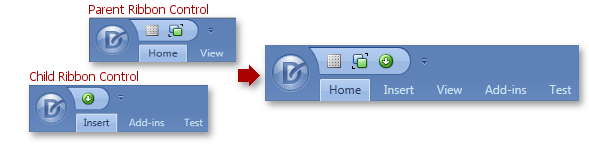
### Example
- XAML
<!-- The parent Ribbon Control: -->
<dxr:RibbonPage MergeOrder="0" Caption="Home" Name="mainHomePage">
    <!-- ... -->
</dxr:RibbonPage>
<dxr:RibbonPage MergeOrder="2" Caption="View" Name="mainViewPage">
    <!-- ...  -->
</dxr:RibbonPage>

<!-- The child Ribbon Control: -->
<dxr:RibbonPage MergeOrder="1" Caption="Insert" Name="child2InsertPage">
    <!-- ... -->
</dxr:RibbonPage>
<dxr:RibbonPage MergeOrder="4" Caption="Add-ins" Name="child2AddInsPage">
    <!-- ... -->
</dxr:RibbonPage>
<dxr:RibbonPage MergeOrder="3" Caption="Test" Name="child2TestPage">
    <!-- ... -->
</dxr:RibbonPage>
The following image demonstrates a merge result:
### Unmerge Ribbons
Call the [RibbonControl.UnMerge](/WPF/DevExpress.Xpf.Ribbon.RibbonControl.UnMerge.overloads) / [RibbonStatusBarControl.UnMerge](/WPF/DevExpress.Xpf.Ribbon.RibbonStatusBarControl.UnMerge.overloads) methods to unmerge [RibbonControl](/WPF/DevExpress.Xpf.Ribbon.RibbonControl) / [RibbonStatusBarControl](/WPF/DevExpress.Xpf.Ribbon.RibbonStatusBarControl).
If you merged multiple Ribbon objects, you can define which child Ribbon object should be unmerged from the parent object.
To restore the parent control’s layout, call an `Unmerge` method without parameters.
## Change the Default Merge Behavior
Menus, bars, and ribbons are **merged** in the following cases:
- In regular MDI mode, when a [DocumentPanel](/WPF/DevExpress.Xpf.Docking.DocumentPanel) is maximized.
- In tabbed MDI mode, when a tab ([DocumentPanel](/WPF/DevExpress.Xpf.Docking.DocumentPanel)) is activated.
Menus, bars, and ribbons are **unmerged** in the following cases:
- In regular MDI mode, when a [DocumentPanel](/WPF/DevExpress.Xpf.Docking.DocumentPanel) is restored from the maximized to the normal state or before another [DocumentPanel](/WPF/DevExpress.Xpf.Docking.DocumentPanel) is maximized.
- In tabbed MDI mode, when a tab ([DocumentPanel](/WPF/DevExpress.Xpf.Docking.DocumentPanel)) is deactivated (for instance, before another tab is selected).
You can use the [DockLayoutManager.MDIMergeStyle](/WPF/DevExpress.Xpf.Docking.DockLayoutManager.MDIMergeStyle) property to change the default bar merging behavior. This property affects all child panels within a [DockLayoutManager](/WPF/DevExpress.Xpf.Docking.DockLayoutManager). You can choose one of the following values:
- [Always](/WPF/DevExpress.Xpf.Bars.MDIMergeStyle)
- The panel’s bar/ribbon is merged with the parent bar/ribbon in the following cases:
- When you maximize a [DocumentGroup](/WPF/DevExpress.Xpf.Docking.DocumentGroup)‘s MDI child panel (**MDI UI**).
- When you select the [DocumentGroup](/WPF/DevExpress.Xpf.Docking.DocumentGroup)‘s panel in the tab (**tabbed UI**).
If your layout contains multiple [DocumentGroups](/WPF/DevExpress.Xpf.Docking.DocumentGroup), the merging mechanism is invoked for all [DocumentGroups](/WPF/DevExpress.Xpf.Docking.DocumentGroup) simultaneously. In this case, all of them are merged to the parent at the same time.
Bars/ribbons are unmerged in the following cases:
- When you restore an MDI child panel from the maximized state to the normal state (**MDI UI**).
- When you select another tab (Tabbed UI).
- [Never](/WPF/DevExpress.Xpf.Bars.MDIMergeStyle)
- Prevents all child tabbed and MDI panels from being merged.
- [WhenChildActivated](/WPF/DevExpress.Xpf.Bars.MDIMergeStyle)
- Bars/ribbons are merged in the following cases:
- When you activate a maximized MDI child panel (**MDI UI**).
- When you select a tab (**tabbed UI**).
Bars/ribbons are unmerged in the following cases:
- When you restore a maximized MDI child panel from the maximized to the normal state or deactivate it (**MDI UI**).
- When you deactivate a selected tab or select another tab (**tabbed UI**).
- [WhenLoadedOrChildActivated](/WPF/DevExpress.Xpf.Bars.MDIMergeStyle)
- Similar to [WhenChildActivated](/WPF/DevExpress.Xpf.Bars.MDIMergeStyle) mode, but additionally merges MDI panels and tabs that are initially maximized (docked), but not yet selected (for example, on application start).
### Change a Panel’s Merge Behavior
Use the [DocumentPanel.MDIMergeStyle](/WPF/DevExpress.Xpf.Docking.LayoutPanel.MDIMergeStyle) attached property to specify the merge behavior for the panel. This property has a higher priority than the [DockLayoutManager.MDIMergeStyle](/WPF/DevExpress.Xpf.Docking.DockLayoutManager.MDIMergeStyle) property.
## Layout Panel Specifics
Bars and Ribbons included in [LayoutPanels](/WPF/DevExpress.Xpf.Docking.LayoutPanel) are not merged with the parent container (the default behavior).
Set the [LayoutPanel](/WPF/DevExpress.Xpf.Docking.LayoutPanel) bar/ribbon’s [ElementMergingBehavior](/WPF/DevExpress.Xpf.Bars.MergingProperties.ElementMergingBehavior) property to [InternalWithExternal](/WPF/DevExpress.Xpf.Bars.ElementMergingBehavior) to merge a [LayoutPanel](/WPF/DevExpress.Xpf.Docking.LayoutPanel)‘s bars/ribbons with a parent container:
- XAML
<Style TargetType="dxdo:LayoutPanel">
    <Setter Property="dxb:MergingProperties.ElementMergingBehavior" Value="InternalWithExternal" />
</Style>
See Also
[MDI Ribbon Merging](/WPF/10587/controls-and-libraries/ribbon-bars-and-menu/ribbon/features/mdi-ribbon-merging)