# Best Fit | WPF Controls | DevExpress Documentation
The [Pivot Grid](/WPF/7228/controls-and-libraries/pivot-grid) control provides the capability to automatically calculate and apply the optimal width/height required for a column/row to completely display its contents.
## Best Fit Overview
The **Best Fit** feature can be applied to an individual column or row, as well as to all columns and rows displayed within the PivotGridControl.
Use the [PivotGridControl.BestFit](/WPF/DevExpress.Xpf.PivotGrid.PivotGridControl.BestFit.overloads) method without parameters to apply Best Fit to all columns/rows.
To specify the field whose columns/rows should be automatically adjusted to the optimal width/height, use the [PivotGridControl.BestFit](/WPF/DevExpress.Xpf.PivotGrid.PivotGridControl.BestFit.overloads) method with a [PivotGridField](/WPF/DevExpress.Xpf.PivotGrid.PivotGridField) parameter.
Use the [PivotGridControl.BestFitArea](/WPF/DevExpress.Xpf.PivotGrid.PivotGridControl.BestFitArea) ([PivotGridField.BestFitArea](/WPF/DevExpress.Xpf.PivotGrid.PivotGridField.BestFitArea)) property to specify interface elements (field headers, field values or cells), which should be taken into account when adjusting column widths and row heights.
The following table lists methods used to apply the Best Fit feature:
| Method | Description |
| --- | --- |
| [PivotGridControl.BestFit](/WPF/DevExpress.Xpf.PivotGrid.PivotGridControl.BestFit.overloads) | Depending on the particular overload, applies the Best Fit:
- to all columns and rows
- to the columns/rows which correspond to the fields contained within the specified area
- to the columns/rows which correspond to the specified field
|
| [PivotGridControl.BestFitColumn](/WPF/DevExpress.Xpf.PivotGrid.PivotGridControl.BestFitColumn%28System.Int32%29) | Resizes the specified column to the minimum width required to completely display its contents. |
| [PivotGridControl.BestFitRow](/WPF/DevExpress.Xpf.PivotGrid.PivotGridControl.BestFitRow%28System.Int32%29) | Resizes the specified row to the minimum height required to completely display its contents. |
Note that The Best Fit feature cannot be applied within the [PivotGridControl.BeginUpdate](/WPF/DevExpress.Xpf.PivotGrid.PivotGridControl.BeginUpdate) and [PivotGridControl.EndUpdate](/WPF/DevExpress.Xpf.PivotGrid.PivotGridControl.EndUpdate) method calls.
Note
The Best Fit feature cannot be applied to the pivot grid if the [PivotGridControl.AllowResizing](/WPF/DevExpress.Xpf.PivotGrid.PivotGridControl.AllowResizing) property is set to **false**.
The Best Fit is available only after the Pivot Grid Control has been loaded in the visual tree.
## End-User Capabilities
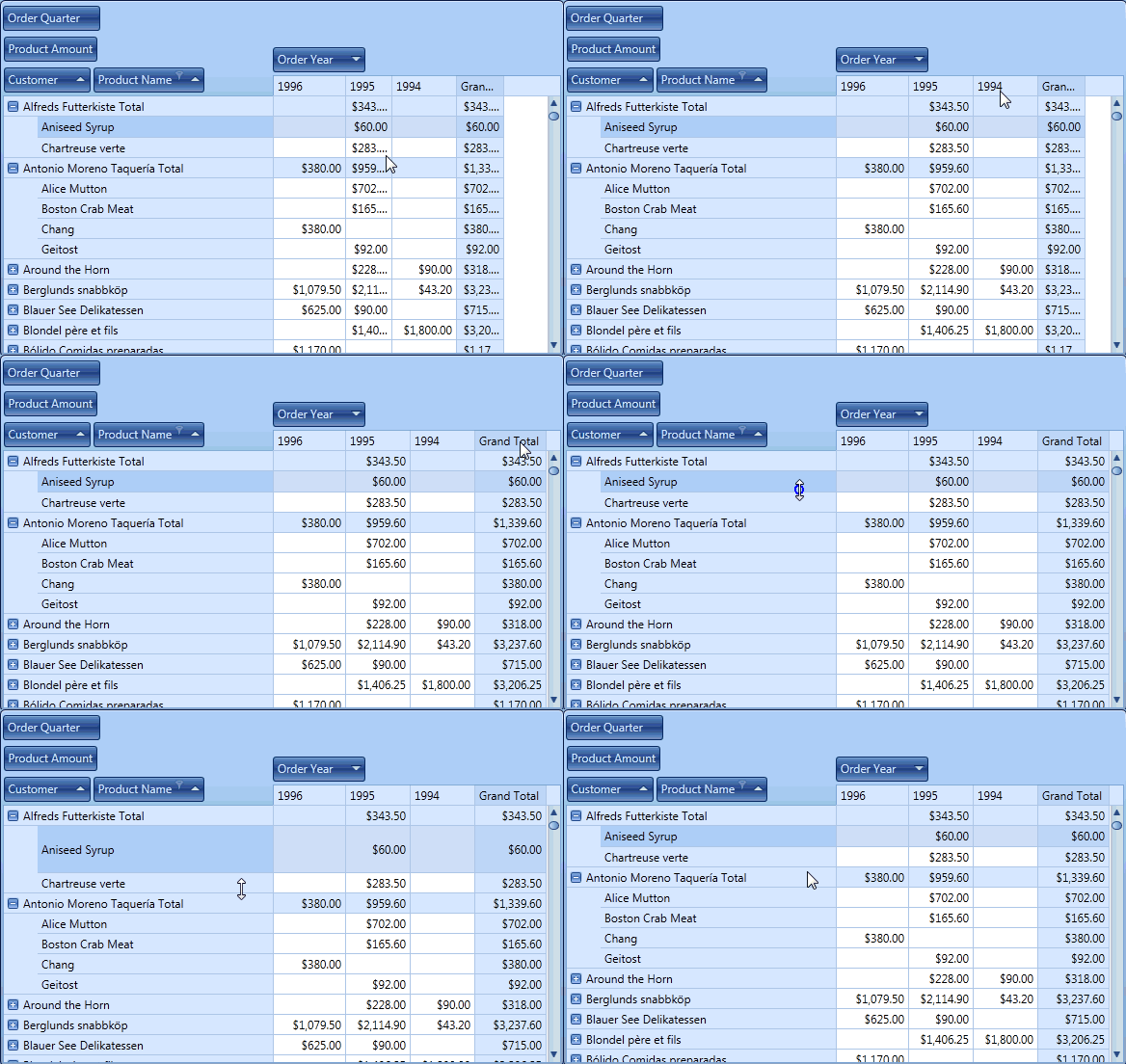
End-users can resize columns to their optimal width (if allowed) by double clicking their right border. Rows are resized by double clicking their bottom border.
## Best Fit Options
You can specify which visual elements are taken into account when calculating the optimal width for columns. To do this, use the [PivotGridControl.BestFitMode](/WPF/DevExpress.Xpf.PivotGrid.PivotGridControl.BestFitMode) ([PivotGridField.BestFitMode](/WPF/DevExpress.Xpf.PivotGrid.PivotGridField.BestFitMode)) property. By default, the column’s width (row’s height) is calculated based on the text of all cells within this column/row.
To increase the application’s performance, the number of cells taken into account when calculating the optimal width/height can be limited by setting the [PivotGridControl.BestFitMaxRowCount](/WPF/DevExpress.Xpf.PivotGrid.PivotGridControl.BestFitMaxRowCount) ([PivotGridField.BestFitMaxRowCount](/WPF/DevExpress.Xpf.PivotGrid.PivotGridField.BestFitMaxRowCount)) property. By default, this property is set to **-1**, to indicate that all cells are processed. If the [PivotGridControl.BestFitMaxRowCount](/WPF/DevExpress.Xpf.PivotGrid.PivotGridControl.BestFitMaxRowCount) property is set to a positive value, the PivotGridControl processes the specified number of cells starting from the first visible cell (top visible for columns, and leftmost visible, for rows).