# Save and Restore Layout | WPF Controls | DevExpress Documentation
A Pivot Grid’s layout contains settings that determine the size and position of its [visual elements](/WPF/7885/controls-and-libraries/pivot-grid/ui-elements). You can customize and save the current Pivot Grid control’s layout and apply the same settings to other Pivot Grid controls. The Pivot Grid uses a field’s [Name](/WPF/DevExpress.Xpf.PivotGrid.PivotGridField.Name) to determine the field in a stored layout.
## Base Concepts
Refer to the following articles for information about the common concept:
- [Save/Restore Control Layout](/WPF/7391/common-concepts/save-and-restore-layouts)
- [DXSerializer Events - Advanced Scenarios](/WPF/7410/common-concepts/saving-and-restoring-layouts/advanced-scenarios)
## Save and Restore Layout in Code
The Pivot Grid control has API methods to save a control’s layout and restore it from the following data stores:
- XML file
- Stream
The following list illustrates methods that you can use to save and restore the Pivot Grid’s layout:
- [PivotGridControl.SaveLayoutToXml](/WPF/DevExpress.Xpf.PivotGrid.PivotGridControl.SaveLayoutToXml%28System.String%29)
- Saves the PivotGridControl’s layout to a file in XML format.
- [PivotGridControl.SaveLayoutToStream](/WPF/DevExpress.Xpf.PivotGrid.PivotGridControl.SaveLayoutToStream%28System.IO.Stream%29)
- Saves the PivotGridControl’s layout to the specified stream.
- [PivotGridControl.RestoreLayoutFromXml](/WPF/DevExpress.Xpf.PivotGrid.PivotGridControl.RestoreLayoutFromXml%28System.String%29)
- Restores the pivot grid’s layout from the specified XML file.
- [PivotGridControl.RestoreLayoutFromStream](/WPF/DevExpress.Xpf.PivotGrid.PivotGridControl.RestoreLayoutFromStream%28System.IO.Stream%29)
- Restores the pivot grid layout from the specified stream.
- [PivotGridControl.RestoreLayoutFromStreamAsync(Stream)](/WPF/DevExpress.Xpf.PivotGrid.PivotGridControl.RestoreLayoutFromStreamAsync%28System.IO.Stream%29)
- Restores the pivot grid layout from the specified stream [asynchronously](/WPF/9776/controls-and-libraries/pivot-grid/binding-to-data/asynchronous-mode).
Call the following methods to save and restore the collapsed field state in the Pivot Grid’s layout. Otherwise, the fields are saved and restored expanded.
- [PivotGridControl.SaveCollapsedStateToFile(String)](/WPF/DevExpress.Xpf.PivotGrid.PivotGridControl.SaveCollapsedStateToFile%28System.String%29)
- Saves the collapsed state of field values to the specified file.
- [PivotGridControl.SaveCollapsedStateToStream(Stream)](/WPF/DevExpress.Xpf.PivotGrid.PivotGridControl.SaveCollapsedStateToStream%28System.IO.Stream%29)
- Saves the collapsed state of field values to the specified stream.
- [PivotGridControl.RestoreCollapsedStateFromFile(String)](/WPF/DevExpress.Xpf.PivotGrid.PivotGridControl.RestoreCollapsedStateFromFile%28System.String%29)
- Restores the collapsed state of field values from the specified file.
- [PivotGridControl.RestoreCollapsedStateFromStream(Stream)](/WPF/DevExpress.Xpf.PivotGrid.PivotGridControl.RestoreCollapsedStateFromStream%28System.IO.Stream%29)
- Restores the collapsed state of field values from the specified stream.
- [PivotGridControl.RestoreCollapsedStateFromStreamAsync(Stream)](/WPF/DevExpress.Xpf.PivotGrid.PivotGridControl.RestoreCollapsedStateFromStreamAsync%28System.IO.Stream%29)
- Restores the collapsed state of field values from the specified stream [asynchronously](/WPF/9776/controls-and-libraries/pivot-grid/binding-to-data/asynchronous-mode).
## Layout Options
The [PivotSerializationOptions.StoreLayoutMode](/WPF/DevExpress.Xpf.PivotGrid.PivotSerializationOptions.StoreLayoutMode) property allows you to save or restore the layout with the specified settings. The default setting is [StoreLayoutMode.AllOptions](/WPF/DevExpress.Xpf.PivotGrid.StoreLayoutMode). This setting includes:
- Visibility state, position and size of the fields.
- Data settings (grouping, sorting, filtering settings and summaries).
- Appearance settings and format rules.
- The field’s data format for exporting.
### Manage Fields in Restored Layout
To manage the layout’s fields, use the [PivotSerializationOptions.AddNewFields](/WPF/DevExpress.Xpf.PivotGrid.PivotSerializationOptions.AddNewFields) and [PivotSerializationOptions.RemoveOldFields](/WPF/DevExpress.Xpf.PivotGrid.PivotSerializationOptions.RemoveOldFields) properties. The Pivot Grid uses a field’s [Name](/WPF/DevExpress.Xpf.PivotGrid.PivotGridField.Name) to determine the field in a stored layout.
New fields are fields in the control, old fields are fields in the saved layout.
- If old and new fields have the same [Name](/WPF/DevExpress.Xpf.PivotGrid.PivotGridField.Name), the control applies the saved layout changes to the fields in the control.
- If old and new fields have a different `Name`, the behavior is as follows:
- If both properties are *true*, the Pivot Grid removes the fields from the saved layout and keeps the fields in the control.
- If both properties are *false*, the Pivot Grid restores the fields from the layout and removes the fields from the control.
- If **AddNewFields** is *true* and **RemoveOldFields** is *false*, the Pivot Grid restores the fields from the layout and keeps the fields in the control.
- If **AddNewFields** is *false* and **RemoveOldFields** is *true*, the Pivot Grid removes the fields from the layout and control.
For field groups, use the [PivotSerializationOptions.AddNewGroups](/WPF/DevExpress.Xpf.PivotGrid.PivotSerializationOptions.AddNewGroups) property.
## Upgrade Layout
When a layout is restored and its version differs from the current Pivot Grid’s layout version, the [PivotGridControl.LayoutUpgradeEvent](/WPF/DevExpress.Xpf.PivotGrid.PivotGridControl.LayoutUpgradeEvent) event occurs.
The layout version is specified with the [DXSerializer.LayoutVersion](/WPF/DevExpress.Xpf.Core.Serialization.DXSerializer.LayoutVersion) property. You can handle the `LayoutUpgrade` event and use this property and the [e.PreviousVersion](/WPF/DevExpress.Xpf.PivotGrid.PivotLayoutUpgradeEventArgs.PreviousVersion) value to decide whether to overwrite the current layout.
When you load or restore a layout, the [PivotGridControl.BeforeLoadLayout](/WPF/DevExpress.Xpf.PivotGrid.PivotGridControl.BeforeLoadLayout) event occurs. You can handle this event and set the [e.Allow](/WPF/DevExpress.Xpf.PivotGrid.PivotLayoutAllowEventArgs.Allow) property to `false` to cancel loading.
## Example: How to Save and Load the Pivot Grid Layout
The following example shows how to save the Pivot Grid’s layout to a file in XML format. The “Save” button calls the [PivotGridControl.SaveLayoutToXml](/WPF/DevExpress.Xpf.PivotGrid.PivotGridControl.SaveLayoutToXml%28System.String%29) method. The “Load” button calls the [PivotGridControl.RestoreLayoutFromXml](/WPF/DevExpress.Xpf.PivotGrid.PivotGridControl.RestoreLayoutFromXml%28System.String%29) method to restore the saved layout.
- MainWindow.xaml.cs
- MainWindow.xaml.vb
using System.Data;
using System.Data.OleDb;
using System.Windows;
using DevExpress.Xpf.PivotGrid;
using HowToBindToMDB.NwindDataSetTableAdapters;

namespace HowToBindToMDB {
    public partial class MainWindow : Window {
        NwindDataSet.SalesPersonDataTable salesPersonDataTable = new NwindDataSet.SalesPersonDataTable();
        SalesPersonTableAdapter salesPersonDataAdapter = new SalesPersonTableAdapter();
        public MainWindow() {
            InitializeComponent();
            pivotGridControl1.DataSource = salesPersonDataTable;
        }
        private void Window_Loaded(object sender, RoutedEventArgs e) {
            salesPersonDataAdapter.Fill(salesPersonDataTable);
        }
        private void buttonSave_Click(object sender, RoutedEventArgs e) {
            pivotGridControl1.SaveLayoutToXml("layout.xml");
        }
        private void buttonLoad_Click(object sender, RoutedEventArgs e) {
            pivotGridControl1.RestoreLayoutFromXml("layout.xml");
        }
    }
}
Imports System.Windows
Imports HowToBindToMDB.NwindDataSetTableAdapters

Namespace HowToBindToMDB

    Public Partial Class MainWindow
        Inherits Window

        Private salesPersonDataTable As NwindDataSet.SalesPersonDataTable = New NwindDataSet.SalesPersonDataTable()

        Private salesPersonDataAdapter As SalesPersonTableAdapter = New SalesPersonTableAdapter()

        Public Sub New()
            Me.InitializeComponent()
            Me.pivotGridControl1.DataSource = salesPersonDataTable
        End Sub

        Private Sub Window_Loaded(ByVal sender As Object, ByVal e As RoutedEventArgs)
            salesPersonDataAdapter.Fill(salesPersonDataTable)
        End Sub

        Private Sub buttonSave_Click(ByVal sender As Object, ByVal e As RoutedEventArgs)
            Me.pivotGridControl1.SaveLayoutToXml("layout.xml")
        End Sub

        Private Sub buttonLoad_Click(ByVal sender As Object, ByVal e As RoutedEventArgs)
            Me.pivotGridControl1.RestoreLayoutFromXml("layout.xml")
        End Sub
    End Class
End Namespace
- MainWindow.xaml
<Window x:Class="HowToBindToMDB.MainWindow"
        xmlns="http://schemas.microsoft.com/winfx/2006/xaml/presentation"
        xmlns:x="http://schemas.microsoft.com/winfx/2006/xaml"
        xmlns:dxpg="http://schemas.devexpress.com/winfx/2008/xaml/pivotgrid"
        Title="MainWindow" Height="350" Width="525"  Loaded="Window_Loaded">
    <Grid>
        <Grid.RowDefinitions>
            <RowDefinition />
            <RowDefinition Height="Auto" />
        </Grid.RowDefinitions>
        <dxpg:PivotGridControl Name="pivotGridControl1" DataProcessingEngine="Optimized">
            <dxpg:PivotGridControl.Fields>
                <dxpg:PivotGridField Name="fieldCategory" Caption="Category" Area="RowArea">
                    <dxpg:PivotGridField.DataBinding>
                        <dxpg:DataSourceColumnBinding ColumnName="CategoryName"/>
                    </dxpg:PivotGridField.DataBinding>
                </dxpg:PivotGridField>
                <dxpg:PivotGridField Name="fieldYear" Area="ColumnArea" Caption="Year">
                    <dxpg:PivotGridField.DataBinding>
                        <dxpg:DataSourceColumnBinding ColumnName="OrderDate" GroupInterval="DateYear"/>
                    </dxpg:PivotGridField.DataBinding>
                </dxpg:PivotGridField>
                <dxpg:PivotGridField Name="fieldExtendedPrice" Area="DataArea" CellFormat="c0">
                    <dxpg:PivotGridField.DataBinding>
                        <dxpg:DataSourceColumnBinding ColumnName="Extended Price"/>
                    </dxpg:PivotGridField.DataBinding>
                </dxpg:PivotGridField>
            </dxpg:PivotGridControl.Fields>
        </dxpg:PivotGridControl>
        <StackPanel Grid.Row="1" Orientation="Horizontal">
            <Button Name="buttonSave" Content="Save" Padding="8, 4, 8, 4"
                    Margin="4" Click="buttonSave_Click" />
            <Button Name="buttonLoad" Content="Load" Padding="8, 4, 8, 4"
                    Margin="4" Click="buttonLoad_Click" />
        </StackPanel>
    </Grid>
</Window>
## Example: Update Pivot Grid Layout on Restore
The example below shows how to manage the layout when you restore the Pivot Grid.
The example contains two Pivot Grid controls with the following fields:
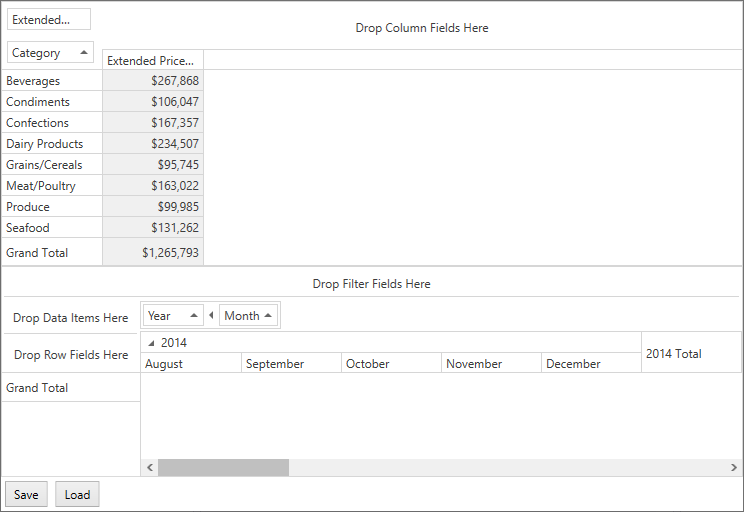
The **SaveLayout** button uses the [PivotGridControl.SaveLayoutToStream](/WPF/DevExpress.Xpf.PivotGrid.PivotGridControl.SaveLayoutToStream%28System.IO.Stream%29) method to save the `pivotGridControlOld` layout to memory streams.
The **RestoreLayout** button uses the [PivotGridControl.RestoreLayoutFromStream](/WPF/DevExpress.Xpf.PivotGrid.PivotGridControl.RestoreLayoutFromStream%28System.IO.Stream%29) method to restore the saved layout to `pivotGridControlNew`.
The following options allows you to combine fields from different Pivot Grid controls on restore:
- [PivotSerializationOptions.AddNewFields](/WPF/DevExpress.Xpf.PivotGrid.PivotSerializationOptions.AddNewFields) set to `true` keeps the field in the `pivotGridControlNew` control when you restore the layout.
- [PivotSerializationOptions.RemoveOldFields](/WPF/DevExpress.Xpf.PivotGrid.PivotSerializationOptions.RemoveOldFields) set to `false` adds fields from `pivotGridControlOld` to `pivotGridControlNew`.
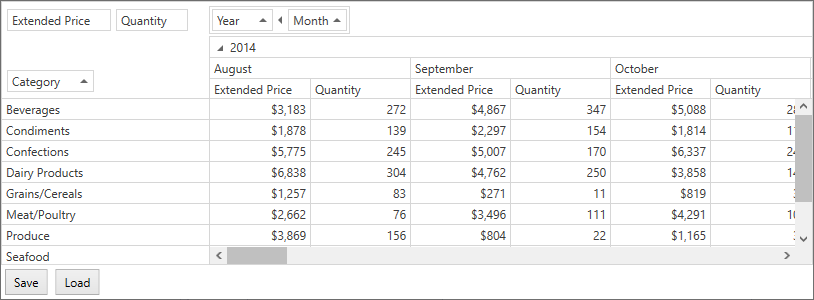
- [PivotSerializationOptions.AddNewGroups](/WPF/DevExpress.Xpf.PivotGrid.PivotSerializationOptions.AddNewGroups) set to `true` keeps the *Year-Quarter* group of the `pivotGridControlNew` when you restore the layout.
- [PivotGridControl.LayoutUpgradeEvent](/WPF/DevExpress.Xpf.PivotGrid.PivotGridControl.LayoutUpgradeEvent) event adds the *Quantity* field to `pivotGridControlNew`‘s data area when you restore the layout.
The following image shows the resulting layout when you save the `pivotGridControlOld` layout and restore it to `pivotGridControlNew`:
- C#
- VB
using DevExpress.Xpf.PivotGrid;
using System.IO;
using System.Windows;

namespace HowToSaveAndRestoreLayoutFromStream {
    public partial class MainWindow : Window {
        // Create a MemoryStream instance.
        System.IO.Stream LayoutStream = new System.IO.MemoryStream();
        public MainWindow() {
            InitializeComponent();
            PivotGridGroup group = pivotGridControlNew.Groups.Add(fieldYear, fieldMonth);
        }
        private void buttonSave_Click(object sender, RoutedEventArgs e) {
            // Save the layout to a stream.
            pivotGridControlOld.SaveLayoutToStream(LayoutStream);
        }
        private void buttonLoad_Click(object sender, RoutedEventArgs e) {
            LayoutStream.Position = 0;
            LayoutStream.Seek(0, SeekOrigin.Begin);
            // Load the layout from the stream.
            pivotGridControlNew.RestoreLayoutFromStream(LayoutStream);
        }
        private void pivotGridControlNew_LayoutUpgrade(object sender, PivotLayoutUpgradeEventArgs e) {
            if (e.PreviousVersion == "1.0") {
                var newField = new PivotGridField() {
                    DataBinding = new DataSourceColumnBinding("Quantity"),
                    Caption = "Quantity",
                    Name = "fieldQuantity",
                    Area = FieldArea.DataArea
                };
                pivotGridControlNew.Fields.Add(newField);
            };
        }
    }
}
Imports DevExpress.Xpf.PivotGrid
Imports System.IO
Imports System.Windows

Namespace HowToSaveAndRestoreLayoutFromStream

    Public Partial Class MainWindow
        Inherits Window

        ' Create a MemoryStream instance.
        Private LayoutStream As Stream = New MemoryStream()

        Public Sub New()
            Me.InitializeComponent()
            Dim group As PivotGridGroup = Me.pivotGridControlNew.Groups.Add(Me.fieldYear, Me.fieldMonth)
        End Sub

        Private Sub buttonSave_Click(ByVal sender As Object, ByVal e As RoutedEventArgs)
            ' Save the layout to a stream.
            Me.pivotGridControlOld.SaveLayoutToStream(LayoutStream)
        End Sub

        Private Sub buttonLoad_Click(ByVal sender As Object, ByVal e As RoutedEventArgs)
            LayoutStream.Position = 0
            LayoutStream.Seek(0, SeekOrigin.Begin)
            ' Load the layout from the stream.
            Me.pivotGridControlNew.RestoreLayoutFromStream(LayoutStream)
        End Sub

        Private Sub pivotGridControlNew_LayoutUpgrade(ByVal sender As Object, ByVal e As PivotLayoutUpgradeEventArgs)
            If Equals(e.PreviousVersion, "1.0") Then
                Dim newField = New PivotGridField() With {.DataBinding = New DataSourceColumnBinding("Quantity"), .Caption = "Quantity", .Name = "fieldQuantity", .Area = FieldArea.DataArea}
                Me.pivotGridControlNew.Fields.Add(newField)
            End If
        End Sub
    End Class
End Namespace
- XAML
<Grid>
    <Grid.RowDefinitions>
        <RowDefinition />
        <RowDefinition />
        <RowDefinition Height="Auto" />
    </Grid.RowDefinitions>
    <dxpg:PivotGridControl Name="pivotGridControlOld"
                           DataSource="{Binding Path=Data, Source={StaticResource TypedSimpleSource}}"
                           DataProcessingEngine="Optimized"
                           dx:DXSerializer.LayoutVersion="1.0">
        <dxpg:PivotGridControl.Fields>
            <dxpg:PivotGridField Name="fieldCategory" Caption="Category" Area="RowArea">
                <dxpg:PivotGridField.DataBinding>
                    <dxpg:DataSourceColumnBinding ColumnName="CategoryName"/>
                </dxpg:PivotGridField.DataBinding>
            </dxpg:PivotGridField>
            <dxpg:PivotGridField Name="fieldExtendedPrice" Area="DataArea" CellFormat="c0">
                <dxpg:PivotGridField.DataBinding>
                    <dxpg:DataSourceColumnBinding ColumnName="Extended Price"/>
                </dxpg:PivotGridField.DataBinding>
            </dxpg:PivotGridField>
        </dxpg:PivotGridControl.Fields>
    </dxpg:PivotGridControl>
    <dxpg:PivotGridControl Grid.Row="1" Name="pivotGridControlNew"
                           DataSource="{Binding Path=Data, Source={StaticResource TypedSimpleSource}}"
                           DataProcessingEngine="Optimized"
                           dx:DXSerializer.LayoutVersion="2.0"
                           dxpg:PivotSerializationOptions.AddNewGroups="True"
                           dxpg:PivotSerializationOptions.AddNewFields="True"
                           dxpg:PivotSerializationOptions.RemoveOldFields="False"
                           LayoutUpgrade="pivotGridControlNew_LayoutUpgrade">
        <dxpg:PivotGridControl.Fields>
        <dxpg:PivotGridField Name="fieldYear" Area="ColumnArea" Caption="Year"
                             Group="{Binding ElementName=group}">
            <dxpg:PivotGridField.DataBinding>
                <dxpg:DataSourceColumnBinding ColumnName="OrderDate" GroupInterval="DateYear"/>
            </dxpg:PivotGridField.DataBinding>
        </dxpg:PivotGridField>
        <dxpg:PivotGridField Name="fieldMonth" Area="ColumnArea" Caption="Month"
                             Group="{Binding ElementName=group}">
        <dxpg:PivotGridField.DataBinding>
            <dxpg:DataSourceColumnBinding ColumnName="OrderDate" GroupInterval="DateMonth"/>
        </dxpg:PivotGridField.DataBinding>
        </dxpg:PivotGridField>
        </dxpg:PivotGridControl.Fields>
    </dxpg:PivotGridControl>
    <StackPanel Grid.Row="2" Orientation="Horizontal" >
        <Button  Name="buttonSave" Content="Save" Padding="8, 4, 8, 4"
                Margin="4" Click="buttonSave_Click" ></Button>
        <Button Name="buttonLoad" Content="Load" Padding="8, 4, 8, 4"
                Margin="4" Click="buttonLoad_Click"></Button>
    </StackPanel>
</Grid>