# DXTabControl | WPF Controls | DevExpress Documentation
[DXTabControl](/WPF/DevExpress.Xpf.Core.DXTabControl) is designed to bring the tab-based navigation functionality to your applications.
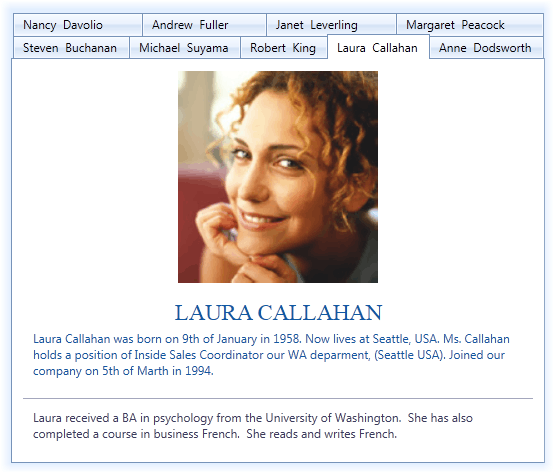
## Tab Control and Items Overview
[DXTabControl](/WPF/DevExpress.Xpf.Core.DXTabControl) is a navigation component that is used to build tabbed UI. The layout, style and behavior settings are defined by [Views](/WPF/7979/controls-and-libraries/layout-management/tab-control/fundamentals/views) objects. To apply a view to the tab control, create a view object and assign it to the [DXTabControl.View](/WPF/DevExpress.Xpf.Core.DXTabControl.View) property. To learn more about views, see [Views](/WPF/7979/controls-and-libraries/layout-management/tab-control/fundamentals/views).
Tab control’s items (pages) are represented by [DXTabItem](/WPF/DevExpress.Xpf.Core.DXTabItem) objects that are located in the [Items](https://learn.microsoft.com/dotnet/api/system.windows.controls.itemscontrol.items#system-windows-controls-itemscontrol-items) collection.

Structurally, each tab item consists of a header and content parts, specified by the **DXTabItem.Header** and **DXTabItem.Content** properties respectively. The templates defining the visual representation of the tab item’s header and content are specified using the **DXTabItem.HeaderTemplate** and **DXTabItem.ContentTemplate** properties. You can specify an icon to be displayed within the tab item’s header. To do this, use the [DXTabItem.Glyph](/WPF/DevExpress.Xpf.Core.DXTabItem.Glyph) or [DXTabItem.GlyphTemplate](/WPF/DevExpress.Xpf.Core.DXTabItem.GlyphTemplate) property.
**Caching Tab Items**
The [DXTabControl](/WPF/DevExpress.Xpf.Core.DXTabControl) does not cache its tabs by default. Set the [DXTabControl.TabContentCacheMode](/WPF/DevExpress.Xpf.Core.DXTabControl.TabContentCacheMode) property to [TabContentCacheMode.CacheAllTabs](/WPF/DevExpress.Xpf.Core.TabContentCacheMode) to make the [DXTabControl](/WPF/DevExpress.Xpf.Core.DXTabControl) load and cache its tab items after the control is shown. Caching tab items can significantly speed up navigation between tabs, but will consume more memory.
Set the [DXTabControl.TabContentCacheMode](/WPF/DevExpress.Xpf.Core.DXTabControl.TabContentCacheMode) property to [TabContentCacheMode.CacheTabsOnSelecting](/WPF/DevExpress.Xpf.Core.TabContentCacheMode) to make the control cache a tab only after it was selected.
## Create DXTabItems
You can add tab items to the tab control in any of the following ways:
- Create [DXTabItem](/WPF/DevExpress.Xpf.Core.DXTabItem) objects and add them to the **DXTabControl.Items** collection.
- MainWindow.xaml
<dx:DXTabControl>
    <dx:DXTabItem Header="Page 1">
        <Label Content="Hello, world!"/>
    </dx:DXTabItem>
    <dx:DXTabItem Header="Page 2">
        <Label Content="DXTabControl"/>
    </dx:DXTabItem>
</dx:DXTabControl>
- Add arbitrary objects (data items) to the **DXTabControl.Items** collection and specify the **DXTabControl.ItemTemplate** and **DXTabControl.ItemHeaderTemplate** templates that define how to present tab headers and pages, respectively. In this instance, [DXTabItem](/WPF/DevExpress.Xpf.Core.DXTabItem) objects will be generated from data items automatically.
- MainWindow.xaml
<Grid>
    <Grid.Resources>
        <DataTemplate x:Key="ItemHeaderTemplate">
            <TextBlock Text="{Binding HeaderText}"/>
        </DataTemplate>
        <DataTemplate x:Key="ItemContentTemplate">
            <TextBlock Text="{Binding PageText}"/>
        </DataTemplate>
    </Grid.Resources>
    <dx:DXTabControl ItemHeaderTemplate="{StaticResource ItemHeaderTemplate}"
                     ItemTemplate="{StaticResource ItemContentTemplate}"
                     Name="dXTabControl1"/>
</Grid>
- MainWindow.xaml.cs
public class TabDataItem {
    public string PageText { get; set;}
    public string HeaderText { get; set;}
}
//...
dXTabControl1.Items.Add(new TabDataItem() {
    HeaderText = "Page 1", PageText = "Hello, world!"
});
dXTabControl1.Items.Add(new TabDataItem() {
    HeaderText = "Page 2", PageText = "DXTabControl"
});
- Bind the tab control to a data source. To do this, assign a data source to the **DXTabControl.ItemsSource** property. In this case, the control retrieves data items from the data source and add them to the **DXTabControl.Items** collection. Similar to the previous case, you should specify the **DXTabControl.ItemTemplate** and **DXTabControl.ItemHeaderTemplate** templates to define the tab headers and pages visual presentation.
- MainWindow.xaml
<Window ...
    xmlns:dx="http://schemas.devexpress.com/winfx/2008/xaml/core"/>
    <Grid>
        <Grid.Resources>
            <DataTemplate x:Key="ItemHeaderTemplate">
                <TextBlock Text="{Binding HeaderText}"/>
            </DataTemplate>
            <DataTemplate x:Key="ItemContentTemplate">
                <TextBlock Text="{Binding PageText}"/>
            </DataTemplate>
        </Grid.Resources>
        <dx:DXTabControl ItemHeaderTemplate="{StaticResource ItemHeaderTemplate}"
                         ItemTemplate="{StaticResource ItemContentTemplate}"
                         Name="dXTabControl1" ItemsSource="{Binding}"/>

    </Grid>
</Window>
- MainWindow.xaml.cs
public partial class MainWindow : Window
{
public class TabDataItem
{
    public string PageText { get; set; }
    public string HeaderText { get; set; }
}

    public MainWindow()
    {
        InitializeComponent();
        this.DataContext = new ObservableCollection<TabDataItem>() {
        new TabDataItem() { HeaderText = "Page 1", PageText = "Hello, world!" },
        new TabDataItem() { HeaderText = "Page 2", PageText = "DXTabControl" }
    };
    }
}
To learn more about a binding a tab control to data, see [Binding to Data Overview](/WPF/7978/controls-and-libraries/layout-management/tab-control/concepts/binding-to-data-overview).