# Add and Remove Rows | WPF Controls | DevExpress Documentation
## New Item Row
The **New Item Row** is an empty row at the top or the bottom of the [View](/WPF/6293/controls-and-libraries/data-grid/views). Users can enter data into this row to create new rows.
To show the **New Item Row**, set the [TableView.NewItemRowPosition](/WPF/DevExpress.Xpf.Grid.TableView.NewItemRowPosition) / [TreeListView.NewItemRowPosition](/WPF/DevExpress.Xpf.Grid.TreeListView.NewItemRowPosition) property to **Top** or **Bottom**.
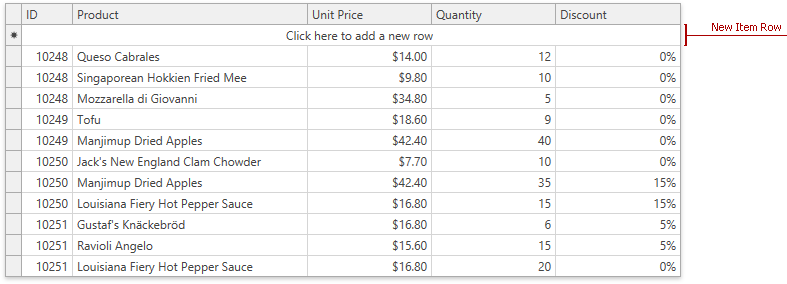**TableView**: NewItemRowPosition = Top
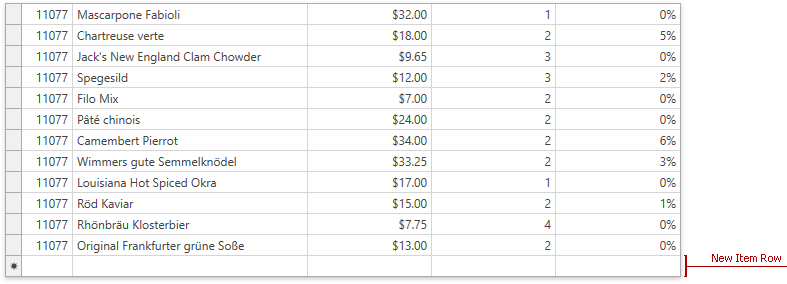**TableView**: NewItemRowPosition = Bottom
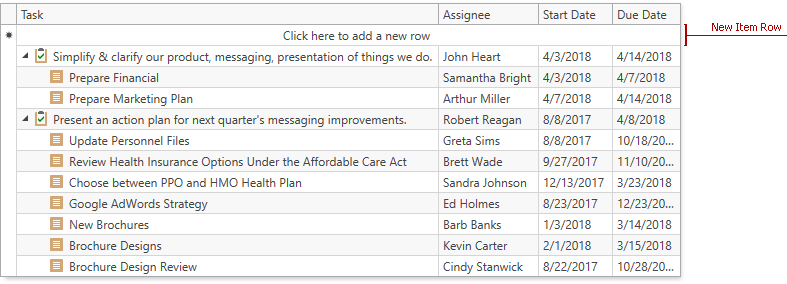**TreeListView**: NewItemRowPosition = Top
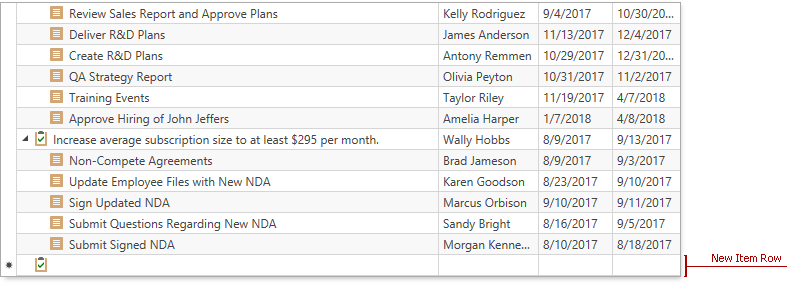**TreeListView**: NewItemRowPosition = Bottom
[Run Demo: New Item Row in TableView](dxdemo://Wpf/DXGrid/MainDemo/NewItemRow) [Run Demo: New Item Row in TreeListView](dxdemo://Wpf/DXTreeList/MainDemo/NewItemRow)
A user should enter values in the **New Item Row**. The [GridControl](/WPF/DevExpress.Xpf.Grid.GridControl) checks whether values are valid and displays the row at the position according to the current filter, group, and sort settings:
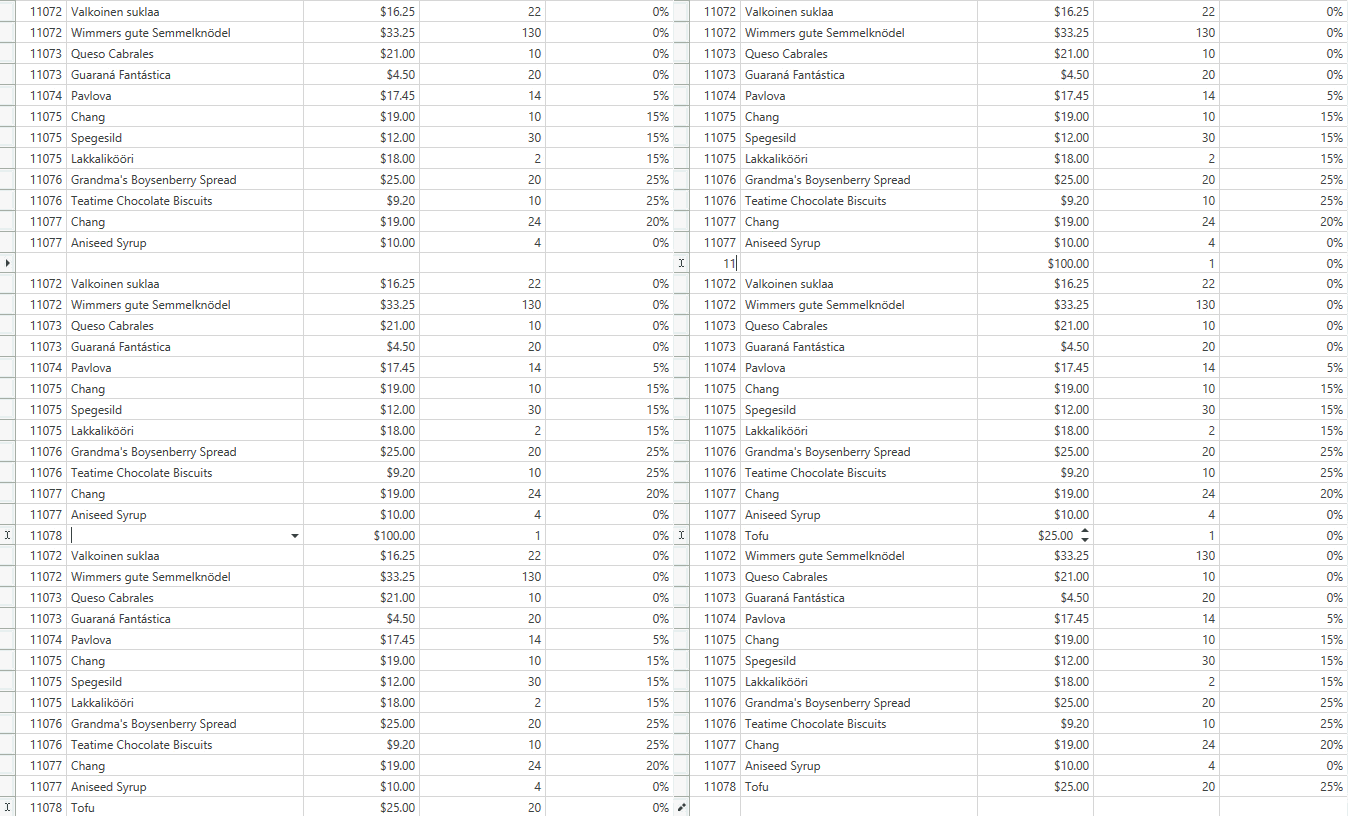
The [GridControl](/WPF/DevExpress.Xpf.Grid.GridControl) validates the **New Item Row**‘s cells in the same way as other data cells. Refer to [Input Validation](/WPF/7358/controls-and-libraries/data-grid/data-editing-and-validation/input-validation) for more information.
In [TreeListView](/WPF/DevExpress.Xpf.Grid.TreeListView), a new row is added to the root level. Users can drag this row anywhere in the hierarchy. Set the [DataViewBase.AllowDragDrop](/WPF/DevExpress.Xpf.Grid.DataViewBase.AllowDragDrop) property to **true** to allow drag-and-drop operations.
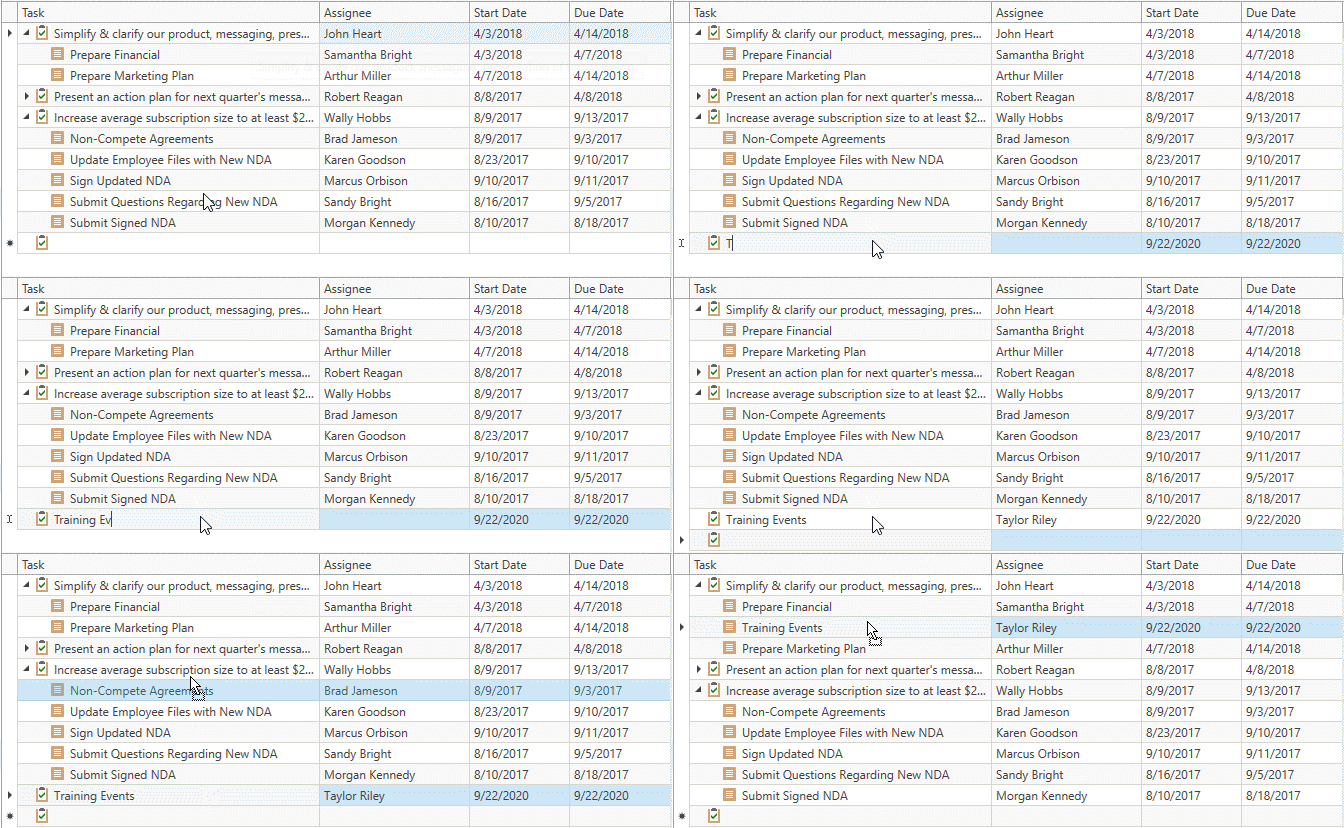
Users can press Esc while the row is focused to cancel appending a new row.
If a cell is in edit mode, a user should press the Esc key twice to close an editor and cancel appending.
You can customize the **New Item Row** that has the [NewItemRowPosition.Top](/WPF/DevExpress.Xpf.Grid.NewItemRowPosition) position. Use the [ColumnBase.NewItemRowCellStyle](/WPF/DevExpress.Xpf.Grid.ColumnBase.NewItemRowCellStyle) / [TableView.NewItemRowCellStyle](/WPF/DevExpress.Xpf.Grid.TableView.NewItemRowCellStyle) / [TreeListView.NewItemRowCellStyle](/WPF/DevExpress.Xpf.Grid.TreeListView.NewItemRowCellStyle) property to specify a style for the column cell(s) within the **New Item Row**.
Note
The [GridControl](/WPF/DevExpress.Xpf.Grid.GridControl) adds new rows only if source objects have a public parameterless constructor. In other cases, you should handle the [GridViewBase.AddingNewRow](/WPF/DevExpress.Xpf.Grid.GridViewBase.AddingNewRow) / [TreeListView.AddingNewNode](/WPF/DevExpress.Xpf.Grid.TreeListView.AddingNewNode) event to create new rows.
### Initialize New Item Row
You can initialize the **New Item Row** with default values:
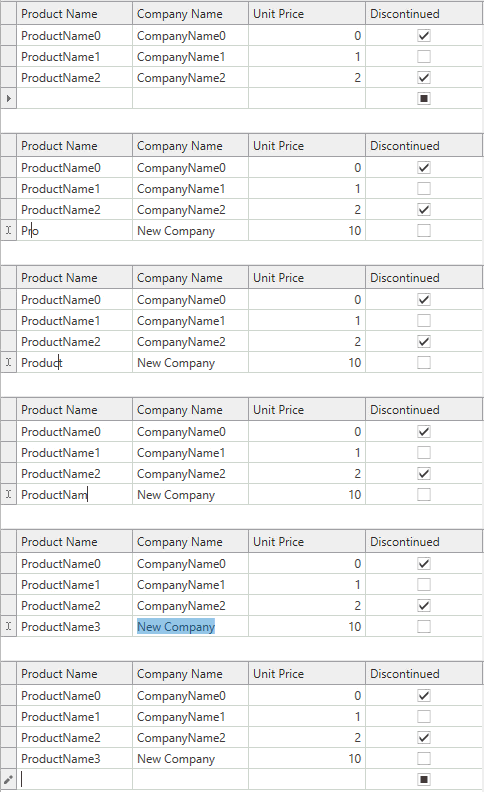
The [GridViewBase.AddingNewRow](/WPF/DevExpress.Xpf.Grid.GridViewBase.AddingNewRow) and [TreeListView.AddingNewNode](/WPF/DevExpress.Xpf.Grid.TreeListView.AddingNewNode) events allow you to specify a new data record. These events occur before the [GridControl](/WPF/DevExpress.Xpf.Grid.GridControl) adds a new record to your data source.
When you handle these events, you can also initialize default properties of the created data record.
- XAML
<dxg:GridControl>
    <dxg:GridControl.View>
        <dxg:TableView NewItemRowPosition="Top"
                       AddingNewRow="view_AddingNewRow" />
    </dxg:GridControl.View>
</dxg:GridControl>
- C#
- VB.NET
void view_AddingNewRow(object sender, System.ComponentModel.AddingNewEventArgs e) {
    e.NewObject = new Product(selectedCompany) {
        ProductName = "",
        CompanyName = "New Company",
        UnitPrice = 10,
        Discontinued = false
    };
}
Private Sub view_AddingNewRow(ByVal sender As Object, ByVal e As System.ComponentModel.AddingNewEventArgs)
    e.NewObject = New Product(selectedCompany) With {
        .ProductName = "",
        .CompanyName = "New Company",
        .UnitPrice = 10,
        .Discontinued = False
    }
End Sub
[View Example: How to Initialize the New Item Row with Default Values](https://github.com/DevExpress-Examples/wpf-data-grid-initialize-new-item-row-with-default-values)
You can also use the [GridViewBase.AddingNewRowCommand](/WPF/DevExpress.Xpf.Grid.GridViewBase.AddingNewRowCommand) and [TreeListView.AddingNewNodeCommand](/WPF/DevExpress.Xpf.Grid.TreeListView.AddingNewNodeCommand) properties to maintain a clean MVVM pattern. These properties allow you to specify a new data record in a ViewModel.
If the [TreeListView](/WPF/DevExpress.Xpf.Grid.TreeListView) is in [Self-Referential](/WPF/9571/controls-and-libraries/data-grid/display-hierarchical-data/bind-to-self-referential-data-structure) mode, you cannot add a new node with the duplicated primary key. Handle the [TreeListView.AddingNewNode](/WPF/DevExpress.Xpf.Grid.TreeListView.AddingNewNode) event and initialize a field specified in the [TreeListView.KeyFieldName](/WPF/DevExpress.Xpf.Grid.TreeListView.KeyFieldName) property with a unique primary key.
- XAML
<dxg:GridControl>
    <dxg:GridControl.View>
        <dxg:TreeListView x:Name="view"
                          KeyFieldName="ID"
                          ParentFieldName="ParentID"
                          NewItemRowPosition="Top"
                          AddingNewNode="view_AddingNewNode"/>
    </dxg:GridControl.View>
</dxg:GridControl>
- C#
- VB.NET
void view_AddingNewNode(object sender, DevExpress.Xpf.Grid.TreeList.TreeListAddingNewEventArgs e) {
    e.NewObject = new Employee() {
        ID = view.TotalNodesCount + 1,
        Name = "",
        Department = "Finance",
        Position = "Manager"
    };
}
Private Sub view_AddingNewNode(ByVal sender As Object, ByVal e As DevExpress.Xpf.Grid.TreeList.TreeListAddingNewEventArgs)
    e.NewObject = New Employee() With {
        .ID = view.TotalNodesCount + 1,
        .Name = "",
        .Department = "Finance",
        .Position = "Manager"
    }
End Sub
## Data Navigator
The embedded [Data Navigator](/WPF/114118/controls-and-libraries/data-grid/visual-elements/common-elements/data-navigator) allows users to add and remove rows.
To show the [Data Navigator](/WPF/114118/controls-and-libraries/data-grid/visual-elements/common-elements/data-navigator), set the [TableView.ShowDataNavigator](/WPF/DevExpress.Xpf.Grid.TableView.ShowDataNavigator) / [TreeListView.ShowDataNavigator](/WPF/DevExpress.Xpf.Grid.TreeListView.ShowDataNavigator) property to **true**.

To add a new row, a user should click the [Data Navigator](/WPF/114118/controls-and-libraries/data-grid/visual-elements/common-elements/data-navigator)‘s **Append (+)** button. To remove a row, a user should focus the row and click the [Data Navigator](/WPF/114118/controls-and-libraries/data-grid/visual-elements/common-elements/data-navigator)‘s **Delete (-)** button.
You can initialize a new row with default values. Refer to the Initialize New Item Row section for more information.
Use the [DataViewBase.DataNavigatorButtons](/WPF/DevExpress.Xpf.Grid.DataViewBase.DataNavigatorButtons) property to specify which buttons to display in the **Data Navigator**.
## Delete Key
Specify the [DataControlBase.DeleteKeyBehavior](/WPF/DevExpress.Xpf.Grid.DataControlBase.DeleteKeyBehavior) property to define the action executed when a user presses the Delete key:
- Delete the focused row (for [single selection mode](/WPF/6121/controls-and-libraries/data-grid/focus-navigation-selection/focus)).
- Delete selected rows (for [multiple selection mode](/WPF/7359/controls-and-libraries/data-grid/focus-navigation-selection/multiple-row-selection)).
## Add and Remove Rows in Code
### Add Rows
Call the [TableView.AddNewRow](/WPF/DevExpress.Xpf.Grid.TableView.AddNewRow%28System.Boolean%29) / [TreeListView.AddNewNode](/WPF/DevExpress.Xpf.Grid.TreeListView.AddNewNode.overloads) method to add a new row. If the **New Item Row** is enabled, these methods move focus to this element. Otherwise, they temporarily add an empty row at the bottom.
**Commands**: [TableViewCommands.AddNewRow](/WPF/DevExpress.Xpf.Grid.TableViewCommands.AddNewRow) / [TreeListViewCommands.AddNewNode](/WPF/DevExpress.Xpf.Grid.TreeListViewCommands.AddNewNode)
- Xaml
<dxg:GridControl x:Name="grid" AutoGenerateColumns="AddNew" ItemsSource="{Binding PersonList}">
    <dxg:GridControl.View>
        <dxg:TableView x:Name="view"/>
    </dxg:GridControl.View>
</dxg:GridControl>
<!-- -->
<Button Click="addNewRow">Add a New Row</Button>
- C#
- VB.NET
void addNewRow(object sender, RoutedEventArgs e) {
    view.AddNewRow();
}
Private Sub addNewRow(ByVal sender As Object, ByVal e As RoutedEventArgs)
    view.AddNewRow()
End Sub
Use [DataControlBase.NewItemRowHandle](/WPF/DevExpress.Xpf.Grid.DataControlBase.NewItemRowHandle) to get the new row and set its values.
**Topic**: [Obtain and Set Cell Values](/WPF/6150/controls-and-libraries/data-grid/data-editing-and-validation/modify-cell-values/obtain-and-set-cell-values-in-code)
- C#
- VB.NET
void addNewRow(object sender, RoutedEventArgs e) {
    view.AddNewRow();
    int newRowHandle = DataControlBase.NewItemRowHandle;
    grid.SetCellValue(newRowHandle, "ProductName", "New Product");
    grid.SetCellValue(newRowHandle, "CompanyName", "New Company");
    grid.SetCellValue(newRowHandle, "UnitPrice", 10);
    grid.SetCellValue(newRowHandle, "Discontinued", false);
}
Private Sub addNewRow(ByVal sender As Object, ByVal e As RoutedEventArgs)
    view.AddNewRow()
    Dim newRowHandle As Integer = DataControlBase.NewItemRowHandle
    grid.SetCellValue(newRowHandle, "ProductName", "New Product")
    grid.SetCellValue(newRowHandle, "CompanyName", "New Company")
    grid.SetCellValue(newRowHandle, "UnitPrice", 10)
    grid.SetCellValue(newRowHandle, "Discontinued", False)
End Sub
After values are set and accepted, the new row moves according to the current filter, group, and sort settings.

[View Example: How to Add and Remove Rows in Code](https://github.com/DevExpress-Examples/wpf-data-grid-add-and-remove-rows-in-code)
After a user posts the new row to the control, the Data Grid raises the [ValidateRow](/WPF/DevExpress.Xpf.Grid.GridViewBase.ValidateRow) event and executes the [ValidateRowCommand](/WPF/DevExpress.Xpf.Grid.GridViewBase.ValidateRowCommand). Use them to validate values, check database constraints, and insert the row to the database.
- Xaml
<dxg:GridControl ItemsSource="{Binding ItemsSource}">
    <dxg:GridControl.View>
        <dxg:TableView NewItemRowPosition="Top"
                       ValidateRowCommand="{Binding ValidateRowCommand}" />
</dxg:GridControl>
- C#
- VB.NET
[DevExpress.Mvvm.DataAnnotations.Command]
public void ValidateRow(DevExpress.Mvvm.Xpf.RowValidationArgs args) {
    var item = (EntityFrameworkIssues.Issues.User)args.Item;
    if(args.IsNewItem)
        _Context.Users.Add(item);
    _Context.SaveChanges();
}
<DevExpress.Mvvm.DataAnnotations.Command>
Public Sub ValidateRow(ByVal args As DevExpress.Mvvm.Xpf.RowValidationArgs)
    Dim item = CType(args.Item, EntityFrameworkIssues.Issues.User)
    If args.IsNewItem Then _Context.Users.Add(item)
    _Context.SaveChanges()
End Sub
### Remove Rows
Call the [GridViewBase.DeleteRow](/WPF/DevExpress.Xpf.Grid.GridViewBase.DeleteRow%28System.Int32%29) / [TreeListView.DeleteNode](/WPF/DevExpress.Xpf.Grid.TreeListView.DeleteNode.overloads) method to delete the specified row. The row is identified by its [handle](/WPF/6322/controls-and-libraries/data-grid/grid-view-data-layout/rows-and-cards/obtain-row-handles) – a non-negative integer value.
**Commands**: [DeleteFocusedRow](/WPF/DevExpress.Xpf.Grid.DataViewCommandsBase.DeleteFocusedRow) and [DeleteSelectedRows](/WPF/DevExpress.Xpf.Grid.DataViewCommandsBase.DeleteSelectedRows)
- XAML
<dxg:GridControl x:Name="grid" AutoGenerateColumns="AddNew" ItemsSource="{Binding PersonList}">
    <dxg:GridControl.View>
        <dxg:TableView x:Name="view"/>
    </dxg:GridControl.View>
</dxg:GridControl>
<!-- -->
<Button Click="deleteRow">Delete the Focused Row</Button>
- C#
- VB.NET
void deleteRow(object sender, RoutedEventArgs e) {
    view.DeleteRow(view.FocusedRowHandle);
}
Private Sub deleteRow(ByVal sender As Object, ByVal e As RoutedEventArgs)
    view.DeleteRow(view.FocusedRowHandle)
End Sub

[View Example: How to Add and Remove Rows in Code](https://github.com/DevExpress-Examples/wpf-data-grid-add-and-remove-rows-in-code)
After a delete operation is executed, the Data Grid raises the [ValidateRowDeletion](/WPF/DevExpress.Xpf.Grid.GridViewBase.ValidateRowDeletion) / [ValidateNodeDeletion](/WPF/DevExpress.Xpf.Grid.TreeListView.ValidateNodeDeletion) events and calls the [ValidateRowDeletionCommand](/WPF/DevExpress.Xpf.Grid.GridViewBase.ValidateRowDeletionCommand) / [ValidateNodeDeletionCommand](/WPF/DevExpress.Xpf.Grid.TreeListView.ValidateNodeDeletionCommand). Use them to validate rows, check database constraints, and delete rows from the database.
- C#
- VB.NET
[DevExpress.Mvvm.DataAnnotations.Command]
public void ValidateDeleteRows(DevExpress.Mvvm.Xpf.DeleteRowsValidationArgs args) {
    var item = (EFCoreIssues.Issues.User)args.Items.Single();
    _Context.Users.Remove(item);
    _Context.SaveChanges();
}
<DevExpress.Mvvm.DataAnnotations.Command>
Public Sub ValidateDeleteRows(ByVal args As DevExpress.Mvvm.Xpf.DeleteRowsValidationArgs)
    Dim item = CType(args.Items.Single(), EFCoreIssues.Issues.User)
    _Context.Users.Remove(item)
    _Context.SaveChanges()
End Sub
See Also
[Obtain and Set Cell Values in Code](/WPF/6150/controls-and-libraries/data-grid/data-editing-and-validation/modify-cell-values/obtain-and-set-cell-values-in-code)
[Input Validation](/WPF/7358/controls-and-libraries/data-grid/data-editing-and-validation/input-validation)
[How to Initialize a New Row when the Editor is Shown](https://github.com/DevExpress-Examples/out-of-maintenance-wpf-grid-initialize-new-item-row)