# Chat Resources | WPF Controls | DevExpress Documentation
The [AI Chat Control](/WPF/405434/ai-powered-extensions/ai-chat-control) can access external or dynamically generated data through resources. A resource is an instance of the [AIChatResource](/Blazor/DevExpress.AIIntegration.Blazor.Chat.AIChatResource) class that supplies text or binary content to the AI model at request time.
Resources extend chat context with additional input (for example, local documents, logs, or images). The AI model uses this data to generate more accurate and context-aware responses.
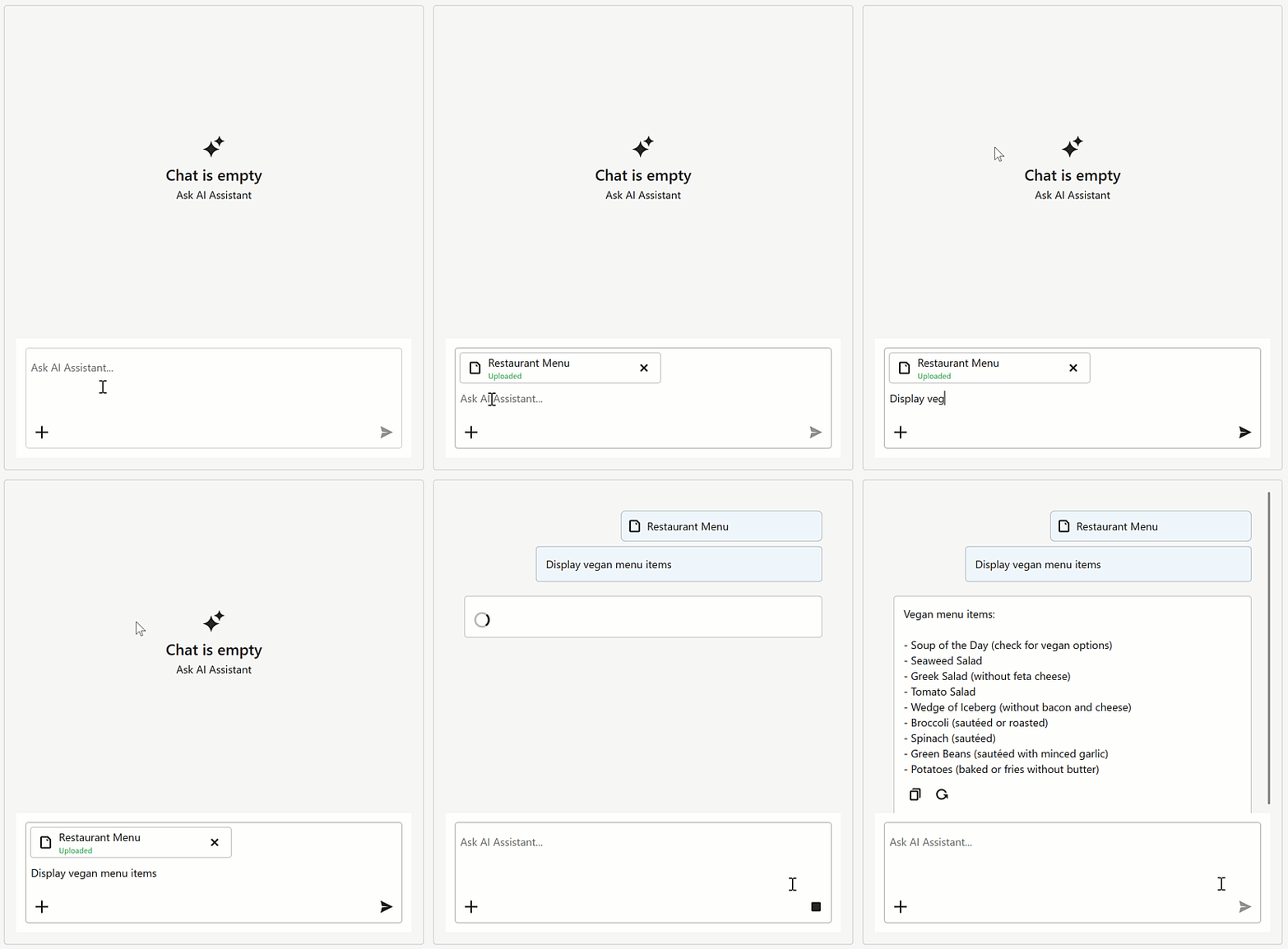
After you assign resources, the `AIChatControl` displays the “Attach Context” (+) button. Users can select one or more resources to include in the chat request. A built-in search box helps users quickly find desired items when the resource list is long.
Tip
The **Resources** feature is primarily designed to integrate with resources provided by MCP (Model Context Protocol) servers. Use the MCP client SDK to retrieve these resources:
```
McpClient = await McpClientFactory.CreateAsync(transport);
var mcpResources = await McpClient.ListResourcesAsync();
Resources = mcpResources.Select(x => new AIChatResource(x.Uri, x.Name, LoadResourceData, x.MimeType, x.Description));
```
## Define Resources
1. Create a collection of [AIChatResource](/Blazor/DevExpress.AIIntegration.Blazor.Chat.AIChatResource) objects.
2. Use the [ChatResources](/WPF/DevExpress.AIIntegration.Wpf.Chat.AIChatControl.ChatResources) property to assign resources to the `AIChatControl`.
Note
Large PDFs or images may impact performance and token consumption.
- C#
- VB.NET
using System;
using System.IO;
using System.Collections.Generic;
using System.Text;
using System.Threading;
using System.Threading.Tasks;
using DevExpress.AIIntegration.Blazor.Chat;
using Microsoft.Extensions.AI;
using UglyToad.PdfPig;

namespace DXChatApplication {
    public partial class MainWindow {
        static readonly IReadOnlyList<AIChatResource> Resources = new List<AIChatResource> {
            new AIChatResource(
                "access.txt",
                "Access Log",
                GetLogResourceAsync,
                "text/plain",
                "Contains web server access records collected over the last 24 hours."
                ),
            new AIChatResource(
                "restaurantmenu.pdf",
                "Restaurant Menu",
                GetPdfResourceAsync,
                "application/pdf",
                "Displays New York Steakhouse's current menu."
                ),
            new AIChatResource(
                "dashboard.jpg",
                "Dashboard (Screenshot)",
                GetImageResourceAsync,
                "image/jpeg",
                "A dashboard screenshot that displays the latest real-time analytics data."
                ),
            new AIChatResource(
                "dxaichat.md",
                "AI Chat Documentation",
                GetDocsResourceAsync,
                "text/markdown",
                "Includes reference documentation that describes AI Chat functionality and usage guidelines."
                )
        };
        public MainWindow() {
            InitializeComponent();
            aiChatControl.ChatResources = Resources;
        }
        // Load a text log file and return it as a single text content block.
        static async Task<IList<AIContent>> GetLogResourceAsync(AIChatResource resource, CancellationToken ct) {
            if (!File.Exists(resource.Uri))
                return new List<AIContent> { new TextContent("Log file not found.") };

            string text = await File.ReadAllTextAsync(resource.Uri, ct).ConfigureAwait(false);
            return new List<AIContent> { new TextContent(text) };
        }

        // Load an image file as binary content.
        static async Task<ReadOnlyMemory<byte>> GetImageResourceAsync(AIChatResource resource, CancellationToken ct) {
            if (!File.Exists(resource.Uri))
                return ReadOnlyMemory<byte>.Empty;

            byte[] data = await File.ReadAllBytesAsync(resource.Uri, ct).ConfigureAwait(false);
            return new ReadOnlyMemory<byte>(data);
        }

        // Load markdown documentation as a string.
        static async Task<string> GetDocsResourceAsync(AIChatResource resource, CancellationToken ct) {
            if (!File.Exists(resource.Uri))
                return "Documentation file not found.";

            return await File.ReadAllTextAsync(resource.Uri, ct).ConfigureAwait(false);
        }

        // Extract all text from a PDF file using the PdfPig library.
        static async Task<string> GetPdfResourceAsync(AIChatResource resource, CancellationToken ct) {
            if (!File.Exists(resource.Uri))
                return "PDF file not found.";

            return await Task.Run(() => {
                var sb = new StringBuilder();
                try {
                    using var pdf = PdfDocument.Open(resource.Uri);
                    foreach (var page in pdf.GetPages()) {
                        sb.AppendLine(page.Text);
                    }
                }
                catch (Exception ex) {
                    return $"[Error reading PDF: {ex.Message}]";
                }
                return sb.ToString();
            }, ct).ConfigureAwait(false);
        }
    }
}
Imports System
Imports System.IO
Imports System.Collections.Generic
Imports System.Text
Imports System.Threading
Imports System.Threading.Tasks
Imports DevExpress.AIIntegration.Blazor.Chat
Imports Microsoft.Extensions.AI
Imports UglyToad.PdfPig

Namespace DXChatApplication
    Partial Public Class MainWindow
        Private Shared ReadOnly Resources As IReadOnlyList(Of AIChatResource) = New List(Of AIChatResource) From {
            New AIChatResource(
                "access.txt",
                "Access Log",
                AddressOf GetLogResourceAsync,
                "text/plain",
                "Contains web server access records collected over the last 24 hours."
            ),
            New AIChatResource(
                "restaurantmenu.pdf",
                "Restaurant Menu",
                AddressOf GetPdfResourceAsync,
                "application/pdf",
                "Displays New York Steakhouse's current menu."
            ),
            New AIChatResource(
                "dashboard.jpg",
                "Dashboard (Screenshot)",
                AddressOf GetImageResourceAsync,
                "image/jpeg",
                "A dashboard screenshot that displays the latest real-time analytics data."
            ),
            New AIChatResource(
                "dxaichat.md",
                "AI Chat Documentation",
                AddressOf GetDocsResourceAsync,
                "text/markdown",
                "Includes reference documentation that describes AI Chat functionality and usage guidelines."
            )
        }

        Public Sub New()
            InitializeComponent()
            aiChatControl.ChatResources = Resources
        End Sub

        ' Load a text log file and return it as a single text content block.
        Private Shared Async Function GetLogResourceAsync(resource As AIChatResource, ct As CancellationToken) As Task(Of IList(Of AIContent))
            If Not File.Exists(resource.Uri) Then
                Return New List(Of AIContent) From {New TextContent("Log file not found.")}
            End If

            Dim text As String = Await File.ReadAllTextAsync(resource.Uri, ct).ConfigureAwait(False)
            Return New List(Of AIContent) From {New TextContent(text)}
        End Function

        ' Load an image file as binary content.
        Private Shared Async Function GetImageResourceAsync(resource As AIChatResource, ct As CancellationToken) As Task(Of ReadOnlyMemory(Of Byte))
            If Not File.Exists(resource.Uri) Then
                Return ReadOnlyMemory(Of Byte).Empty
            End If

            Dim data As Byte() = Await File.ReadAllBytesAsync(resource.Uri, ct).ConfigureAwait(False)
            Return New ReadOnlyMemory(Of Byte)(data)
        End Function

        ' Load markdown documentation as a string.
        Private Shared Async Function GetDocsResourceAsync(resource As AIChatResource, ct As CancellationToken) As Task(Of String)
            If Not File.Exists(resource.Uri) Then
                Return "Documentation file not found."
            End If

            Return Await File.ReadAllTextAsync(resource.Uri, ct).ConfigureAwait(False)
        End Function

        ' Extract all text from a PDF file using the PdfPig library.
        Private Shared Async Function GetPdfResourceAsync(resource As AIChatResource, ct As CancellationToken) As Task(Of String)
            If Not File.Exists(resource.Uri) Then
                Return "PDF file not found."
            End If

            Return Await Task.Run(Function()
                    Dim sb As New StringBuilder()
                    Try
                        Using pdf = PdfDocument.Open(resource.Uri)
                            For Each page In pdf.GetPages()
                                sb.AppendLine(page.Text)
                            Next
                        End Using
                    Catch ex As Exception
                        Return $"[Error reading PDF: {ex.Message}]"
                    End Try
                    Return sb.ToString()
                End Function, ct).ConfigureAwait(False)
        End Function
    End Class
End Namespace
## Resource Parameters
| Parameter | Description |
| --- | --- |
| [Uri](/Blazor/DevExpress.AIIntegration.Blazor.Chat.AIChatResource.Uri) | Gets or sets the resource identifier (for example, a file name, local path, or external URI). |
| [Guid](/Blazor/DevExpress.AIIntegration.Blazor.Chat.AIChatResource.Guid) | Gets the unique, autogenerated identifier. |
| [Name](/Blazor/DevExpress.AIIntegration.Blazor.Chat.AIChatResource.Name) | Gets or sets the resource name displayed in the chat UI. |
| [MimeType](/Blazor/DevExpress.AIIntegration.Blazor.Chat.AIChatResource.MimeType) | Gets or sets the resource content type (for example, `text/plain`, `application/pdf`, `image/jpeg`). |
| [Description](/Blazor/DevExpress.AIIntegration.Blazor.Chat.AIChatResource.Description) | Gets or sets the resource description displayed in a tooltip. |
## Customize Resource Appearance
Use the [AIChatControl.ResourceItemTemplate](/WPF/DevExpress.AIIntegration.Wpf.Chat.AIChatControl.ResourceItemTemplate) property to supply a Razor-based template for resource items displayed in the chat’s “Attach Context” dropdown:

```
using DevExpress.AIIntegration.Blazor.Chat;
using Microsoft.AspNetCore.Components;
//...
RenderFragment ResourceTemplate;
public MainWindow() {
InitializeComponent();
aiChatControl.ChatResources = Resources;
ResourceTemplate = resource => builder => {
builder.OpenComponent(0);
builder.AddAttribute(1, "resource", resource);
builder.CloseComponent();
};
// Assign a Razor-based template.
aiChatControl.ResourceItemTemplate = ResourceTemplate;
}
```
The *Resource.razor* file:
```
@using Microsoft.AspNetCore.Components.Web
@using DevExpress.AIIntegration.Blazor.Chat
@resource.Name
@resource.MimeType
@resource.Description
@code {
[Parameter]
public AIChatResource resource { get; set; }
}
```
## Best Practices
- Use short and scannable resource names.
- Specify consistent MIME types (incorrect values can reduce model relevance).
- Avoid sending confidential resources unless necessary.
- Enforce size limits on resources to prevent excessive token usage.
- Log resource access for auditing (for example, when dealing with sensitive or compliance-related data).
See Also
[AI Chat Control](/WPF/405434/ai-powered-extensions/ai-chat-control)