# SplashScreenManagerService | WPF Controls | DevExpress Documentation
The [SplashScreenManagerService](/WPF/DevExpress.Xpf.Core.SplashScreenManagerService) allows you to add the [SplashScreenManager](/WPF/DevExpress.Xpf.Core.SplashScreenManager) functionality to MVVM-compliant applications.
## Add Service
To use the [SplashScreenManagerService](/WPF/DevExpress.Xpf.Core.SplashScreenManagerService), add it to the view’s **Interaction.Behaviors** collection. You can use the Smart Tag as described in the [Quick Actions](/WPF/402198/whats-installed/smart-tags/suggested-actions#attach-mvvm-behaviors-and-services) or as shown in the code snippet below.
- XAML
<UserControl x:Class="DXSampleSplashScreenService.View.MainView"
    ...
    xmlns:dx="http://schemas.devexpress.com/winfx/2008/xaml/core"
    xmlns:dxmvvm="http://schemas.devexpress.com/winfx/2008/xaml/mvvm">
    <dxmvvm:Interaction.Behaviors>
        <dx:SplashScreenManagerService/>
    </dxmvvm:Interaction.Behaviors>
    ...
</UserControl>
The service creates and shows splash windows in a separate thread.
## Specify Splash Screen View
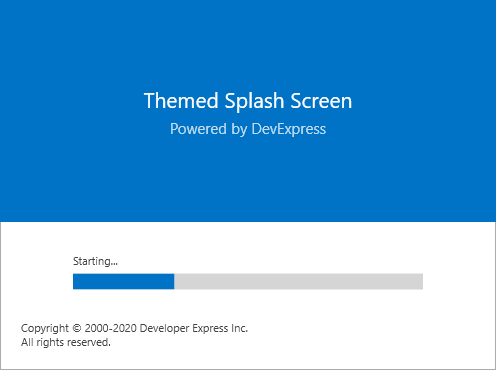
Use the [PredefinedSplashScreenType](/WPF/DevExpress.Xpf.Core.SplashScreenManagerService.PredefinedSplashScreenType) property to specify which one of the three predefined splash screen styles to display.
The following predefined splash screen styles are available:
- **Themed**
- **Fluent**

- **WaitIndicator**

Tip
You can implement your own splash screen view based on a [SplashScreenWindow](/WPF/DevExpress.Xpf.Core.SplashScreenWindow). Refer to the [How to: Create a Custom Splash Screen](/WPF/401690/controls-and-libraries/windows-and-utility-controls/splash-screen-manager/how-to-create-a-custom-splash-screen) tutorial for details. In this scenario, set the [SplashScreenManagerService.SplashScreenType](/WPF/DevExpress.Xpf.Core.SplashScreenManagerService.SplashScreenType) property to the custom splash screen view type.
## Show Splash Screen From View Model
To show and hide the splash screen from your View Model, access the service and use the [SplashScreenManagerService.Show](/CoreLibraries/DevExpress.Mvvm.ISplashScreenManagerService.Show%28System.String-System.Int32%29) and [SplashScreenManagerService.Close](/CoreLibraries/DevExpress.Mvvm.ISplashScreenManagerService.Close) methods correspondingly.
Tip
A detailed description on how to obtain a service from a View Model (which is a POCO object or a ViewModelBase descendant) is available here: [Services in POCO objects](/WPF/17447/mvvm-framework/services/services-in-generated-view-models) and [Services in ViewModelBase descendants](/WPF/17446/mvvm-framework/services/services-in-viewmodelbase-descendants).
- C#
- VB.NET
[POCOViewModel]
public class MainViewModel {
    protected ISplashScreenManagerService SplashScreenManagerService { get { return this.GetService<ISplashScreenManagerService>();} }
    public void Display() {
        SplashScreenManagerService.Show();
        //...
        SplashScreenManagerService.Close();
    }
}
<POCOViewModel> _
Public Class MainViewModel
    Protected ReadOnly Property SplashScreenManagerService() As ISplashScreenManagerService
        Get
            Return Me.GetService(Of ISplashScreenManagerService)()
        End Get
    End Property
    Public Sub Display()
        SplashScreenManagerService.Show()
        '...
        SplashScreenManagerService.Close()
    End Sub
End Class
## Edit Splash Screen Data
Access the [SplashScreenManagerService.ViewModel](/CoreLibraries/DevExpress.Mvvm.ISplashScreenManagerService.ViewModel) to specify splash screen data and content.
- C#
- VB.NET
public void Display() {
    SplashScreenManagerService.ViewModel = new DXSplashScreenViewModel();
    SplashScreenManagerService.ViewModel.Subtitle = "Powered by DevExpress";
    SplashScreenManagerService.ViewModel.Logo = new Uri("../../Images/Logo.png", UriKind.Relative);
    SplashScreenManagerService.Show();
    //...
    SplashScreenManagerService.Close();
}
Public Sub Display()
    SplashScreenManagerService.ViewModel = New DXSplashScreenViewModel()
    SplashScreenManagerService.ViewModel.Subtitle = "Powered by DevExpress"
    SplashScreenManagerService.ViewModel.Logo = New Uri("../../Images/Logo.png", UriKind.Relative)
    SplashScreenManagerService.Show()
    '...
    SplashScreenManagerService.Close()
End Sub
## Options
To display a splash screen on top of a UI element, specify this element as the [Owner](/WPF/DevExpress.Xpf.Core.SplashScreenManagerService.Owner) property value and set the [StartupLocation](/WPF/DevExpress.Xpf.Core.SplashScreenManagerService.StartupLocation) property to [CenterOwner](https://learn.microsoft.com/dotnet/api/system.windows.windowstartuplocation#system-windows-windowstartuplocation-centerowner). Set the [TrackOwnerPosition](/WPF/DevExpress.Xpf.Core.SplashScreenManagerService.TrackOwnerPosition) property to **true** to keep the splash screen above the owner when the user drags the owner.
Use the [InputBlock](/WPF/DevExpress.Xpf.Core.SplashScreenManagerService.InputBlock) property to specify the input restriction mode.
## Example
[View Example: How to use the SplashScreenManagerService](https://github.com/DevExpress-Examples/splashscreenmanagerservice)