# Splash Screen Manager | WPF Controls | DevExpress Documentation
The [SplashScreenManager](/WPF/DevExpress.Xpf.Core.SplashScreenManager) allows you to add splash screens to your applications. Splash screens can be displayed during a time-consuming task such as application startup.
[Run Demo: Utility Controls - Splash Screen](dxdemo://Wpf/DXControls/MainDemo/SplashScreenManagerModule)
## Splash Screen Appearance and Content
### Predefined Styles
The following methods create a splash screen with a predefined style:
- [CreateThemed](/WPF/DevExpress.Xpf.Core.SplashScreenManager.CreateThemed%28DevExpress.Mvvm.DXSplashScreenViewModel-System.Boolean%29)
The color scheme for this splash screen is generated based on the application’s [theme](/WPF/7406/common-concepts/themes).
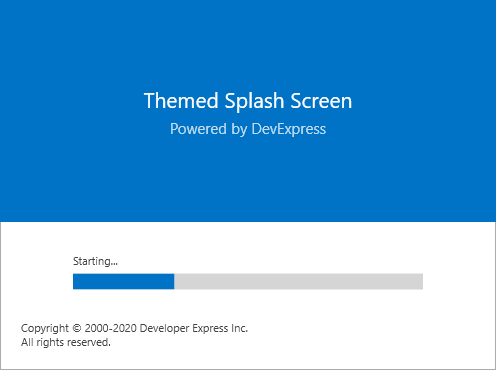
- [CreateFluent](/WPF/DevExpress.Xpf.Core.SplashScreenManager.CreateFluent%28DevExpress.Mvvm.DXSplashScreenViewModel-System.Boolean%29)
This splash screen uses an acrylic background from [Fluent Design](/WPF/401394/common-concepts/fluent-design-support).
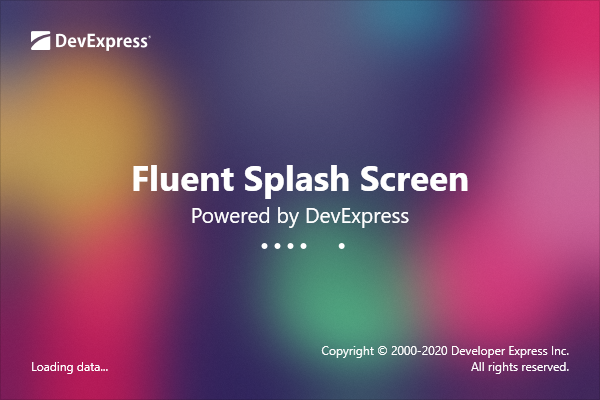
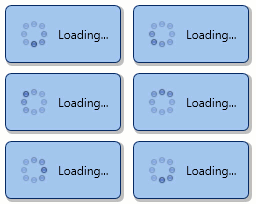
- [CreateWaitIndicator](/WPF/DevExpress.Xpf.Core.SplashScreenManager.CreateWaitIndicator%28DevExpress.Mvvm.DXSplashScreenViewModel-System.Boolean%29)
A compact loading indicator that displays text specified by the [Status](/CoreLibraries/DevExpress.Mvvm.DXSplashScreenViewModel.Status) property.
### Content
To specify the splash screen content, pass a [DXSplashScreenViewModel](/CoreLibraries/DevExpress.Mvvm.DXSplashScreenViewModel) as the **Create** method parameter. See the example below.
- C#
- VB.NET
SplashScreenManager.CreateThemed(new DXSplashScreenViewModel {
    Copyright = "All rights reserved",
    IsIndeterminate = true,
    Logo = new System.Uri("pack://application:,,,/Images/MyLogo.png",
                           UriKind.RelativeOrAbsolute),
    Status = "Starting...",
    Title = "",
    Subtitle = "Powered by DevExpress" }
).ShowOnStartup();
SplashScreenManager.CreateThemed(New DXSplashScreenViewModel With {
    .Copyright = "All rights reserved",
    .IsIndeterminate = True,
    .Logo = New System.Uri("pack://application:,,,/Images/MyLogo.png", UriKind.RelativeOrAbsolute),
    .Status = "Starting...",
    .Title = "",
    .Subtitle = "Powered by DevExpress"
}).ShowOnStartup()
You can also access the [ViewModel](/WPF/DevExpress.Xpf.Core.SplashScreenManager.ViewModel) and edit its properties. Use this approach to change the content of an active splash screen. The example below illustrates how to change the progress bar value.
- C#
- VB.NET
void Calculate() {
    var manager = SplashScreenManager.CreateThemed(new DXSplashScreenViewModel {
    IsIndeterminate = false});
    manager.Show();
    for(int i = 0; i <= 100; i++) {
        //Calculate the progress
        manager.ViewModel.Progress = i;
    }
    manager.Close();
}
Sub Calculate()
    Dim manager = SplashScreenManager.CreateThemed(New DXSplashScreenViewModel With {.IsIndeterminate = False})
    manager.Show()
    For i As Integer = 0 To 100
        'Calculate the progress
        manager.ViewModel.Progress = i
    Next i
    manager.Close()
End Sub
Use the [DXSplashScreenViewModel.Tag](/CoreLibraries/DevExpress.Mvvm.DXSplashScreenViewModel.Tag) property to specify the additional data associated with the view model instance. The example below illustrates how to pass a custom object to the splash screen:
- C#
- VB.NET
SplashScreenManagerService.ViewModel = new DXSplashScreenViewModel() {
    Tag = new CustomDataSplashScreenViewModel() {
        Caption = "Custom Caption",
        Message = "Custom Message"
    }
};
SplashScreenManagerService.Show();

//...
public class CustomDataSplashScreenViewModel : ViewModelBase {
    public string Caption {
        get { return GetValue<string>(nameof(Caption)); }
        set { SetValue(value, nameof(Caption)); }
    }
    public string Message {
        get { return GetValue<string>(nameof(Message)); }
        set { SetValue(value, nameof(Message)); }
    }
}
SplashScreenManagerService.ViewModel = New DXSplashScreenViewModel() With {
    .Tag = New CustomDataSplashScreenViewModel() With {
        .Caption = "Custom Caption",
        .Message = "Custom Message"
    }
}
SplashScreenManagerService.Show()

Public Class CustomDataSplashScreenViewModel
    Inherits ViewModelBase

    Public Property Caption() As String
        Get
            Return GetValue(Of String)(NameOf(Caption))
        End Get
        Set(ByVal value As String)
            SetValue(value, NameOf(Caption))
        End Set
    End Property
    Public Property Message() As String
        Get
            Return GetValue(Of String)(NameOf(Message))
        End Get
        Set(ByVal value As String)
            SetValue(value, NameOf(Message))
        End Set
    End Property
End Class
- XAML
<dx:WaitIndicator DeferedVisibility="True" Content="{Binding Path=.}">
    <dx:WaitIndicator.ContentTemplate>
        <DataTemplate>
            <StackPanel Orientation="Vertical">
                <TextBlock Text="{Binding Tag.Caption}" FontSize="20"/>
                <TextBlock Text="{Binding Tag.Message}"/>
            </StackPanel>
        </DataTemplate>
    </dx:WaitIndicator.ContentTemplate>
</dx:WaitIndicator>
### Custom Style
Use the [Create](/WPF/DevExpress.Xpf.Core.SplashScreenManager.Create%28System.Func-System.Windows.Window--DevExpress.Mvvm.DXSplashScreenViewModel%29) method to create a custom splash screen. Refer to the [How to: Create a Custom Splash Screen](/WPF/401690/controls-and-libraries/windows-and-utility-controls/splash-screen-manager/how-to-create-a-custom-splash-screen) tutorial for more information.
## Show Splash Screen
Tip
To test the performance of the Splash Screen that you display on application startup, run your application without attaching the debugger (**Ctrl + F5**).
The [Show](/WPF/DevExpress.Xpf.Core.SplashScreenManager.Show.overloads) method displays the created splash screen. The [ShowOnStartup](/WPF/DevExpress.Xpf.Core.SplashScreenManager.ShowOnStartup%28System.Boolean%29) method calls the [Show](/WPF/DevExpress.Xpf.Core.SplashScreenManager.Show.overloads) method with the following parameters for a startup splash screen:
- C#
- VB.NET
 Show(
   owner:null,
   startupLocation:WindowStartupLocation.CenterScreen,
   trackOwnerPosition:true,
   inputBlock:InputBlockMode.None,
   timeout:700);
 Show(
   owner:=Nothing,
   startupLocation:=WindowStartupLocation.CenterScreen,
   trackOwnerPosition:=true,
   inputBlock:=InputBlockMode.None,
   timeout:700)
### At Startup
To display a splash screen at the application startup, add the following code to the **App.xaml.cs**/**Application.xaml.vb**:
Tip
If you apply the application’s [theme](/WPF/7406/common-concepts/themes) in **App.xaml.cs**/**Application.xaml.vb**, specify it before showing a themed splash screen.
- C#
- VB.NET
App() {
    ApplicationThemeHelper.ApplicationThemeName = Theme.Office2019DarkGrayName;
    SplashScreenManager.CreateThemed().ShowOnStartup();
}
Private Sub New()
    ApplicationThemeHelper.ApplicationThemeName = Theme.Office2019DarkGrayName
    SplashScreenManager.CreateThemed().ShowOnStartup()
End Sub
### On Demand
To display a splash screen on top of a UI element, pass the element as the **owner** parameter and set the **startupLocation** parameter to [CenterOwner](https://learn.microsoft.com/dotnet/api/system.windows.windowstartuplocation#system-windows-windowstartuplocation-centerowner). Set the **trackOwnerPosition** parameter to **true** to keep the splash screen above the owner when the user drags the owner.
The example below illustrates how to display a wait indicator when the user navigates a [HamburgerMenu](/WPF/DevExpress.Xpf.WindowsUI.HamburgerMenu).
- C#
- VB.NET
private void HamburgerMenu_Navigating(object sender, DevExpress.Xpf.WindowsUI.HamburgerMenuNavigatingEventArgs e) {
    SplashScreenManager.CreateWaitIndicator().Show((hamburgerMenu.Content as FrameworkElement),
        WindowStartupLocation.CenterOwner, true, InputBlockMode.Owner);
}
Private Sub HamburgerMenu_Navigating(ByVal sender As Object, ByVal e As DevExpress.Xpf.WindowsUI.HamburgerMenuNavigatingEventArgs)
    SplashScreenManager.CreateWaitIndicator().Show((TryCast(hamburgerMenu.Content, FrameworkElement)),
        WindowStartupLocation.CenterOwner, True, InputBlockMode.Owner)
End Sub
### Prevent the Splash Screen from Showing Too Briefly
Use the combination of the following parameters of the [Show](/WPF/DevExpress.Xpf.Core.SplashScreenManager.Show.overloads) method:
- **showDelay** - The delay after which the splash screen is shown. If the associated operation completes faster than the parameter value, the splash screen will not be displayed.
- **minDuration** - The splash screen is shown for at least the value of this parameter.
The splash screen window should be a [SplashScreenWindow](/WPF/DevExpress.Xpf.Core.SplashScreenWindow) descendant to support the **showDelay** and **minDuration** parameters.
## Hide Active Splash Screens
To automatically hide the splash screen once the application is initialized, use the [ShowOnStartup](/WPF/DevExpress.Xpf.Core.SplashScreenManager.ShowOnStartup%28System.Boolean%29) method with the **autoClose** parameter set to **true**.
To hide all active splash screens, call the [CloseAll](/WPF/DevExpress.Xpf.Core.SplashScreenManager.CloseAll%28System.Boolean%29) method. You can also access the [ActiveSplashScreens](/WPF/DevExpress.Xpf.Core.SplashScreenManager.ActiveSplashScreens) collection and use the [Close](/WPF/DevExpress.Xpf.Core.SplashScreenManager.Close%28System.Boolean%29) method to hide a specific splash screen.
- C#
- VB.NET
private void Window_Loaded(object sender, RoutedEventArgs e) {
    SplashScreenManager.CloseAll();
}
Private Sub Window_Loaded(ByVal sender As Object, ByVal e As RoutedEventArgs)
    SplashScreenManager.CloseAll()
End Sub
## MVVM
The [SplashScreenManagerService](/WPF/DevExpress.Xpf.Core.SplashScreenManagerService) allows you to add the **SplashScreenManager** functionality to MVVM-compliant applications. Refer to the [SplashScreenManagerService](/WPF/401692/mvvm-framework/services/predefined-set/splashscreenmanagerservice) topic for more information.
Tip
**DevExpress AI Skills** help your AI assistant generate code that uses Splash Screen Manager API in accordance with DevExpress best practices:
- [Splash Screen Manager Skill](https://github.com/DevExpress/agent-skills/tree/main/plugins/dx-wpf/skills/devexpress-wpf-loading-indicators)
- [WPF Skills Overview](/WPF/405959/ai-assisted-development/agent-skills)
See Also
[Preload Theme Resources](/WPF/403439/common-concepts/themes/preload-theme-resources)