# DXMessageBoxService | WPF Controls | DevExpress Documentation
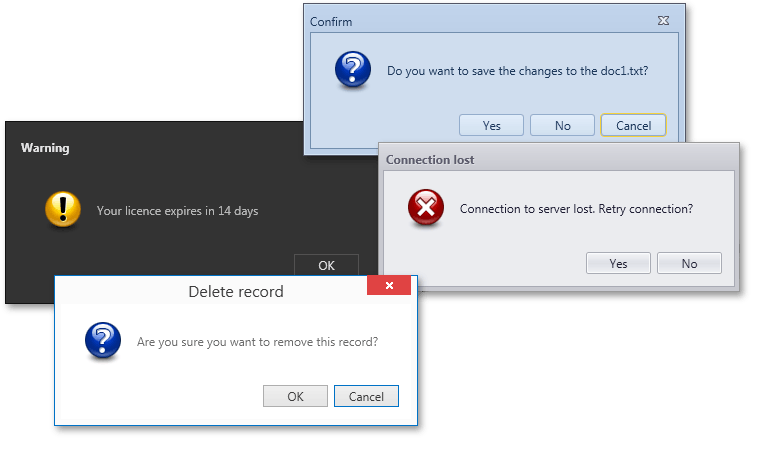
The [DXMessageBoxService](/WPF/DevExpress.Xpf.Core.DXMessageBoxService) is an [IMessageBoxService](/CoreLibraries/DevExpress.Mvvm.IMessageBoxService) implementation that uses the [ThemedMessageBox](/WPF/DevExpress.Xpf.Core.ThemedMessageBox) control to show messages.
Note
Use the [UseThemedWindowInServices](/CoreLibraries/DevExpress.Xpf.Core.CompatibilitySettings.UseThemedWindowInServices) compatibility property to use the [DXMessageBox](/WPF/DevExpress.Xpf.Core.DXMessageBox) control in the `DXMessageBoxService`.
The following code sample demonstrates how to use the [DXMessageBoxService](/WPF/DevExpress.Xpf.Core.DXMessageBoxService) and perform an action based on the clicked message box button:

- XAML
<Window ...
        xmlns:dx="http://schemas.devexpress.com/winfx/2008/xaml/core"
        xmlns:dxmvvm="http://schemas.devexpress.com/winfx/2008/xaml/mvvm"
        DataContext="{dxmvvm:ViewModelSource Type=local:ViewModel}">
    <dxmvvm:Interaction.Behaviors>
        <dx:DXMessageBoxService/>
    </dxmvvm:Interaction.Behaviors>

    <dx:SimpleButton Content="{Binding ButtonText}"
                     Command="{Binding SaveConfirmationCommand}"/>
</Window>
- C#
- VB.NET
public class ViewModel : ViewModelBase {
    public virtual string ButtonText { get; set; } = "Save Changes Button";

    IMessageBoxService MessageBoxService { get { return GetService<IMessageBoxService>(); } }

    [Command]
    public void SaveConfirmation() {
        MessageResult result;
        result = MessageBoxService.ShowMessage(
            messageBoxText: "Save Changes?",
            caption: "DXApplication",
            icon: MessageIcon.Question,
            button: MessageButton.YesNoCancel,
            defaultResult: MessageResult.Cancel
        );
        switch (result) {
            case MessageResult.Yes:
                ButtonText = "Changes Saved";
                break;
            case MessageResult.No:
                ButtonText = "Changes Discarded";
                break;
            case MessageResult.Cancel:
                ButtonText = "Continue Editing";
                break;
        }
    }
}
Public Class ViewModel
    Inherits ViewModelBase

    Public Overridable Property ButtonText As String = "Save Changes Button"

    Private ReadOnly Property MessageBoxService As IMessageBoxService
        Get
            Return GetService(Of IMessageBoxService)()
        End Get
    End Property

    <Command>
    Public Sub SaveConfirmation()
        Dim result As MessageResult
        result = MessageBoxService.ShowMessage(messageBoxText:="Save Changes?", caption:="DXApplication", icon:=MessageIcon.Question, button:=MessageButton.YesNoCancel, defaultResult:=MessageResult.Cancel)

        Select Case result
            Case MessageResult.Yes
                ButtonText = "Changes Saved"
            Case MessageResult.No
                ButtonText = "Changes Discarded"
            Case MessageResult.Cancel
                ButtonText = "Continue Editing"
        End Select
    End Sub
End Class
Below is the list of examples that describes how to use the `DXMessageBoxService` in different View Models:
- Example: How to use MessageBoxService in ViewModels derived from the ViewModelBase class
- Example: How to use MessageBoxService in POCO View Models
- Example: How to use MessageBoxService in a custom View Model
## How to use MessageBoxService in ViewModels derived from the ViewModelBase class
This example demonstrates how to use the **DXMessageBoxService** in View Models derived from the [ViewModelBase](/WPF/17351/mvvm-framework/viewmodels/viewmodelbase) class. The View Models are related to each other by the parent-child relationship with the **ISupportParentViewModel** interface.
Refer to the [ViewModel relationships (ISupportParentViewModel)](/WPF/17449/mvvm-framework/viewmodels/viewmodel-relationships-isupportparentviewmodel) topic for more information on View Model parent-child relationships.
- ChildViewModel.cs
- MainView.xaml
- ChildView.xaml
- MainViewModel.cs
- ChildViewModel.vb
- MainViewModel.vb
using DevExpress.Mvvm;
using System.Windows.Input;

namespace Example.ViewModel {
    public class ChildViewModel : ViewModelBase {
        public ICommand ShowMessageCommand { get; private set; }
        public ChildViewModel() {
            ShowMessageCommand = new DelegateCommand(ShowMessage);
        }

        IMessageBoxService MessageBoxService { get { return GetService<IMessageBoxService>(ServiceSearchMode.PreferParents); } }
        void ShowMessage() {
            MessageBoxService.Show("This is ChildView");
        }
    }
}
<UserControl x:Class="Example.View.MainView"
    xmlns="http://schemas.microsoft.com/winfx/2006/xaml/presentation"
    xmlns:x="http://schemas.microsoft.com/winfx/2006/xaml"
    xmlns:ViewModel="clr-namespace:Example.ViewModel"
    xmlns:View="clr-namespace:Example.View"
    xmlns:dxmvvm="http://schemas.devexpress.com/winfx/2008/xaml/mvvm"
    xmlns:dx="http://schemas.devexpress.com/winfx/2008/xaml/core"
    xmlns:d="http://schemas.microsoft.com/expression/blend/2008"
    xmlns:mc="http://schemas.openxmlformats.org/markup-compatibility/2006"
    mc:Ignorable="d" d:DesignHeight="500" d:DesignWidth="600">
    <UserControl.DataContext>
        <ViewModel:MainViewModel/>
    </UserControl.DataContext>
    <dxmvvm:Interaction.Behaviors>
        <dx:DXMessageBoxService/>
    </dxmvvm:Interaction.Behaviors>

    <Grid x:Name="LayoutRoot" Background="White">
        <StackPanel Orientation="Vertical">
            <StackPanel Orientation="Horizontal">
                <TextBlock Text="MainView: "/>
                <Button Content="Show Message" Command="{Binding ShowMessageCommand}"/>
            </StackPanel>
            <StackPanel Orientation="Horizontal">
                <TextBlock Text="ChildView: " />
                <View:ChildView dxmvvm:ViewModelExtensions.ParentViewModel="{Binding DataContext, ElementName=LayoutRoot}"/>
            </StackPanel>
        </StackPanel>
    </Grid>
</UserControl>
<UserControl x:Class="Example.View.ChildView"
             xmlns="http://schemas.microsoft.com/winfx/2006/xaml/presentation"
             xmlns:x="http://schemas.microsoft.com/winfx/2006/xaml"
             xmlns:ViewModel="clr-namespace:Example.ViewModel"
             xmlns:dxmvvm="http://schemas.devexpress.com/winfx/2008/xaml/mvvm"
             xmlns:mc="http://schemas.openxmlformats.org/markup-compatibility/2006"
             xmlns:d="http://schemas.microsoft.com/expression/blend/2008"
             mc:Ignorable="d"
             d:DesignHeight="300" d:DesignWidth="300">
    <UserControl.DataContext>
        <ViewModel:ChildViewModel/>
    </UserControl.DataContext>
    <Grid>
        <Button Content="ChildView: Show Message" Command="{Binding ShowMessageCommand}"/>
    </Grid>
</UserControl>
using DevExpress.Mvvm;
using System.Windows.Input;

namespace Example.ViewModel {
    public class MainViewModel : ViewModelBase {
        public ICommand ShowMessageCommand { get; private set; }
        IMessageBoxService MessageBoxService { get { return GetService<IMessageBoxService>(); } }

        public MainViewModel() {
            ShowMessageCommand = new DelegateCommand(ShowMessage);
        }
        void ShowMessage() {
            MessageBoxService.Show("This is MainView!");
        }
    }
}
Imports DevExpress.Mvvm
Imports System.Windows.Input

Namespace Example.ViewModel
    Public Class ChildViewModel
        Inherits ViewModelBase

        Private privateShowMessageCommand As ICommand
        Public Property ShowMessageCommand() As ICommand
            Get
                Return privateShowMessageCommand
            End Get
            Private Set(ByVal value As ICommand)
                privateShowMessageCommand = value
            End Set
        End Property
        Public Sub New()
            ShowMessageCommand = New DelegateCommand(AddressOf ShowMessage)
        End Sub

        Private ReadOnly Property MessageBoxService() As IMessageBoxService
            Get
                Return GetService(Of IMessageBoxService)(ServiceSearchMode.PreferParents)
            End Get
        End Property
        Private Sub ShowMessage()
            MessageBoxService.Show("This is ChildView")
        End Sub
    End Class
End Namespace
Imports DevExpress.Mvvm
Imports System.Windows.Input

Namespace Example.ViewModel
    Public Class MainViewModel
        Inherits ViewModelBase

        Private privateShowMessageCommand As ICommand
        Public Property ShowMessageCommand() As ICommand
            Get
                Return privateShowMessageCommand
            End Get
            Private Set(ByVal value As ICommand)
                privateShowMessageCommand = value
            End Set
        End Property
        Private ReadOnly Property MessageBoxService() As IMessageBoxService
            Get
                Return GetService(Of IMessageBoxService)()
            End Get
        End Property

        Public Sub New()
            ShowMessageCommand = New DelegateCommand(AddressOf ShowMessage)
        End Sub
        Private Sub ShowMessage()
            MessageBoxService.Show("This is MainView!")
        End Sub
    End Class
End Namespace
## How to use MessageBoxService in POCO View Models
This example demonstrates how to use the **DXMessageBoxService** in [POCO](/WPF/17352/mvvm-framework/viewmodels/runtime-generated-poco-viewmodels) View Models. The View Models are related to each other by the parent-child relationship with the **ISupportParentViewModel** interface.
Refer to the [ViewModel relationships (ISupportParentViewModel)](/WPF/17449/mvvm-framework/viewmodels/viewmodel-relationships-isupportparentviewmodel) topic for more information on View Model parent-child relationships.
- ChildView.xaml
- MainView.xaml
- ChildViewModel.cs
- MainViewModel.cs
- MainViewModel.vb
- ChildViewModel.vb
<UserControl x:Class="Example.View.ChildView"
             xmlns="http://schemas.microsoft.com/winfx/2006/xaml/presentation"
             xmlns:x="http://schemas.microsoft.com/winfx/2006/xaml"
             xmlns:ViewModel="clr-namespace:Example.ViewModel"
             xmlns:dxmvvm="http://schemas.devexpress.com/winfx/2008/xaml/mvvm"
             xmlns:mc="http://schemas.openxmlformats.org/markup-compatibility/2006"
             xmlns:d="http://schemas.microsoft.com/expression/blend/2008"
             mc:Ignorable="d"
             d:DesignHeight="300" d:DesignWidth="300"
             DataContext="{dxmvvm:ViewModelSource ViewModel:ChildViewModel}">
    <Grid>
        <Button Content="ChildView: Show Message" Command="{Binding ShowMessageCommand}"/>
    </Grid>
</UserControl>
<UserControl x:Class="Example.View.MainView"
    xmlns="http://schemas.microsoft.com/winfx/2006/xaml/presentation"
    xmlns:x="http://schemas.microsoft.com/winfx/2006/xaml"
    xmlns:ViewModel="clr-namespace:Example.ViewModel"
    xmlns:View="clr-namespace:Example.View"
    xmlns:dxmvvm="http://schemas.devexpress.com/winfx/2008/xaml/mvvm"
    xmlns:dx="http://schemas.devexpress.com/winfx/2008/xaml/core"
    xmlns:d="http://schemas.microsoft.com/expression/blend/2008"
    xmlns:mc="http://schemas.openxmlformats.org/markup-compatibility/2006"
    mc:Ignorable="d" d:DesignHeight="500" d:DesignWidth="600"
    DataContext="{dxmvvm:ViewModelSource ViewModel:MainViewModel}">
    <dxmvvm:Interaction.Behaviors>
        <dx:DXMessageBoxService/>
    </dxmvvm:Interaction.Behaviors>

    <Grid x:Name="LayoutRoot" Background="White">
        <StackPanel Orientation="Vertical">
            <StackPanel Orientation="Horizontal">
                <TextBlock Text="MainView: "/>
                <Button Content="Show Message" Command="{Binding ShowMessageCommand}"/>
            </StackPanel>
            <StackPanel Orientation="Horizontal">
                <TextBlock Text="ChildView: " />
                <View:ChildView dxmvvm:ViewModelExtensions.ParentViewModel="{Binding DataContext, ElementName=LayoutRoot}"/>
            </StackPanel>
        </StackPanel>
    </Grid>
</UserControl>
using DevExpress.Mvvm;
using DevExpress.Mvvm.DataAnnotations;

namespace Example.ViewModel {
    public class ChildViewModel {
        [ServiceProperty(SearchMode=ServiceSearchMode.PreferParents)]
        protected virtual IMessageBoxService MessageBoxService { get { return null; } }
        public void ShowMessage() {
            MessageBoxService.Show("This is ChildView");
        }
    }
}
using DevExpress.Mvvm;
using System.Windows.Input;

namespace Example.ViewModel {
    public class MainViewModel {
        protected virtual IMessageBoxService MessageBoxService { get { return null; } }
        public void ShowMessage() {
            MessageBoxService.Show("This is MainView!");
        }
    }
}
Imports DevExpress.Mvvm
Imports System.Windows.Input

Namespace Example.ViewModel
    Public Class MainViewModel
        Protected Overridable ReadOnly Property MessageBoxService() As IMessageBoxService
            Get
                Return Nothing
            End Get
        End Property
        Public Sub ShowMessage()
            MessageBoxService.Show("This is MainView!")
        End Sub
    End Class
End Namespace
Imports DevExpress.Mvvm
Imports DevExpress.Mvvm.DataAnnotations

Namespace Example.ViewModel
    Public Class ChildViewModel
        <ServiceProperty(SearchMode:=ServiceSearchMode.PreferParents)> _
        Protected Overridable ReadOnly Property MessageBoxService() As IMessageBoxService
            Get
                Return Nothing
            End Get
        End Property
        Public Sub ShowMessage()
            MessageBoxService.Show("This is ChildView")
        End Sub
    End Class
End Namespace
## How to use MessageBoxService in a custom View Model
This example demonstrates how to use the **DXMessageBoxService** in a custom View Model (not derived from the [ViewModelBase](/WPF/17351/mvvm-framework/viewmodels/viewmodelbase) class and not a [POCO](/WPF/17352/mvvm-framework/viewmodels/runtime-generated-poco-viewmodels) View Model).
Refer to the [Services in custom ViewModels](/WPF/17450/mvvm-framework/services/services-in-custom-viewmodels) topic for more information on how to use the Service mechanism in a custom View Model.
Custom View Models in this example are related to each other with the parent-child relationship. This is achieved by supporting the **ISupportParentViewModel** interface in the View Models.
Refer to the [ViewModel relationships (ISupportParentViewModel)](/WPF/17449/mvvm-framework/viewmodels/viewmodel-relationships-isupportparentviewmodel) topic for more information on View Model parent-child relationships.
- ChildViewModel.vb
- MainViewModel.vb
- ChildView.xaml
- MainView.xaml
- MainViewModel.cs
- ChildViewModel.cs
Imports DevExpress.Mvvm
Imports System.Windows.Input

Namespace Example.ViewModel
    Public Class ChildViewModel
        Implements ISupportServices, ISupportParentViewModel

        Private serviceContainer_Renamed As IServiceContainer = Nothing
        Protected ReadOnly Property ServiceContainer() As IServiceContainer
            Get
                If serviceContainer_Renamed Is Nothing Then
                    serviceContainer_Renamed = New ServiceContainer(Me)
                End If
                Return serviceContainer_Renamed
            End Get
        End Property
        Private ReadOnly Property ISupportServices_ServiceContainer() As IServiceContainer Implements ISupportServices.ServiceContainer
            Get
                Return ServiceContainer
            End Get
        End Property
        Private Property ISupportParentViewModel_ParentViewModel() As Object Implements ISupportParentViewModel.ParentViewModel

        Private ReadOnly Property MessageBoxService() As IMessageBoxService
            Get
                Return ServiceContainer.GetService(Of IMessageBoxService)(ServiceSearchMode.PreferParents)
            End Get
        End Property

        Private privateShowMessageCommand As ICommand
        Public Property ShowMessageCommand() As ICommand
            Get
                Return privateShowMessageCommand
            End Get
            Private Set(ByVal value As ICommand)
                privateShowMessageCommand = value
            End Set
        End Property
        Public Sub New()
            ShowMessageCommand = New DelegateCommand(AddressOf ShowMessage)
        End Sub
        Private Sub ShowMessage()
            MessageBoxService.Show("This is ChildView")
        End Sub
    End Class
End Namespace
Imports DevExpress.Mvvm
Imports System.Windows.Input

Namespace Example.ViewModel
    Public Class MainViewModel
        Implements ISupportServices

        Private serviceContainer_Renamed As IServiceContainer = Nothing
        Protected ReadOnly Property ServiceContainer() As IServiceContainer
            Get
                If serviceContainer_Renamed Is Nothing Then
                    serviceContainer_Renamed = New ServiceContainer(Me)
                End If
                Return serviceContainer_Renamed
            End Get
        End Property
        Private ReadOnly Property ISupportServices_ServiceContainer() As IServiceContainer Implements ISupportServices.ServiceContainer
            Get
                Return ServiceContainer
            End Get
        End Property
        Private ReadOnly Property MessageBoxService() As IMessageBoxService
            Get
                Return ServiceContainer.GetService(Of IMessageBoxService)()
            End Get
        End Property

        Private privateShowMessageCommand As ICommand
        Public Property ShowMessageCommand() As ICommand
            Get
                Return privateShowMessageCommand
            End Get
            Private Set(ByVal value As ICommand)
                privateShowMessageCommand = value
            End Set
        End Property
        Public Sub New()
            ShowMessageCommand = New DelegateCommand(AddressOf ShowMessage)
        End Sub
        Private Sub ShowMessage()
            MessageBoxService.Show("This is MainView!")
        End Sub
    End Class
End Namespace
<UserControl x:Class="Example.View.ChildView"
             xmlns="http://schemas.microsoft.com/winfx/2006/xaml/presentation"
             xmlns:x="http://schemas.microsoft.com/winfx/2006/xaml"
             xmlns:ViewModel="clr-namespace:Example.ViewModel"
             xmlns:dxmvvm="http://schemas.devexpress.com/winfx/2008/xaml/mvvm"
             xmlns:mc="http://schemas.openxmlformats.org/markup-compatibility/2006"
             xmlns:d="http://schemas.microsoft.com/expression/blend/2008"
             mc:Ignorable="d"
             d:DesignHeight="300" d:DesignWidth="300">
    <UserControl.DataContext>
        <ViewModel:ChildViewModel/>
    </UserControl.DataContext>
    <Grid>
        <Button Content="ChildView: Show Message" Command="{Binding ShowMessageCommand}"/>
    </Grid>
</UserControl>
<UserControl x:Class="Example.View.MainView"
    xmlns="http://schemas.microsoft.com/winfx/2006/xaml/presentation"
    xmlns:x="http://schemas.microsoft.com/winfx/2006/xaml"
    xmlns:ViewModel="clr-namespace:Example.ViewModel"
    xmlns:View="clr-namespace:Example.View"
    xmlns:dxmvvm="http://schemas.devexpress.com/winfx/2008/xaml/mvvm"
    xmlns:dx="http://schemas.devexpress.com/winfx/2008/xaml/core"
    xmlns:d="http://schemas.microsoft.com/expression/blend/2008"
    xmlns:mc="http://schemas.openxmlformats.org/markup-compatibility/2006"
    mc:Ignorable="d" d:DesignHeight="500" d:DesignWidth="600">
    <UserControl.DataContext>
        <ViewModel:MainViewModel/>
    </UserControl.DataContext>
    <dxmvvm:Interaction.Behaviors>
        <dx:DXMessageBoxService/>
    </dxmvvm:Interaction.Behaviors>

    <Grid x:Name="LayoutRoot" Background="White">
        <StackPanel Orientation="Vertical">
            <StackPanel Orientation="Horizontal">
                <TextBlock Text="MainView: "/>
                <Button Content="Show Message" Command="{Binding ShowMessageCommand}"/>
            </StackPanel>
            <StackPanel Orientation="Horizontal">
                <TextBlock Text="ChildView: " />
                <View:ChildView dxmvvm:ViewModelExtensions.ParentViewModel="{Binding DataContext, ElementName=LayoutRoot}"/>
            </StackPanel>
        </StackPanel>
    </Grid>
</UserControl>
using DevExpress.Mvvm;
using System.Windows.Input;

namespace Example.ViewModel {
    public class MainViewModel : ISupportServices {
        IServiceContainer serviceContainer = null;
        protected IServiceContainer ServiceContainer {
            get {
                if(serviceContainer == null)
                    serviceContainer = new ServiceContainer(this);
                return serviceContainer;
            }
        }
        IServiceContainer ISupportServices.ServiceContainer { get { return ServiceContainer; } }
        IMessageBoxService MessageBoxService { get { return ServiceContainer.GetService<IMessageBoxService>(); } }

        public ICommand ShowMessageCommand { get; private set; }
        public MainViewModel() {
            ShowMessageCommand = new DelegateCommand(ShowMessage);
        }
        void ShowMessage() {
            MessageBoxService.Show("This is MainView!");
        }
    }
}
using DevExpress.Mvvm;
using System.Windows.Input;

namespace Example.ViewModel {
    public class ChildViewModel : ISupportServices, ISupportParentViewModel {
        IServiceContainer serviceContainer = null;
        protected IServiceContainer ServiceContainer {
            get {
                if(serviceContainer == null)
                    serviceContainer = new ServiceContainer(this);
                return serviceContainer;
            }
        }
        IServiceContainer ISupportServices.ServiceContainer { get { return ServiceContainer; } }
        object ISupportParentViewModel.ParentViewModel { get; set; }

        IMessageBoxService MessageBoxService { get { return ServiceContainer.GetService<IMessageBoxService>(ServiceSearchMode.PreferParents); } }

        public ICommand ShowMessageCommand { get; private set; }
        public ChildViewModel() {
            ShowMessageCommand = new DelegateCommand(ShowMessage);
        }
        void ShowMessage() {
            MessageBoxService.Show("This is ChildView");
        }
    }
}