# Property Attributes | WPF Controls | DevExpress Documentation
The **PropertyGrid** control recognizes [property attributes](/WPF/16863/mvvm-framework/data-annotation-attributes) specified in the model.
**Property attributes** allow you to configure the appearance and behavior of the **PropertyGrid** control on the model level. To use **property atributes** in your project, reference the **System.ComponentModel** namespace.
[View Example: Configure Properties at the Data Model Level](https://github.com/DevExpress-Examples/wpf-property-grid-apply-data-annotation-attributes)
The following example demonstrates the **property attribute** syntax.
- C#
using System.ComponentModel;
...
[TypeConverter(typeof(ExpandableObjectConverter)), Description("Customer's address")]
public SimpleAddress Address { get; set; }
The following table lists some of the property attributes recognized by the **PropertyGrid** control.
| Attribute | Description |
| --- | --- |
| BrowsableAttribute | Specifies whether the property is displayed within the property grid. |
| CategoryAttribute | Specifies the property’s [category](/WPF/117082/controls-and-libraries/property-grid/property-categories). |
| DefaultValueAttribute | Specifies the property’s default value. |
| DescriptionAttribute | Specifies the property’s [description](/WPF/15629/controls-and-libraries/property-grid/visual-elements/descriptions). |
| DisplayNameAttribute | Specifies the property’s display name. |
| ReadOnlyAttribute | Specifies whether the property is read-only. |
| TypeConverterAttribute | Specifies a type converter for the property.
To learn more, see [Expandability Customization](/WPF/117149/controls-and-libraries/property-grid/expandability-customization). |
| ConvertToAttribute | Specifies a type converter’s destination type. |
| InstanceInitializerAttribute | Specifies an instance initializer for the property.
To learn more, see [Collection Definitions](/WPF/15719/controls-and-libraries/property-grid/property-definitions/collection-definitions). |
| DisplayFormatAttribute | Specifies how to display and format the property’s value. |
| PropertyGridEditorAttribute | Specifies the property template. |
Refer to the following help topic for a complete list of supported attributes: [Data Annotation Attributes](/WPF/16863/mvvm-framework/data-annotation-attributes).
## Apply Annotation Attributes
The following example demonstrates the use of various **property attributes**.
- C#
using System.Collections.Generic;
using System.ComponentModel;
...
public class Customer {
    [Browsable(false), ReadOnly(true)]
    public int ID { get; set; }
    [Category("Customer Info"), Description("Customer's full name")]
    public string Name { get; set; }
    [Category("Contact"), Description("Customer's email address")]
    public string Email { get; set; }
    [Category("Contact"), Description("Customer's phone number")]
    public string Phone { get; set; }
    [Category("Order Info"), Description("Ordered items"), DisplayName("Ordered Items")]
    public ProductList Products { get; set; }
}

public class Book {
    [DisplayName("ISBN")]
    public int ID { get; set; }
    public string Author { get; set; }
    public string Title { get; set; }
    public double Price { get; set; }
}

public class ProductList : List<Object> {
    public ProductList() : base() { }
    public override string ToString() {
        return "Product List";
    }
}
- C#
public class ViewModel {
    public Customer DemoCustomer { get; set; }
    public ViewModel() {
        DemoCustomer = new Customer()
        {
            ID = 0,
            Name = "Anita Benson",
            Email = "Anita_Benson@example.com",
            Phone = "7138638137",
            Products = new ProductList {
                new Book
                {
                    ID = 47583,
                    Author = "Arthur Cane",
                    Title = "Digging deeper",
                    Price = 14.79
                }
            }
        };
    }
}
- XAML
...
<Window.DataContext>
    <local:ViewModel/>
</Window.DataContext>
...
<dxprg:PropertyGridControl SelectedObject="{Binding DemoCustomer}"/>
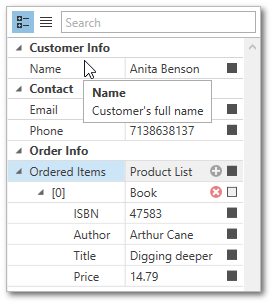
## PropertyGridEditor Attribute
The `PropertyGridEditor` attribute allows you to apply a property template at the data model level.
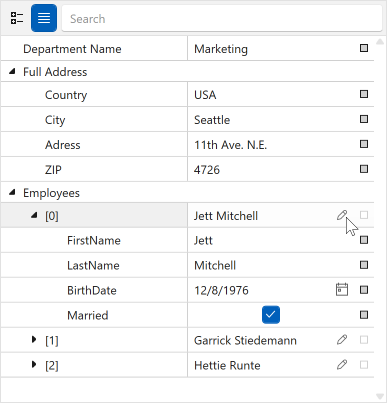
You can specify a template for the entire property definition:
- XAML
<DataTemplate x:Key="PropertyTemplate">
    <dxprg:PropertyDefinition Header="Full Address" HeaderShowMode="OnlyHeader"/>
</DataTemplate>
<DataTemplate x:Key="CollectionDefinitionTemplate">
    <dxprg:CollectionDefinition HeaderShowMode="OnlyHeader" AllowRemoveItems="False"/>
</DataTemplate>
- C#
public class Department {
    [Display(Name = "Department Name")]
    public string Name { get; set; }
    [TypeConverter(typeof(ExpandableObjectConverter))]
    [PropertyGridEditor(TemplateKey = "PropertyTemplate")]
    public Location Location { get; set; }
    [PropertyGridEditor(TemplateKey = "CollectionDefinitionTemplate")]
    public ObservableCollection<Employee> Employees { get; set; }
}
You can also specify the editor’s template only:
- XAML
<DataTemplate x:Key="ButtonEditTemplate">
    <dxe:ButtonEdit Name="PART_Editor"
                    IsTextEditable="False"/>
</DataTemplate>
- C#
[PropertyGridEditor(TemplateKey = "ButtonEditTemplate")]
public class Employee : BindableBase {
    public string FirstName { get { return GetValue<string>(); } set { SetValue(value); } }
    public string LastName { get { return GetValue<string>(); } set { SetValue(value); } }
    public DateTime BirthDate { get { return GetValue<DateTime>(); } set { SetValue(value); } }
    public bool Married { get { return GetValue<bool>(); } set { SetValue(value); } }

    public override string ToString() {
        return FirstName + " " + LastName;
    }
}
[View Example: Use the PropertyGridEditor Attribute to Define a Property Editor](https://github.com/DevExpress-Examples/wpf-property-grid-use-data-annotations-to-define-property-editor)
See Also
[Property Categories](/WPF/117082/controls-and-libraries/property-grid/property-categories)