# Property Definitions | WPF Controls | DevExpress Documentation
## Overview
**Property definitions** allow you to visualize properties of a bound object and specify their appearance within the property grid. Each **property definition** is linked to one or multiple properties of the bound object. **Property definitions** ([PropertyDefinition](/WPF/DevExpress.Xpf.PropertyGrid.PropertyDefinition) objects) are stored within the [PropertyGridControl.PropertyDefinitions](/WPF/DevExpress.Xpf.PropertyGrid.PropertyGridControl.PropertyDefinitions) collection.
## Managing Property Grid Content
Depending on the [PropertyGridControl.ShowProperties](/WPF/DevExpress.Xpf.PropertyGrid.PropertyGridControl.ShowProperties) value, the property grid displays the following content.
| [PropertyGridControl.ShowProperties](/WPF/DevExpress.Xpf.PropertyGrid.PropertyGridControl.ShowProperties)
value | PropertyGridControl content |
| --- | --- |
| All | The property grid displays all properties of an object. |
| WithPropertyDefinitions | The property grid displays only the properties that are specified by the property definitions. |
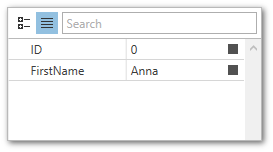
The following example demonstrates a property grid that displays two properties of the bound object:
- XAML
- C#
<Window.DataContext>
    <local:ViewModel/>
</Window.DataContext>
...
<dxprg:PropertyGridControl SelectedObject="{Binding Data}" ShowProperties="WithPropertyDefinitions">
    <dxprg:PropertyDefinition Path="ID" IsReadOnly="True"/>
    <dxprg:PropertyDefinition Path="FirstName"/>
</dxprg:PropertyGridControl>
public class ViewModel {
    public SimpleModel Data { get; set; }
    public ViewModel() {
        Data = new SimpleModel()
        {
            ID = 0,
            FirstName = "Anna",
            LastName = "Trujilo",
            Birthday = new DateTime(1987, 09, 14)
        };
    }
}

public class SimpleModel {
    public int ID { get; set; }
    public string FirstName { get; set; }
    public string LastName { get; set; }
    public DateTime Birthday { get; set; }
}
## Linking Properties to Definitions
You can link a property of an object to a **property definition** using an association criteria. Different criteria and combinations of criteria have different priorities. When an object property matches multiple **definitions**, the **PropertyGrid** control links it to the **definition** with the highest priority. The following table lists the available association criteria and their priorities:
| Criteria | Priority | Description |
| --- | --- | --- |
| Property path | High | Use the [PropertyDefinitionBase.Path](/WPF/DevExpress.Xpf.PropertyGrid.PropertyDefinitionBase.Path) property to specify the direct path to the associated property. |
| Parent property path | Medium | Use the [PropertyDefinition.Scope](/WPF/DevExpress.Xpf.PropertyGrid.PropertyDefinition.Scope) property to specify the path to the parent property (see Nested Properties). |
| Property type | Low | Use the [PropertyDefinition.Type](/WPF/DevExpress.Xpf.PropertyGrid.PropertyDefinition.Type) property to specify the type of the associated property.
The [PropertyDefinition.TypeMatchMode](/WPF/DevExpress.Xpf.PropertyGrid.PropertyDefinition.TypeMatchMode) property specifies the rules of type matching. See [TypeMatchMode](/WPF/DevExpress.Xpf.PropertyGrid.TypeMatchMode) to learn more. |
Important
You can use the asterisk **\*** character as a placeholder for a property name when specifying the criteria with the [PropertyDefinitionBase.Path](/WPF/DevExpress.Xpf.PropertyGrid.PropertyDefinitionBase.Path) and [PropertyDefinition.Scope](/WPF/DevExpress.Xpf.PropertyGrid.PropertyDefinition.Scope) properties.
Tip
You can specify child property definitions using the [PropertyDefinition.InsertDefinitionsFrom](/WPF/DevExpress.Xpf.PropertyGrid.PropertyDefinition.InsertDefinitionsFrom) property.
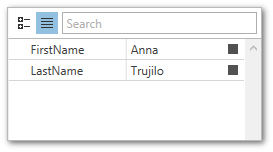
The following example demonstrates how to use **property definitions** to display only the string properties of the bound object.
- XAML
- C#
<Window.DataContext>
    <local:ViewModel/>
</Window.DataContext>
...
<dxprg:PropertyGridControl SelectedObject="{Binding Data}" ShowProperties="WithPropertyDefinitions">
    <dxprg:PropertyDefinition Type="sys:String"/>
</dxprg:PropertyGridControl>
public class ViewModel {
    public SimpleModel Data { get; set; }
    public ViewModel() {
        Data = new SimpleModel()
        {
            ID = 0,
            FirstName = "Anna",
            LastName = "Trujilo",
            Birthday = new DateTime(1987, 09, 14)
        };
    }
}

public class SimpleModel {
    public int ID { get; set; }
    public string FirstName { get; set; }
    public string LastName { get; set; }
    public DateTime Birthday { get; set; }
}
## Custom Editors and Property Editing
The **PropertyGridControl** automatically assigns editors to the edit fields based on the corresponding property type. **Property definitions** allow you to specify and configure custom in-place editors for the associated properties of the bound object.
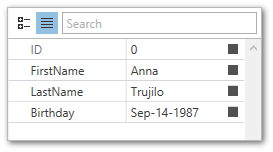
The following example demonstrates how to assign editors to property grid rows based on the property path and type.
- XAML
- C#
<Window.DataContext>
    <local:ViewModel/>
</Window.DataContext>
...
<dxprg:PropertyGridControl SelectedObject="{Binding Data}" ShowProperties="All">
    <dxprg:PropertyDefinition Path="ID" IsReadOnly="True"/>
    <dxprg:PropertyDefinition Type="sys:DateTime">
        <dxprg:PropertyDefinition.EditSettings>
            <dxe:DateEditSettings DisplayFormat="MMM-dd-yyyy"/>
        </dxprg:PropertyDefinition.EditSettings>
    </dxprg:PropertyDefinition>
    <dxprg:PropertyDefinition Type="sys:String">
        <dxprg:PropertyDefinition.EditSettings>
            <dxe:TextEditSettings MaxLength="15"/>
        </dxprg:PropertyDefinition.EditSettings>
    </dxprg:PropertyDefinition>
</dxprg:PropertyGridControl>
public class ViewModel {
    public SimpleModel Data { get; set; }
    public ViewModel() {
        Data = new SimpleModel()
        {
            ID = 0,
            FirstName = "Anna",
            LastName = "Trujilo",
            Birthday = new DateTime(1987, 09, 14)
        };
    }
}

public class SimpleModel {
    public int ID { get; set; }
    public string FirstName { get; set; }
    public string LastName { get; set; }
    public DateTime Birthday { get; set; }
}
Refer to the following help topic for more information: [Customize Properties](/WPF/401044/controls-and-libraries/property-grid/property-definitions/customize-properties).
Note
Property definitions that use the [TokenComboBoxStyleSettings](/WPF/DevExpress.Xpf.Editors.TokenComboBoxStyleSettings) should have the [PropertyDefinitionBase.IsReadOnly](/WPF/DevExpress.Xpf.PropertyGrid.PropertyDefinitionBase.IsReadOnly) property set to **true** to enable editing.
Note
The [PropertyGridControl.SelectedObjects](/WPF/DevExpress.Xpf.PropertyGrid.PropertyGridControl.SelectedObjects) property allows users to edit properties of multiple objects. A property whose value differs between objects has a blank value in the property grid. Editing such a property using the property grid changes it for all selected objects simultaneously.
## Nested Properties
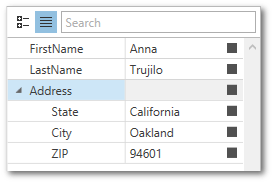
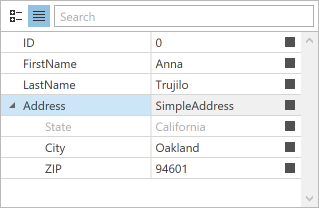
The **PropertyGrid** control can display nested properties as an expandable list. Use the [TypeConverter](https://learn.microsoft.com/dotnet/api/system.componentmodel.typeconverter) attribute and specify the **ExpandableObjectConverter** type converter for a property to make it expandable.
The following example demonstrates how to display nested properties in the **PropertyGrid** control:
- XAML
- C#
- C#
<Window.DataContext>
    <local:ViewModel/>
</Window.DataContext>
<!-- ... -->
<dxprg:PropertyGridControl SelectedObject="{Binding Data}">
    <dxprg:PropertyDefinition Path="FirstName"/>
    <dxprg:PropertyDefinition Path="LastName"/>
    <dxprg:PropertyDefinition Type="{x:Type local:SimpleAddress}"/>
</dxprg:PropertyGridControl>
public class ViewModel {
    public SimpleModel Data { get; set; }
    public ViewModel() {
        Data = new SimpleModel {
            ID = 0,
            FirstName = "Anna",
            LastName = "Trujilo",
            Address = new SimpleAddress() {State="California", City="Oakland", ZIP="94601"}
        };
    }
}
using System.ComponentModel;
...
public class SimpleAddress {
    public string State { get; set; }
    public string City { get; set; }
    public string ZIP { get; set; }
}

public class SimpleModel {
    public int ID { get; set; }
    public string FirstName { get; set; }
    public string LastName { get; set; }
    [TypeConverter(typeof(ExpandableObjectConverter))]
    public SimpleAddress Address { get; set; }
}
The following code sample demonstrates different techniques to configure nested properties:
- XAML
<dxprg:PropertyGridControl SelectedObject="{Binding Data}" >
    <!-- ... -->
    <dxprg:PropertyDefinition Path="Address">
        <dxprg:PropertyDefinition Path="State" IsReadOnly="True"/>
    </dxprg:PropertyDefinition>
    <!-- OR -->
    <dxprg:PropertyDefinition Scope="Address" Path="State" IsReadOnly="True"/>
    <!-- OR -->
    <dxprg:PropertyDefinition Type="{x:Type local:SimpleAddress}">
        <dxprg:PropertyDefinition Path="State" IsReadOnly="True"/>
    </dxprg:PropertyDefinition>
</dxprg:PropertyGridControl>
Note
To learn more about property expandability and type converters, see [Expandability Customization](/WPF/117149/controls-and-libraries/property-grid/expandability-customization).
See Also
[Binding to a collection of PropertyDefinitions](/WPF/115668/controls-and-libraries/property-grid/property-definitions/binding-to-a-collection-of-propertydefinitions)
[Displaying Multiple Properties in a Single Cell](/WPF/118197/controls-and-libraries/property-grid/property-definitions/displaying-multiple-properties-in-a-single-cell)
[Expandability Customization](/WPF/117149/controls-and-libraries/property-grid/expandability-customization)
[Property Menu](/WPF/15720/controls-and-libraries/property-grid/property-menu)
[Descriptions](/WPF/117200/controls-and-libraries/property-grid/descriptions)