# Timeline View | WPF Controls | DevExpress Documentation
The **Timeline** view displays appointments as horizontal bars along the timescales. This view allows users to quickly review appointment information for multiple resources.
Set the [SchedulerControl.ActiveViewIndex](/WPF/DevExpress.Xpf.Scheduling.SchedulerControl.ActiveViewIndex) property to the corresponding view index in the [SchedulerControl.Views](/WPF/DevExpress.Xpf.Scheduling.SchedulerControl.Views) collection to show the view. This collection stores all views defined in the scheduler.
- XAML
<dxsch:SchedulerControl ActiveViewIndex="0">
    <dxsch:TimelineView
        x:Name="timelineView"/>
        <!---->
</dxsch:SchedulerControl>
Note
The SchedulerControl has all views enabled out-of-the-box. If you declare any view in XAML or create views using the SchedulerControl’s [smart tag](/WPF/119608/controls-and-libraries/scheduler/design-time-features/smart-tag/manage-views), only the explicitly declared views become available. You can specify any number of views with the same type and different settings.
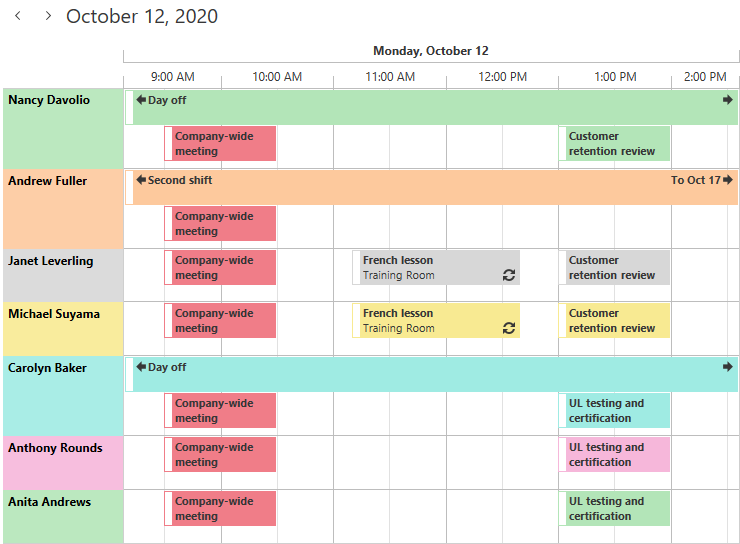
The Timeline view is the [TimelineView](/WPF/DevExpress.Xpf.Scheduling.TimelineView) class in the Scheduler API. It inherits the [ViewBase](/WPF/DevExpress.Xpf.Scheduling.ViewBase) base class.
## Updated Timeline View
v20.2 introduces an updated Timeline view that is enabled by default.
The updated Timeline view features the following enhancements over the previous version:
- [TimeScale](/WPF/DevExpress.Xpf.Scheduling.TimeScale) is a new universal time scale that adapts to the current zoom level.
- Per-pixel horizontal and vertical scrolling.
- Resources with multiple appointments that occupy the same time slot can be expanded/collapsed.

- Resource height adapts to uniformly fill the viewport.
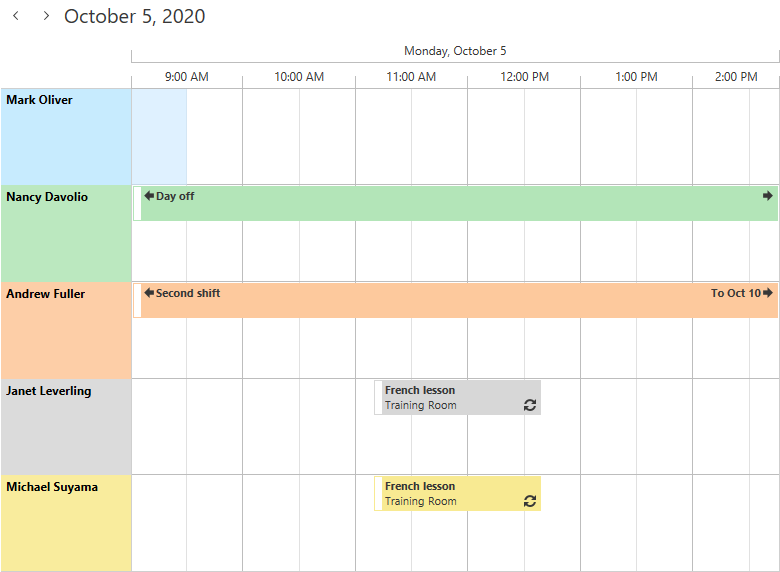Fewer resources
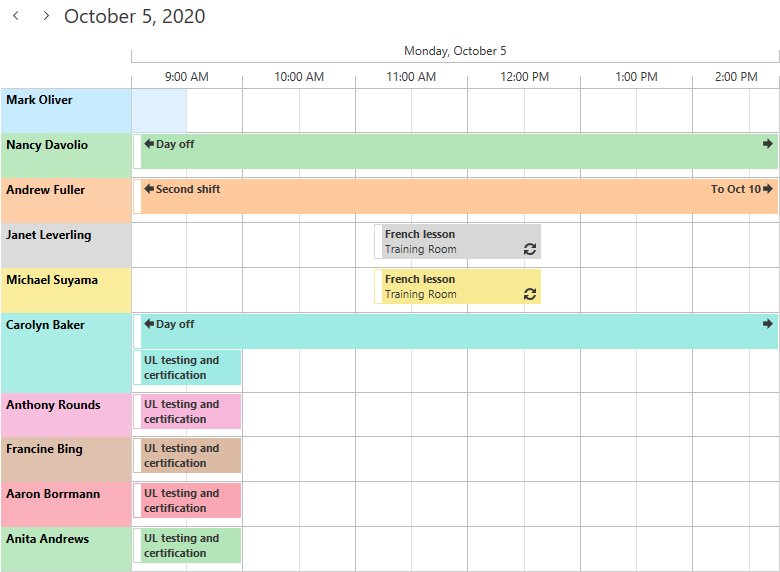More resources
Custom styles and templates defined for the Legacy view version are not compatible. Set the [ViewMode](/WPF/DevExpress.Xpf.Scheduling.TimelineView.ViewMode) property to **Legacy** to revert to the previous view version.
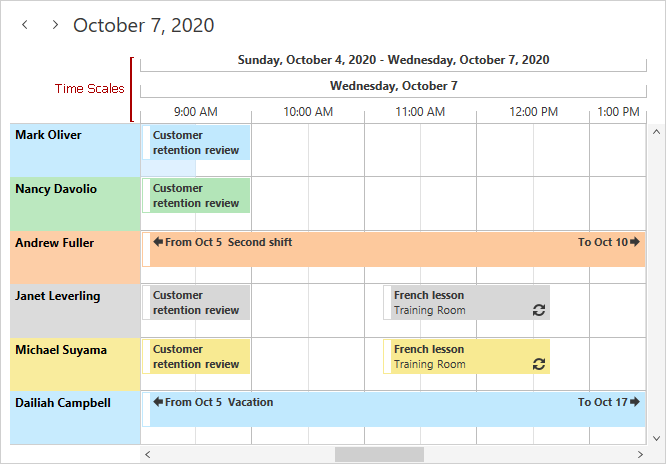
## Time Scales
Use the [TimeScales](/WPF/DevExpress.Xpf.Scheduling.TimelineView.TimeScales) property to define time scales displayed in the Timeline View.
If you define multiple time scales, the scheduler displays the time scale that has the shortest duration of a single division:
Duration = [ScaleUnit](/WPF/DevExpress.Xpf.Scheduling.TimeScale.ScaleUnit) \* [UnitCount](/WPF/DevExpress.Xpf.Scheduling.TimeScale.UnitCount)
Use the [MinWidth](/WPF/DevExpress.Xpf.Scheduling.TimeScaleBase.MinWidth) property to specify the minimum allowed width of a single division. A time scale can only be shown if the [Zoom](/WPF/DevExpress.Xpf.Scheduling.TimelineView.Zoom) value is small enough to accommodate the duration of at least a single division:
[Zoom](/WPF/DevExpress.Xpf.Scheduling.TimelineView.Zoom) < Duration / [MinWidth](/WPF/DevExpress.Xpf.Scheduling.TimeScaleBase.MinWidth)
The code snippet below illustrates how to define two time scales:
- XAML
<dxsch:TimelineView>
    <dxsch:TimelineView.TimeScales>
        <!--duration of a single scale division is 1 hour-->
        <dxsch:TimeScale ScaleUnit="Hour" UnitCount="1" MinWidth="0"/>
        <!--duration of a single scale division is 3 minutes-->
        <dxsch:TimeScale ScaleUnit="Minute" UnitCount="30" MinWidth="60"/>
    </dxsch:TimelineView.TimeScales>
</dxsch:TimelineView>
The following image shows the result:
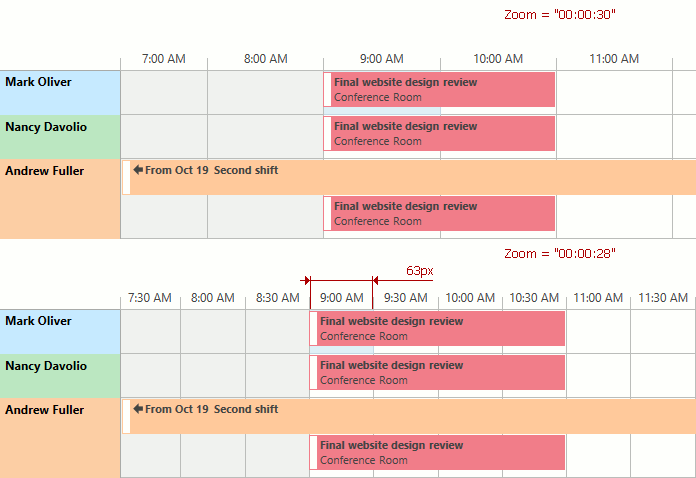
The [TimeScaleMaxCount](/WPF/DevExpress.Xpf.Scheduling.TimelineView.TimeScaleMaxCount) property specifies the maximum number of time scales displayed by the Scheduler. The image below illustrates the **Timeline View** with three time scales.
## API
The following properties affect the view’s appearance and functionality:
| View Mode | Property | Description |
| --- | --- | --- |
| | [TimelineView.ViewMode](/WPF/DevExpress.Xpf.Scheduling.TimelineView.ViewMode) | Allows you to switch to the updated version of the Timeline View. |
| Standard | [TimelineView.IntervalDuration](/WPF/DevExpress.Xpf.Scheduling.TimelineView.IntervalDuration) | Specifies the interval available in the Timeline View. This is a dependency property. |
| Standard | [TimelineView.ResourceMaxHeight](/WPF/DevExpress.Xpf.Scheduling.TimelineView.ResourceMaxHeight) | Specifies the maximum resource height in the collapsed state. This is a dependency property. |
| Standard | [TimelineView.ShowCellControls](/WPF/DevExpress.Xpf.Scheduling.TimelineView.ShowCellControls) | Specifies whether to generate and display CellControl instances. This is a dependency property. |
| Standard | [TimelineView.TimeScaleMaxCount](/WPF/DevExpress.Xpf.Scheduling.TimelineView.TimeScaleMaxCount) | Specifies the maximum number of time scales displayed by the Scheduler. This is a dependency property. |
| Standard | [TimelineView.ViewportInterval](/WPF/DevExpress.Xpf.Scheduling.TimelineView.ViewportInterval) | Returns the interval currently visible in the client. This is a dependency property. |
| Standard | [TimelineView.Zoom](/WPF/DevExpress.Xpf.Scheduling.TimelineView.Zoom) | Specifies the current zoom level. This is a dependency property. |
| Standard | [TimelineView.ZoomRange](/WPF/DevExpress.Xpf.Scheduling.TimelineView.ZoomRange) | Allows you to limit the zoom level. This is a dependency property. |
| Both | [SchedulerControl.GroupType](/WPF/DevExpress.Xpf.Scheduling.SchedulerControl.GroupType) | Gets or sets the type of grouping applied to the Scheduler. This is a dependency property. |
| Both | [SchedulerViewBase.ShowResourceHeaders](/WPF/DevExpress.Xpf.Scheduling.SchedulerViewBase.ShowResourceHeaders) | Gets or sets whether to display [resource](/WPF/119219/controls-and-libraries/scheduler/resources) headers. This is a dependency property. |
| Both | [SchedulerViewBase.ShowDayHeaders](/WPF/DevExpress.Xpf.Scheduling.SchedulerViewBase.ShowDayHeaders) | Gets or sets whether to display day headers. This is a dependency property. |
| Both | [TimelineView.TimeScales](/WPF/DevExpress.Xpf.Scheduling.TimelineView.TimeScales) | Gets or sets the time intervals displayed in the Timeline view. |
| Both | [TimelineView.SnapToCellsMode](/WPF/DevExpress.Xpf.Scheduling.TimelineView.SnapToCellsMode) | Gets or sets the method of snapping appointments to time cells. This is a dependency property. |
| Both | [TimelineView.AppointmentMinHeight](/WPF/DevExpress.Xpf.Scheduling.TimelineView.AppointmentMinHeight) | Gets or sets the minimum height of appointments in the [Timeline View](/WPF/119586/controls-and-libraries/scheduler/views/timeline-view). This is a dependency property. |
| Both | [TimelineView.AppointmentMinWidth](/WPF/DevExpress.Xpf.Scheduling.TimelineView.AppointmentMinWidth) | Gets or sets the minimum width of appointments in the [Timeline View](/WPF/119586/controls-and-libraries/scheduler/views/timeline-view). This is a dependency property. |
| Both | [TimelineView.StretchAppointments](/WPF/DevExpress.Xpf.Scheduling.TimelineView.StretchAppointments) | Gets or sets a value indicating whether appointments in the [Timeline View](/WPF/119586/controls-and-libraries/scheduler/views/timeline-view) should be stretched to fill the time cells. This is a dependency property. |
| Both | [TimelineView.ResourceMinHeight](/WPF/DevExpress.Xpf.Scheduling.TimelineView.ResourceMinHeight) | Gets or sets the resource row’s minimum height when the [TimelineView.ResourceAutoHeight](/WPF/DevExpress.Xpf.Scheduling.TimelineView.ResourceAutoHeight) is true. This is a dependency property. |
| Both | [SchedulerViewBase.NavigationButtonsVisibility](/WPF/DevExpress.Xpf.Scheduling.SchedulerViewBase.NavigationButtonsVisibility) | Gets or sets whether to display appointment navigation buttons. This is a dependency property. |
| Both | [SchedulerViewBase.MoreButtonsVisibility](/WPF/DevExpress.Xpf.Scheduling.SchedulerViewBase.MoreButtonsVisibility) | Gets or sets the visibility state of More buttons in the current View. This is a dependency property. |
| Both | [TimelineView.TimeIndicatorVisibility](/WPF/DevExpress.Xpf.Scheduling.TimelineView.TimeIndicatorVisibility) | Gets or sets whether to display the time indicator. This is a dependency property. |
| Both | [TimelineView.ShowTimeIndicatorOverAppointment](/WPF/DevExpress.Xpf.Scheduling.TimelineView.ShowTimeIndicatorOverAppointment) | Gets or sets a value indicating whether the **Time Indicator** is displayed above the appointments. This is a dependency property. |
| Both | [TimelineView.HorizontalScrollBarVisibility](/WPF/DevExpress.Xpf.Scheduling.SchedulerViewBase.HorizontalScrollBarVisibility) | Gets or sets the horizontal scrollbar visibility mode. This is a dependency property. |
| Both | [TimelineView.VerticalScrollBarVisibility](/WPF/DevExpress.Xpf.Scheduling.SchedulerViewBase.VerticalScrollBarVisibility) | Gets or sets the vertical scrollbar visibility mode. This is a dependency property. |
| Legacy | [TimelineView.GroupSeparatorSize](/WPF/DevExpress.Xpf.Scheduling.SchedulerViewBase.GroupSeparatorSize) | Specifies the width of the line between groups when the scheduler is [grouped by dates or resources](/WPF/119230/controls-and-libraries/scheduler/grouping). |
| Legacy | [TimelineView.IntervalCount](/WPF/DevExpress.Xpf.Scheduling.TimelineView.IntervalCount) | Gets or sets the number of time intervals displayed in the timeline view. This is a dependency property. |
| Legacy | [TimelineView.ResourceAutoHeight](/WPF/DevExpress.Xpf.Scheduling.TimelineView.ResourceAutoHeight) | Automatically adjust the resource row height to fit all appointments in a row. The scheduler should be grouped by resources or dates. This is a dependency property. |
| Legacy | [SchedulerViewBase.ResourcesPerPage](/WPF/DevExpress.Xpf.Scheduling.SchedulerViewBase.ResourcesPerPage) | Gets or sets the maximum number of simultaneously displayed [resources](/WPF/119219/controls-and-libraries/scheduler/resources). This is a dependency property. |
| Legacy | [SchedulerViewBase.ShowResourceNavigator](/WPF/DevExpress.Xpf.Scheduling.SchedulerViewBase.ShowResourceNavigator) | Gets or sets whether to display the [resource](/WPF/119219/controls-and-libraries/scheduler/resources) navigator. This is a dependency property. |