// Remove previous reminders
appointment.Reminders.Clear();
// Set multiple reminders for an appointment
ReminderItem reminder1 = appointment.CreateNewReminder();
ReminderItem reminder2 = appointment.CreateNewReminder();
reminder1.AlertTime = DateTime.Now.AddMinutes(15);
reminder2.TimeBeforeStart = new TimeSpan(0, 30, 0);

appointment.Reminders.Add(reminder1);
appointment.Reminders.Add(reminder2);
' Remove previous reminders
appointment.Reminders.Clear()
' Set multiple reminders for an appointment
Dim reminder1 As ReminderItem = appointment.CreateNewReminder()
Dim reminder2 As ReminderItem = appointment.CreateNewReminder()
reminder1.AlertTime = Date.Now.AddMinutes(15)
reminder2.TimeBeforeStart = New TimeSpan(0, 30, 0)

appointment.Reminders.Add(reminder1)
appointment.Reminders.Add(reminder2)
- Select an appointment and click **Reminder** in the **Appointment** tab’s **Options** group to specify the time before the appointment starts when you want to get a reminder. The selected value is assigned to the [ReminderItem.TimeBeforeStart](/WPF/DevExpress.Xpf.Scheduling.ReminderItem.TimeBeforeStart) property.

- Invoke the [Appointment Window](/WPF/119347/controls-and-libraries/scheduler/visual-elements/windows/appointment-window) and use the Reminder editor to select the time before the appointment starts. The selected value is assigned to the [ReminderItem.TimeBeforeStart](/WPF/DevExpress.Xpf.Scheduling.ReminderItem.TimeBeforeStart) property.

- Set the [SchedulerControl.DefaultReminderTime](/WPF/DevExpress.Xpf.Scheduling.SchedulerControl.DefaultReminderTime) to a TimeSpan value that specifies the time before the appointment starts. Subsequently, all new appointments have a reminder with the specified [ReminderItem.TimeBeforeStart](/WPF/DevExpress.Xpf.Scheduling.ReminderItem.TimeBeforeStart) value. You can handle the [SchedulerControl.InitNewAppointment](/WPF/DevExpress.Xpf.Scheduling.SchedulerControl.InitNewAppointment) event to change a particular appointment’s default reminder.
## Using Reminders
To get a collection of reminders for an appointment, use the [AppointmentItem.Reminders](/WPF/DevExpress.Xpf.Scheduling.AppointmentItem.Reminders) property. The [AppointmentItem.Reminder](/WPF/DevExpress.Xpf.Scheduling.AppointmentItem.Reminder) property returns the first reminder in a collection (that is, with the index of 0).
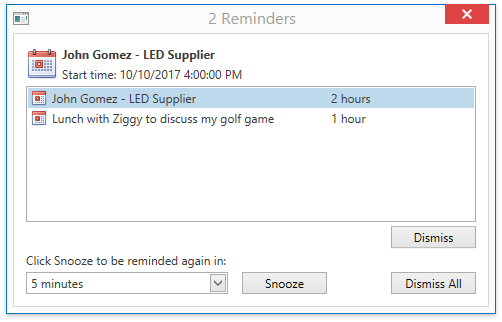
The built-in reminder controller checks the alert times for all reminders at a regular interval the [SchedulerControl.RemindersCheckInterval](/WPF/DevExpress.Xpf.Scheduling.SchedulerControl.RemindersCheckInterval) property specifies. When it is time for the reminder (determined by the [ReminderItem.AlertTime](/WPF/DevExpress.Xpf.Scheduling.ReminderItem.AlertTime) property), the controller adds it to the [SchedulerControl.TriggeredReminders](/WPF/DevExpress.Xpf.Scheduling.SchedulerControl.TriggeredReminders) collection, fires the [SchedulerControl.RemindersWindowShowing](/WPF/DevExpress.Xpf.Scheduling.SchedulerControl.RemindersWindowShowing) event and invokes the notification dialog, as illustrated below:
Tip
To perform a custom action on a reminder alert, handle the [SchedulerControl.TriggeredReminders](/WPF/DevExpress.Xpf.Scheduling.SchedulerControl.TriggeredReminders) collection’s **CollectionChanged** event.
An end-user can switch the reminders off by clicking the “**Dismiss**“ or “**Dismiss All**“ buttons.
Alternatively, they can postpone the alert for a specified time by selecting the time interval in the combo box and clicking the “**Snooze**“ button.
They can also close the Reminders window without making a decision. In this situation, clicking the **Reminders Window** in the **Window** group displays the Reminders window again.

Tip
You can display a custom window instead of the built-in Reminders window. Use the [SchedulerControl.OptionsWindows](/WPF/DevExpress.Xpf.Scheduling.SchedulerControl.OptionsWindows) property in XAML to specify a custom window, or handle the [SchedulerControl.RemindersWindowShowing](/WPF/DevExpress.Xpf.Scheduling.SchedulerControl.RemindersWindowShowing) event and set the [WindowShowingEventArgs<T>.Window](/WPF/DevExpress.Xpf.Scheduling.WindowShowingEventArgs-1.Window) property. It does not display an alert if you do not specify the window and set the [CancelRoutedEventArgs.Cancel](/WPF/DevExpress.Xpf.Core.CancelRoutedEventArgs.Cancel) property to **true**.
## Handling Outdated Appointments
The following rules are in effect:
- If a normal (not recurring) appointment becomes outdated (when it is moved to an earlier time, or if the application starts later than the appointment), the controller checks the appointment reminder after the interval the [SchedulerControl.RemindersCheckInterval](/WPF/DevExpress.Xpf.Scheduling.SchedulerControl.RemindersCheckInterval) setting specifies and fires an alert. You can call the [SchedulerControl.CheckTriggeredReminders](/WPF/DevExpress.Xpf.Scheduling.SchedulerControl.CheckTriggeredReminders) method to fire all the outdated appointment reminders immediately.
- If a reminder is set for a recurring appointment, the reminder never fires for an outdated occurrence. This is sensible because recurrence chains can be lengthy and even infinite.
## Handling Reminders for Changed Occurrences
A recurrence series shares reminders, assigned to the [Appointment.RecurrencePattern](/CoreLibraries/DevExpress.XtraScheduler.Appointment.RecurrencePattern).
The following behavior is implemented for a changed occurrence:
If a regular occurrence is in the future:
- Once this occurrence is moved to the past, its reminder is deleted.
- When this occurrence is restored to a time in the future, its reminder is restored and persists until this occurrence becomes outdated.
- The reminder is not restored when this occurrence is restored to a time in the past.
If a recurring appointment is in the past (such occurrences do not have reminders):
- Once the occurrence is moved to the future, its reminder is re-created from the pattern.
- When the occurrence is restored to a time in the past, the reminder is deleted.
## Reminder Member Table
The following table lists the main properties, methods, and events which implement a Reminder’s basic functionality:
| Member Name | Description |
| --- | --- |
| [SchedulerControl.DefaultReminderTime](/WPF/DevExpress.Xpf.Scheduling.SchedulerControl.DefaultReminderTime) | Gets or sets the value used to specify the reminder’s [ReminderItem.TimeBeforeStart](/WPF/DevExpress.Xpf.Scheduling.ReminderItem.TimeBeforeStart) property for a newly created appointment. |
| [SchedulerControl.RemindersCheckInterval](/WPF/DevExpress.Xpf.Scheduling.SchedulerControl.RemindersCheckInterval) | Gets or sets the period of time between checks for a reminder’s alert time. |
| [SchedulerControl.AllowReminders](/WPF/DevExpress.Xpf.Scheduling.SchedulerControl.AllowReminders) | Gets or sets whether appointment [reminders](/WPF/119237/controls-and-libraries/scheduler/reminders) are allowed. This is a dependency property. |
| [SchedulerControl.RemindersWindowShowing](/WPF/DevExpress.Xpf.Scheduling.SchedulerControl.RemindersWindowShowing) | Enables you to specify the window displayed when a reminder fires, or hide it. |
| [ReminderItem](/WPF/DevExpress.Xpf.Scheduling.ReminderItem) | A reminder for a non-recurring appointment. |
| [TriggeredReminder](/WPF/DevExpress.Xpf.Scheduling.TriggeredReminder) | An object that identifies a reminder which is due. |
| [AppointmentItem.CreateNewReminder](/WPF/DevExpress.Xpf.Scheduling.AppointmentItem.CreateNewReminder) | Creates a reminder for the specified appointment. |
| [AppointmentItem.Reminders](/WPF/DevExpress.Xpf.Scheduling.AppointmentItem.Reminders) | Returns the collection of [reminders](/WPF/119237/controls-and-libraries/scheduler/reminders) for the appointment. |
| [AppointmentItem.Reminder](/WPF/DevExpress.Xpf.Scheduling.AppointmentItem.Reminder) | Gets a reminder associated with the current appointment (the collection’s first reminder, if there are several reminders). |
| [AppointmentMappings.Reminder](/WPF/DevExpress.Xpf.Scheduling.AppointmentMappings.Reminder) | Gets or sets the mapping that binds the appointment’s [AppointmentItem.Reminder](/WPF/DevExpress.Xpf.Scheduling.AppointmentItem.Reminder) property to the data source field. |
| [OptionsWindows.RemindersWindowType](/WPF/DevExpress.Xpf.Scheduling.OptionsWindows.RemindersWindowType) | Gets or sets the object type inherited from the [Window](https://learn.microsoft.com/dotnet/api/system.windows.window) class which is instantiated and shown instead of the default Reminders window. |