# Expandability Customization | WPF Controls | DevExpress Documentation
## Overview
The **PropertyGrid** control allows you to customize property expandability in the following ways.
- At the control level, using the **AllowExpanding** property.
- At the model level, using the [TypeConverter](https://learn.microsoft.com/dotnet/api/system.componentmodel.typeconverter) attribute.
## Customizing Property Expandability at the Control Level
The following **PropertyGrid** properties affect the expandability behavior.
- [PropertyGridControl.AllowExpanding](/WPF/DevExpress.Xpf.PropertyGrid.PropertyGridControl.AllowExpanding) specifies the expandability behavior for the entire property grid.
- [PropertyDefinition.AllowExpanding](/WPF/DevExpress.Xpf.PropertyGrid.PropertyDefinition.AllowExpanding) specifies the expandability behavior for individual properties.
Note
The [PropertyDefinition.AllowExpanding](/WPF/DevExpress.Xpf.PropertyGrid.PropertyDefinition.AllowExpanding) property has higher precedence than the [PropertyGridControl.AllowExpanding](/WPF/DevExpress.Xpf.PropertyGrid.PropertyGridControl.AllowExpanding) property.
The following table lists the available **AllowExpanding** property values and corresponding expandability modes.
| AllowExpanding
property value | Property grid expandability behavior |
| --- | --- |
| Default | Expands properties according to their type converters. |
| Force | Expands all properties. |
| ForceIfNoTypeConverter | Expands all properties that don’t have a type converter. |
| Never | Properties are not expandable. |
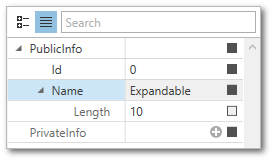
The following example demonstrates the **AllowExpanding** property precedence.
- XAML
- C#
- C#
<Window.DataContext>
    <local:ViewModel/>
</Window.DataContext>
...
<dxprg:PropertyGridControl Grid.Column="1" SelectedObject="{Binding Data}" ShowProperties="All" AllowExpanding="Force">
    <dxprg:PropertyDefinition Path="PublicInfo"/>
    <dxprg:CollectionDefinition Path="PrivateInfo" AllowExpanding="Never"/>
</dxprg:PropertyGridControl>
public class ViewModel {
    public Container Data { get; set; }
    public ViewModel() {
        Data = new Container
        {
            PublicInfo = new ClassWithProperties() { Id=0, Name = "Expandable"},
            PrivateInfo = new List<ClassWithProperties>
            {
                new ClassWithProperties() { Id=1, Name="Not expandable" },
                new ClassWithProperties() { Id=2, Name="Not expandable" }
            }
        };
    }
}
public class ClassWithProperties {
    public int Id { get; set; }
    public string Name { get; set; }
    public override string ToString() {
        return Name;
    }
}

public class Container {
    public ClassWithProperties PublicInfo { get; set; }
    public List<ClassWithProperties> PrivateInfo { get; set; }
}
## Customizing Property Expandability at the Model Level
To control property expandability from the model, use the [TypeConverter](https://learn.microsoft.com/dotnet/api/system.componentmodel.typeconverter) attribute.
Important
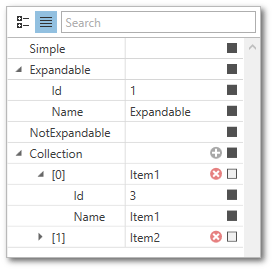
A **type converter** affects the expandability if the **AllowExpanding** property is set to **Default** or **ForceIfNoTypeConverter**.
Note
To learn more about the **property attributes** supported by the **PropertyGrid** control, see [Property Attributes](/WPF/15623/controls-and-libraries/property-grid/property-attributes).
- XAML
- C#
- C#
<Window.DataContext>
    <local:ViewModel/>
</Window.DataContext>
...
<dxprg:PropertyGridControl Grid.Column="1" SelectedObject="{Binding Data}" ShowProperties="All" AllowExpanding="Default">

    <!--No type converter, not expandable-->
    <dxprg:PropertyDefinition Path="Simple"/>

    <dxprg:PropertyDefinition Path="Expandable"/>

    <dxprg:PropertyDefinition Path="NotExpandable"/>

    <!--No type converter, expandable-->
    <dxprg:CollectionDefinition Path="Collection"/>

</dxprg:PropertyGridControl>
using System.ComponentModel;
...
public class ClassWithProperties {
    public int Id { get; set; }
    public string Name { get; set; }
    public override string ToString() {
        return Name;
    }
}

public class Container {
    public ClassWithProperties Simple { get; set; }
    [TypeConverter(typeof(ExpandableObjectConverter))]
    public ClassWithProperties Expandable { get; set; }
    [TypeConverter(typeof(NotExpandableConverter))]
    public ClassWithProperties NotExpandable { get; set; }
    public List<ClassWithProperties> Collection { get; set; }
}

public class NotExpandableConverter : TypeConverter {
    public override bool GetPropertiesSupported(ITypeDescriptorContext context) {
        return false;
    }
}
public class ViewModel {
    public Container Data { get; set; }
    public ViewModel() {
        Data = new Container
        {
            Simple = new ClassWithProperties() { Id=0, Name = "Simple"},
            Expandable = new ClassWithProperties() { Id=1, Name = "Expandable"},
            NotExpandable = new ClassWithProperties() { Id = 2, Name= "Not expandable" },
            Collection = new List<ClassWithProperties>
            {
                new ClassWithProperties() { Id=3, Name="Item1" },
                new ClassWithProperties() { Id=4, Name="Item2" }
            }
        };
    }
}
See Also
[Property Definitions](/WPF/15521/controls-and-libraries/property-grid/property-definitions)
[Collection Definitions](/WPF/15719/controls-and-libraries/property-grid/property-definitions/collection-definitions)
[Property Attributes](/WPF/15623/controls-and-libraries/property-grid/property-attributes)