# Property Categories | WPF Controls | DevExpress Documentation
## Overview
The **PropertyGrid** control can divide the properties of the bound object into [categories](/WPF/116320/controls-and-libraries/property-grid/visual-elements/category). Properties from the same **category** are displayed within an expandable group. To specify a **category**, decorate a property of the bound object with the [Category attribute](https://learn.microsoft.com/dotnet/api/system.componentmodel.categoryattribute). The **PropertyGrid** control automatically generates **category rows** based on the **category attribute** values.
The following example demonstrates how to decorate properties of the bound object with the **category attribute**.
- C#
- VB.NET
[Category("Contact")]
public string Email { get; set; }
[Category("Address")]
public string AddressLine1 { get; set; }
<Category("Contact")>
Public Property Email As String
<Category("Address")>
Public Property AddressLine1 As String
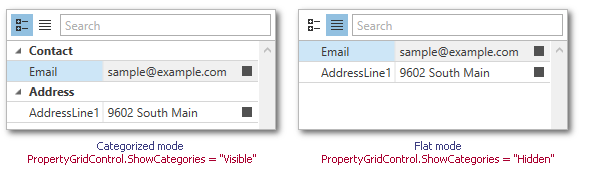
Users can switch between **categorized** and **flat** display modes at runtime using the [tool panel](/WPF/15624/controls-and-libraries/property-grid/visual-elements/tool-panel). To specify the default **category display mode**, use the [PropertyGridControl.ShowCategories](/WPF/DevExpress.Xpf.PropertyGrid.PropertyGridControl.ShowCategories) property. The image below demonstrates both display modes.
Set the [ExpandCategoriesWhenSelectedObjectChanged](/WPF/DevExpress.Xpf.PropertyGrid.PropertyGridControl.ExpandCategoriesWhenSelectedObjectChanged) property to **true** to automatically expand all categories when the user selects another object.
## Using Category Definitions
**Category definitions** represent the [category rows](/WPF/116320/controls-and-libraries/property-grid/visual-elements/category) and specify their appearance within the property grid. **Category definitions** are represented by the[CategoryDefinition](/WPF/DevExpress.Xpf.PropertyGrid.CategoryDefinition) objects that are stored within the [PropertyGridControl.PropertyDefinitions](/WPF/DevExpress.Xpf.PropertyGrid.PropertyGridControl.PropertyDefinitions) collection.
The following example demonstrates the [CategoryDefinition](/WPF/DevExpress.Xpf.PropertyGrid.CategoryDefinition) objects that specify the custom category headers.
- C#
- VB.NET
using System.ComponentModel;
...
public class Supplier {
    [Category("Info")]
    public int ID { get; set; }
    [Category("Info")]
    public string Name { get; set; }
    [Category("Contact")]
    public string Email { get; set; }
    [Category("Contact")]
    public string Phone { get; set; }
}

public class ViewModel {
    public Supplier DemoSupplier { get; set; }
    public ViewModel() {
        DemoSupplier = new Supplier()
        {
            ID = 0,
            Name = "Anita Benson",
            Email = "Anita_Benson@example.com",
            Phone = "7138638137"
        };
    }
}
Imports System.ComponentModel

Public Class Supplier
    <Category("Info")>
    Public Property ID As Integer
    <Category("Info")>
    Public Property Name As String
    <Category("Contact")>
    Public Property Email As String
    <Category("Contact")>
    Public Property Phone As String
End Class

Public Class ViewModel
    Public Property DemoSupplier As Supplier

    Public Sub New()
        DemoSupplier = New Supplier() With {
            .ID = 0,
            .Name = "Anita Benson",
            .Email = "Anita_Benson@example.com",
            .Phone = "7138638137"
        }
    End Sub
End Class
- XAML
<Window.DataContext>
    <local:ViewModel/>
</Window.DataContext>
...
<dxprg:PropertyGridControl SelectedObject="{Binding DemoSupplier}"
                           ShowProperties="All" ShowCategories="Visible">
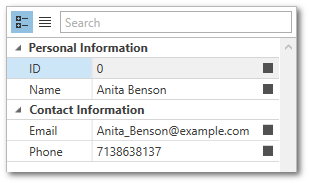
    <dxprg:CategoryDefinition Path="Info" Header="Personal Information"/>
    <dxprg:CategoryDefinition Path="Contact" Header="Contact Information"/>
</dxprg:PropertyGridControl>
The image below demonstrates the result.
## Tabbed View
To display each **category** in a separate tab, set the [PropertyGridControl.ShowCategories](/WPF/DevExpress.Xpf.PropertyGrid.PropertyGridControl.ShowCategories) property to **Tabbed**.
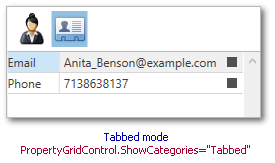
The following example demonstrates how to use the [CategoryDefinition](/WPF/DevExpress.Xpf.PropertyGrid.CategoryDefinition) objects to specify a glyph for each tab header.
- C#
- VB.NET
using System.ComponentModel;

public class Supplier {
    [Category("Info")]
    public int ID { get; set; }
    [Category("Info")]
    public string Name { get; set; }
    [Category("Contact")]
    public string Email { get; set; }
    [Category("Contact")]
    public string Phone { get; set; }
}

public class ViewModel {
    public Supplier DemoSupplier { get; set; }
    public ViewModel() {
        DemoSupplier = new Supplier()
        {
            ID = 0,
            Name = "Anita Benson",
            Email = "Anita_Benson@example.com",
            Phone = "7138638137"
        };
    }
}
Imports System.ComponentModel

Public Class Supplier
    <Category("Info")>
    Public Property ID As Integer
    <Category("Info")>
    Public Property Name As String
    <Category("Contact")>
    Public Property Email As String
    <Category("Contact")>
    Public Property Phone As String
End Class

Public Class ViewModel
    Public Property DemoSupplier As Supplier

    Public Sub New()
        DemoSupplier = New Supplier() With {
            .ID = 0,
            .Name = "Anita Benson",
            .Email = "Anita_Benson@example.com",
            .Phone = "7138638137"
        }
    End Sub
End Class
- XAML
<Window
        ...
        xmlns:dx="http://schemas.devexpress.com/winfx/2008/xaml/core">
<Window.DataContext>
    <local:ViewModel/>
</Window.DataContext>
...
<dxprg:PropertyGridControl SelectedObject="{Binding DemoSupplier}" ShowProperties="All" ShowCategories="Tabbed">
    <dxprg:CategoryDefinition Path="Info" Glyph="{dx:DXImage Image=Female_32x32.png}"/>
    <dxprg:CategoryDefinition Path="Contact" Glyph="{dx:DXImage Image=Contact_32x32.png}"/>
</dxprg:PropertyGridControl>
## Applying Mode
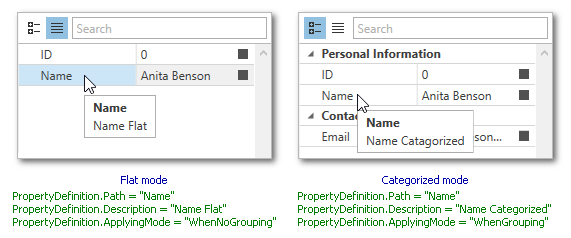
You can create different property definitions for each of the display modes. The [PropertyDefinitionBase.ApplyingMode](/WPF/DevExpress.Xpf.PropertyGrid.PropertyDefinitionBase.ApplyingMode) property specifies whether a property definition should be applied in the categorized or flat mode.
The example below demonstrates a property grid that is configured in the following way.
- The **ID** property is visible in both the **flat** and **categorized** display modes.
- The **Email** property is visible in the **categorized** mode only.
- The **Name** property has different descriptions in each of the display modes.
- XAML
<dxprg:PropertyGridControl SelectedObject="{Binding DemoSupplier}" ShowProperties="WithPropertyDefinitions">
    <dxprg:CategoryDefinition Path="Info" Header="Personal Information"/>
    <dxprg:CategoryDefinition Path="Contact" Header="Contact Information"/>

    <dxprg:PropertyDefinition Path="ID" Description="Customer's ID" ApplyingMode="Always"/>
    <dxprg:PropertyDefinition Path="Email" Description="Email" ApplyingMode="WhenGrouping"/>
    <dxprg:PropertyDefinition Path="Name" Description="Name Catagorized" ApplyingMode="WhenGrouping"/>
    <dxprg:PropertyDefinition Path="Name" Description="Name Flat" ApplyingMode="WhenNoGrouping"/>
</dxprg:PropertyGridControl>
### Limitation
If you have two definitions with equal Path property values and different [PropertyDefinitionBase.ApplyingModes](/WPF/DevExpress.Xpf.PropertyGrid.PropertyDefinitionBase.ApplyingMode), the [PropertyGridControl](/WPF/DevExpress.Xpf.PropertyGrid.PropertyGridControl) does not update its property definitions when you switch the [PropertyGridControl.ShowCategories](/WPF/DevExpress.Xpf.PropertyGrid.PropertyGridControl.ShowCategories) property’s value at runtime.
- XAML
<dxprg:PropertyGridControl SelectedObject="{Binding DemoSupplier}" ShowProperties="WithPropertyDefinitions">
    <dxprg:PropertyDefinition Path="Name" Description="Name Catagorized" ApplyingMode="WhenGrouping"/>
    <dxprg:PropertyDefinition Path="Name" Description="Name Flat" ApplyingMode="WhenNoGrouping"/>
</dxprg:PropertyGridControl>
You can declare a custom [PropertyGridControl](/WPF/DevExpress.Xpf.PropertyGrid.PropertyGridControl) descendant and override its `OnShowCategoriesChanged` method to force the [PropertyGridControl](/WPF/DevExpress.Xpf.PropertyGrid.PropertyGridControl) to regenerate its definitions when you change [ShowCategories](/WPF/DevExpress.Xpf.PropertyGrid.PropertyGridControl.ShowCategories) mode:
- C#
- VB.NET
public class MyPropertyGridControl : PropertyGridControl {
    protected override void OnShowCategoriesChanged(CategoriesShowMode oldValue) {
        base.OnShowCategoriesChanged(oldValue);
        this.DataController.ResetCache();
    }
}
Public Class MyPropertyGridControl
    Inherits PropertyGridControl

    Protected Overrides Sub OnShowCategoriesChanged(ByVal oldValue As CategoriesShowMode)
        MyBase.OnShowCategoriesChanged(oldValue)
        Me.DataController.ResetCache()
    End Sub
End Class
See Also
[Property Definitions](/WPF/15521/controls-and-libraries/property-grid/property-definitions)