# LookUpEdit | WPF Controls | DevExpress Documentation
The [lookup](/WPF/DevExpress.Xpf.Grid.LookUp.LookUpEdit) editor’s [StyleSettings](/WPF/DevExpress.Xpf.Editors.BaseEdit.StyleSettings) property allows you to fine-tune the editor. This property allows you to alter the appearance and behavior of a lookup editor, for example, by adding a search and selecting multiple items. To apply specific settings, assign the lookup’s [StyleSettings](/WPF/DevExpress.Xpf.Editors.BaseEdit.StyleSettings) property to one of the objects listed in the table below:
| Mode | Corresponding settings object | Description |
| --- | --- | --- |
| `LookUpEdit` | [LookUpEditStyleSettings](/WPF/DevExpress.Xpf.Grid.LookUp.LookUpEditStyleSettings) | Editor’s dropdown displays a grid. This is a default setting. |
| `SearchLookUpEdit` | [SearchLookUpEditStyleSettings](/WPF/DevExpress.Xpf.Grid.LookUp.SearchLookUpEditStyleSettings) | Editor’s dropdown displays a grid and a search box. |
| `MultiSelectLookUpEdit` | [MultiSelectLookUpEditStyleSettings](/WPF/DevExpress.Xpf.Grid.LookUp.MultiSelectLookUpEditStyleSettings) | Editor’s dropdown displays a grid that allows you to select multiple items. |
| `TokenLookUpEdit` | [TokenLookUpEditStyleSettings](/WPF/DevExpress.Xpf.Grid.LookUp.TokenLookUpEditStyleSettings) | Editor’s dropdown displays a grid that allows you to select multiple items.
Selected items appear as tokens. |
| `SearchTokenLookUpEdit` | [SearchTokenLookUpEditStyleSettings](/WPF/DevExpress.Xpf.Grid.LookUp.SearchTokenLookUpEditStyleSettings) | Editor’s dropdown displays a grid and a search box. Allows multiple item selection.
Selected items appear as tokens. |
Each of the settings objects has properties you can use to enable or disable the following grid features:
- Filtering ([LookUpEditStyleSettings.AllowColumnFiltering](/WPF/DevExpress.Xpf.Grid.LookUp.LookUpEditStyleSettings.AllowColumnFiltering))
- Grouping ([LookUpEditStyleSettings.AllowGrouping](/WPF/DevExpress.Xpf.Grid.LookUp.LookUpEditStyleSettings.AllowGrouping))
- Sorting ([LookUpEditStyleSettings.AllowSorting](/WPF/DevExpress.Xpf.Grid.LookUp.LookUpEditStyleSettings.AllowSorting))
The code example below shows a lookup editor in SearchLookUp mode with the grouping feature disabled:
- XAML
<dxg:LookUpEdit SeparatorString="; ">
    <dxg:LookUpEdit.StyleSettings>
        <dxg:SearchLookUpEditStyleSettings AllowGrouping="False"/>
    </dxg:LookUpEdit.StyleSettings>
</dxg:LookUpEdit>
The following sections describe different [LookUpEdit](/WPF/DevExpress.Xpf.Grid.LookUp.LookUpEdit) control settings:
## LookUpEdit
`LookUpEdit` is the default mode.
The editor’s dropdown displays a fully-functional grid that supports the following features:
- Single item selection
- Data filtering
- Data grouping
- Data sorting
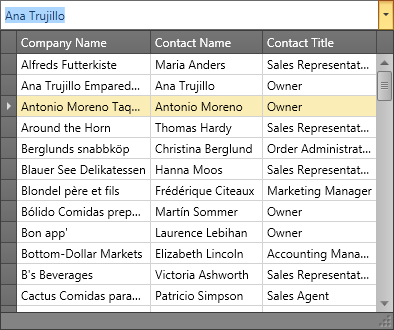
The following example adds a LookUpEdit to an app form:
- XAML
<Window ...
        xmlns:x="http://schemas.microsoft.com/winfx/2006/xaml"
        xmlns:dxg="http://schemas.devexpress.com/winfx/2008/xaml/grid"
        ...>
    <Grid VerticalAlignment="Center">
        <dxg:LookUpEdit ItemsSource="{x:Static local:Helper.Data}"
                        DisplayMember="Name"
                        IsTextEditable="False"
                        SeparatorString="; ">
            <dxg:LookUpEdit.StyleSettings>
                <dxg:LookUpEditStyleSettings AllowGrouping="False"/>
            </dxg:LookUpEdit.StyleSettings>
        </dxg:LookUpEdit>
    </Grid>
</Window>
Tip
For more information and examples, refer to the following help topics:
- [LookUpEdit](/WPF/DevExpress.Xpf.Grid.LookUp.LookUpEdit)
- [LookUpEditStyleSettings](/WPF/DevExpress.Xpf.Grid.LookUp.LookUpEditStyleSettings)
## SearchLookUpEdit
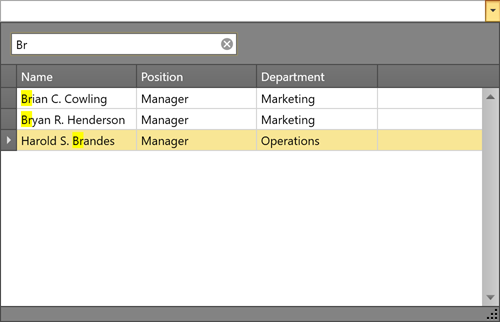
In addition to [LookUpEdit](/WPF/DevExpress.Xpf.Grid.LookUp.LookUpEdit) features, `SearchLookUpEdit` displays the embedded GridControl’s [search panel](/WPF/11403/controls-and-libraries/data-grid/visual-elements/common-elements/search-panel). This panel allows users to [find information](/WPF/11402/controls-and-libraries/data-grid/filtering-and-searching/search) within the data grid.
Tip
For more information and examples, refer to the following help topic: [SearchLookUpEditStyleSettings](/WPF/DevExpress.Xpf.Grid.LookUp.SearchLookUpEditStyleSettings)
## MultiSelectLookUpEdit
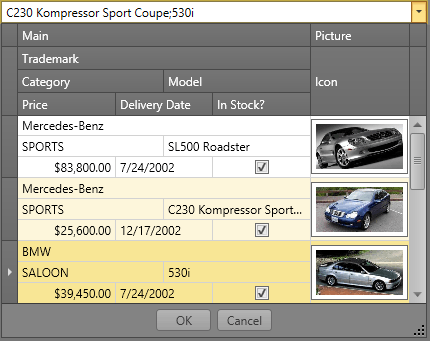
In addition to [LookUpEdit](/WPF/DevExpress.Xpf.Grid.LookUp.LookUpEdit) features, `MultiSelectLookUpEdit` supports multiple item selection.
Tip
For more information and examples, refer to the following help topic: [MultiSelectLookUpEditStyleSettings](/WPF/DevExpress.Xpf.Grid.LookUp.MultiSelectLookUpEditStyleSettings)
## TokenLookUpEdit
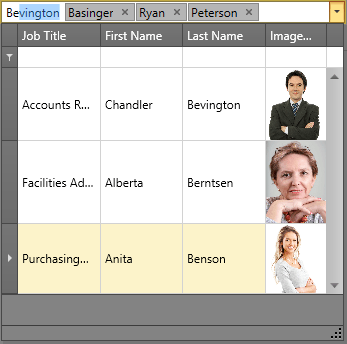
`TokenLookupEdit` mode is inspired by modern mail clients.
In addition to LookUpEdit features, `TokenLookupEdit` supports the following:
- Multiple item selection
- Selected items appear as tokens
Tip
For more information and examples, refer to the following help topic: [TokenLookUpEditStyleSettings](/WPF/DevExpress.Xpf.Grid.LookUp.TokenLookUpEditStyleSettings)
## SearchTokenLookUpEdit
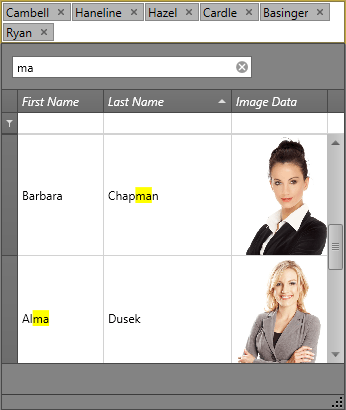
`SearchTokenLookupEdit` mode is inspired by modern mail clients.
In addition to LookUpEdit features, `SearchTokenLookupEdit` supports the following:
- Data search
- Multiple item selection
- Selected items appear as tokens
Tip
For more information and examples, refer to the following help topic: [SearchTokenLookUpEditStyleSettings](/WPF/DevExpress.Xpf.Grid.LookUp.SearchTokenLookUpEditStyleSettings).
## LookUpEdit Modes Comparison
The table below compares the features of different LookUpEdit operation modes:
| | Grouping | Filtering | Sorting | Single Item Selection | Multiple Item Selection^[1]^ | Search | Tokens | Text Editing |
| --- | --- | --- | --- | --- | --- | --- | --- | --- |
| LookUpEdit |  |  |  |  |  |  |  |  |
| SearchLookUpEdit |  |  |  |  |  |  |  |  |
| MultiselectLookUpEdit |  |  |  |  |  |  |  |  |
| TokenLookUpEdit |  |  |  |  |  |  |  |  |
| SearchTokenLookUpEdit |  |  |  |  |  |  |  |  |
## More Examples
- [Enable Multiple Selection Mode](https://github.com/DevExpress-Examples/wpf-lookupedit-enable-multiple-selection-mode)
- [Customize the Embedded Data Grid](https://github.com/DevExpress-Examples/wpf-lookupedit-customize-the-embedded-data-grid)
- [Display a TreeList as Popup Content](https://github.com/DevExpress-Examples/wpf-lookupedit-display-treelist-as-popup-content)
- [Filter by Multiple Columns](https://github.com/DevExpress-Examples/wpf-lookupedit-filter-by-multiple-columns)
- [Display CheckBoxes for Multiple Selection Mode](https://github.com/DevExpress-Examples/wpf-lookupedit-display-checkboxes-for-multiple-selection-mode)
- [Process New Values](https://github.com/DevExpress-Examples/wpf-lookupedit-process-new-values)
Footnotes
1. Refer to the following help topic for more information: [Multiple Selection in ComboBoxEdit, LookUpEdit, and ListBoxEdit](/WPF/405078/controls-and-libraries/data-editors/implement-multi-selection).
See Also
[Editor Operation Modes](/WPF/116526/controls-and-libraries/data-editors/common-features/editor-operation-modes)
[SeparatorString](/WPF/DevExpress.Xpf.Editors.LookUpEditBase.SeparatorString)