# ListBoxEdit | WPF Controls | DevExpress Documentation
You can change the operation mode of a list box editor by using the [BaseEdit.StyleSettings](/WPF/DevExpress.Xpf.Editors.BaseEdit.StyleSettings) property.
To apply specific settings, assign the [BaseEdit.StyleSettings](/WPF/DevExpress.Xpf.Editors.BaseEdit.StyleSettings) property of a list box editor to one of the objects listed in the table below.
| Operation Mode | Settings object | Description |
| --- | --- | --- |
| Simple item list | [ListBoxEditStyleSettings](/WPF/DevExpress.Xpf.Editors.ListBoxEditStyleSettings) | Standard list box. This is the default operation mode.
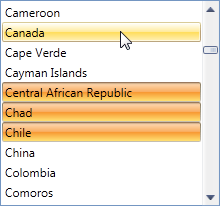 |
| Checked list box | [CheckedListBoxEditStyleSettings](/WPF/DevExpress.Xpf.Editors.CheckedListBoxEditStyleSettings) | Checked item list. Allows multiple item selection.
 |
| Radio button list box | [RadioListBoxEditStyleSettings](/WPF/DevExpress.Xpf.Editors.RadioListBoxEditStyleSettings) | A list with radio buttons next to the items. Allows single item selection.
 |
Refer to the following help topic for more information: [Multiple Selection in ComboBoxEdit, LookUpEdit, and ListBoxEdit](/WPF/405078/controls-and-libraries/data-editors/implement-multi-selection).
See Also
[Editor Operation Modes](/WPF/116526/controls-and-libraries/data-editors/common-features/editor-operation-modes)