# Search Panel | WPF Controls | DevExpress Documentation
The built-in **Search Panel** allows users to search against multiple columns.
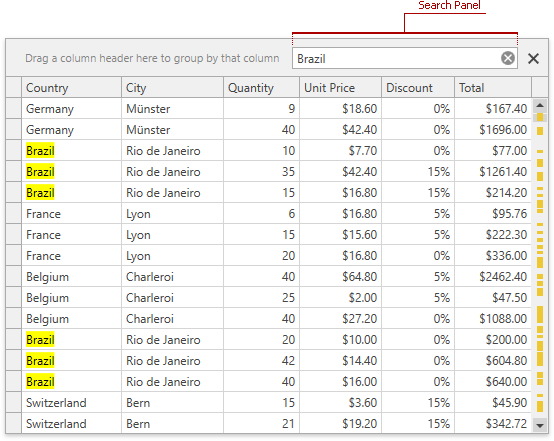
[Run Demo: Search Panel - Filter Mode](dxdemo://Wpf/DXGrid/MainDemo/FilteringModule?SearchPanelFilterMode)
[Run Demo: Search Panel - Highlight Mode](dxdemo://Wpf/DXGrid/MainDemo/FilteringModule?SearchPanelHighlightMode)
The sections below list properties that affect Search Panel element behavior and appearance.
## Visibility
- [DataViewBase.ShowSearchPanelMode](/WPF/DevExpress.Xpf.Grid.DataViewBase.ShowSearchPanelMode)
- Gets or sets a value that specifies when the [Search Panel](/WPF/11403/controls-and-libraries/data-grid/visual-elements/common-elements/search-panel) is displayed.
- [DataViewBase.ActualShowSearchPanel](/WPF/DevExpress.Xpf.Grid.DataViewBase.ActualShowSearchPanel)
- Gets whether the [Search Panel](/WPF/11403/controls-and-libraries/data-grid/visual-elements/common-elements/search-panel) is displayed within a View. This is a dependency property.
## Position
The Search Panel is merged with the [Group Panel](/WPF/6215/controls-and-libraries/data-grid/visual-elements/common-elements/group-panel).
Set the [GridViewBase.SearchPanelPosition](/WPF/DevExpress.Xpf.Grid.GridViewBase.SearchPanelPosition) property to [SearchPanelPosition.OverGroupPanel](/WPF/DevExpress.Xpf.Grid.SearchPanelPosition) to display the **Search Panel** over the [Group Panel](/WPF/6215/controls-and-libraries/data-grid/visual-elements/common-elements/group-panel).
## Parse Modes
- [DataViewBase.SearchPanelParseMode](/WPF/DevExpress.Xpf.Grid.DataViewBase.SearchPanelParseMode)
- Gets or sets a mode that specifies how the search string is parsed. This is a dependency property.
## Result Info
- [DataViewBase.ShowSearchPanelResultInfo](/WPF/DevExpress.Xpf.Grid.DataViewBase.ShowSearchPanelResultInfo)
- Gets or sets whether to show information about search results in the search panel.
## Search Modes and Delay
- [DataViewBase.SearchPanelFindMode](/WPF/DevExpress.Xpf.Grid.DataViewBase.SearchPanelFindMode)
- Gets or sets whether data searching starts automatically, or must be started manually. This is a dependency property.
- [DataViewBase.SearchDelay](/WPF/DevExpress.Xpf.Grid.DataViewBase.SearchDelay)
- Gets or sets the amount of time in milliseconds, after which a data search is initiated (in an automatic find mode). This is a dependency property.
## Search String
- [DataViewBase.SearchString](/WPF/DevExpress.Xpf.Grid.DataViewBase.SearchString)
- Gets or sets the search string specified within the [Search Panel](/WPF/11403/controls-and-libraries/data-grid/visual-elements/common-elements/search-panel). This is a dependency property.
## Search Results
- [DataViewBase.SearchPanelHighlightResults](/WPF/DevExpress.Xpf.Grid.DataViewBase.SearchPanelHighlightResults)
- Gets or sets whether to highlight search results within located records. This is a dependency property.
## Filtering
- [DataViewBase.SearchPanelAllowFilter](/WPF/DevExpress.Xpf.Grid.DataViewBase.SearchPanelAllowFilter)
- Gets or sets whether the grid displays only those records that match the search criteria. This is a dependency property.
- [DataViewBase.SearchPanelFindFilter](/WPF/DevExpress.Xpf.Grid.DataViewBase.SearchPanelFindFilter)
- Gets or sets the type of the comparison operator used to create filter conditions. This is a dependency property.
## Buttons
- [DataViewBase.ShowSearchPanelCloseButton](/WPF/DevExpress.Xpf.Grid.DataViewBase.ShowSearchPanelCloseButton)
- Gets or sets whether to display the **Close** button within the [Search Panel](/WPF/11403/controls-and-libraries/data-grid/visual-elements/common-elements/search-panel).
- [DataViewBase.ShowSearchPanelFindButton](/WPF/DevExpress.Xpf.Grid.DataViewBase.ShowSearchPanelFindButton)
- Gets or sets whether to display the **Find** button within the [Search Panel](/WPF/11403/controls-and-libraries/data-grid/visual-elements/common-elements/search-panel).
- [DataViewBase.ShowSearchPanelMRUButton](/WPF/DevExpress.Xpf.Grid.DataViewBase.ShowSearchPanelMRUButton)
- Gets or sets whether a button used to invoke the MRU search dropdown list is displayed within the [Search Panel](/WPF/11403/controls-and-libraries/data-grid/visual-elements/common-elements/search-panel). This is a dependency property.
- [DataViewBase.ShowSearchPanelNavigationButtons](/WPF/DevExpress.Xpf.Grid.DataViewBase.ShowSearchPanelNavigationButtons)
- Gets or sets whether to show navigation buttons in the grid’s [search panel](/WPF/11403/controls-and-libraries/data-grid/visual-elements/common-elements/search-panel).
## Null Text
- [DataViewBase.SearchPanelNullText](/WPF/DevExpress.Xpf.Grid.DataViewBase.SearchPanelNullText)
- Gets or sets the text displayed within the search panel edit box when the search text is **null**. This is a dependency property.
## Alignment
- [DataViewBase.SearchPanelHorizontalAlignment](/WPF/DevExpress.Xpf.Grid.DataViewBase.SearchPanelHorizontalAlignment)
- Gets or sets the [Search Panel](/WPF/11403/controls-and-libraries/data-grid/visual-elements/common-elements/search-panel)‘s alignment. This is a dependency property.
## Custom Content
Add custom UI elements (a label, icon, or button) next to the search box.
- [GridDataViewBase.SearchPanelLeftContentTemplate](/WPF/DevExpress.Xpf.Grid.GridDataViewBase.SearchPanelLeftContentTemplate)
- Gets or sets the template used to display additional UI elements to the left of the [Search Panel](/WPF/11403/controls-and-libraries/data-grid/visual-elements/common-elements/search-panel). This is a dependency property.
- [GridDataViewBase.SearchPanelRightContentTemplate](/WPF/DevExpress.Xpf.Grid.GridDataViewBase.SearchPanelRightContentTemplate)
- Gets or sets the template designed to display additional UI elements to the right of the [Search Panel](/WPF/11403/controls-and-libraries/data-grid/visual-elements/common-elements/search-panel). This is a dependency property.
## Width
Constrain the Search Panel width to a specific range (in pixels).
- [GridDataViewBase.SearchPanelMinWidth](/WPF/DevExpress.Xpf.Grid.GridDataViewBase.SearchPanelMinWidth)
- Gets or sets the [Search Panel](/WPF/11403/controls-and-libraries/data-grid/visual-elements/common-elements/search-panel) minimum width (in pixels). This is a dependency property.
- [GridDataViewBase.SearchPanelMaxWidth](/WPF/DevExpress.Xpf.Grid.GridDataViewBase.SearchPanelMaxWidth)
- Gets or sets the [Search Panel](/WPF/11403/controls-and-libraries/data-grid/visual-elements/common-elements/search-panel) maximum width (in pixels). This is a dependency property.
## Keyboard Operations
- Ctrl+F - Invokes the Search Panel (if the [DataViewBase.ShowSearchPanelMode](/WPF/DevExpress.Xpf.Grid.DataViewBase.ShowSearchPanelMode) property is set to [ShowSearchPanelMode.Default](/WPF/DevExpress.Xpf.Grid.ShowSearchPanelMode)).
- Esc - Clears the search box. If the search box is empty, press Esc to close the Search Panel.
- Down Arrow - Moves focus from the Search Panel to the grid’s data area.
See Also
[Search](/WPF/11402/controls-and-libraries/data-grid/filtering-and-searching/search)
[Data Grid in Details](/WPF/119851/controls-and-libraries/data-grid/master-detail/data-grid-in-details#enable-search-operations-in-detail-grid)