# Bind to Hierarchical Data Structure | WPF Controls | DevExpress Documentation
A hierarchical data structure is a set of nested objects where a ***children*** field contains child records. Parents and children can be of different object types.
The [DataControlBase.ItemsSource](/WPF/DevExpress.Xpf.Grid.DataControlBase.ItemsSource) property contains only data items that correspond to [root nodes](/WPF/9615/controls-and-libraries/data-grid/grid-view-data-layout/nodes/nodes-overview). Use the following techniques to make the [TreeListView](/WPF/DevExpress.Xpf.Grid.TreeListView) work with the hierarchical data structure:
- Child Nodes Path - Set a path to the ***children*** field. Use this technique only when child and parent fields have the same object type.
- Child Nodes Selector - Create a selector that returns node children. You can use this technique for different object types.
- Asynchronous Child Nodes Selector - Fetch child nodes in a background thread to keep the [TreeListView](/WPF/DevExpress.Xpf.Grid.TreeListView) responsive to user actions.
- Hierarchical Data Templates - Create a template for different data types.
## Child Nodes Path
[View Example: Implement the Child Nodes Path](https://github.com/DevExpress-Examples/wpf-treelist-implement-childnodespath)
Use the Child Nodes Path to bind the [TreeListView](/WPF/DevExpress.Xpf.Grid.TreeListView) to a collection if all objects have the same ***children*** field. An example of such a structure is shown below:
- C#
- VB.NET
public class BaseObject {
    public string Name { get; set; }
    public String Executor { get; set; }
    public ObservableCollection<Task> Tasks { get; set; }
}

public class ProjectObject : BaseObject {}

public class Task : BaseObject {
    public string State { get; set; }
}
Public Class BaseObject
    Public Property Name As String
    Public Property Executor As String
    Public Property Tasks As ObservableCollection(Of Task)
End Class

Public Class ProjectObject
    Inherits BaseObject
End Class

Public Class Task
    Inherits BaseObject

    Public Property State As String
End Class
1. Set the [TreeListView.ChildNodesPath](/WPF/DevExpress.Xpf.Grid.TreeListView.ChildNodesPath) property to the ***children*** field name.
2. Set the [TreeListView.TreeDerivationMode](/WPF/DevExpress.Xpf.Grid.TreeListView.TreeDerivationMode) property to **ChildNodesSelector**.
In the code sample below, the **Tasks** field is the ***children*** field:
- XAML
<dxg:TreeListControl Name="treeListView1" ItemsSource="{Binding DataItems}">
    <dxg:TreeListControl.Columns>
        <dxg:TreeListColumn FieldName="Name" AllowSorting="True" />
        <dxg:TreeListColumn FieldName="Executor" AllowSorting="True" />
        <dxg:TreeListColumn FieldName="State" AllowSorting="True" />
    </dxg:TreeListControl.Columns>
    <dxg:TreeListControl.View>
        <dxg:TreeListView TreeDerivationMode="ChildNodesSelector" ChildNodesPath="Tasks"/>
    </dxg:TreeListControl.View>
</dxg:TreeListControl>

Set the [TreeListView.AllowChildNodeSourceUpdates](/WPF/DevExpress.Xpf.Grid.TreeListView.AllowChildNodeSourceUpdates) property to **true** to update child nodes when you set the collection property to a new value.
## Child Nodes Selector
[Run Demo: Child Nodes Selector](dxdemo://Wpf/DXTreeList/MainDemo/BuildTreeViaChildNodesSelector) [View Example: Use the Child Nodes Selector to Display Hierarchical Data](https://github.com/DevExpress-Examples/wpf-treelist-use-child-nodes-selector-to-display-hierarchical-data)
Use the Child Nodes Selector to create a hierarchical data structure in the [TreeListView](/WPF/DevExpress.Xpf.Grid.TreeListView). An example of this structure is shown below:
- C#
- VB.NET
public class ProjectObject : BaseObject {
    public ObservableCollection<ProjectStage> Stages { get; set; }
}

public class ProjectStage : BaseObject {
    public ObservableCollection<Task> Tasks { get; set; }
}

public class Task : BaseObject {
    State state;
    // ...
}
Public Class ProjectObject
    Inherits BaseObject

    Public Property Stages As ObservableCollection(Of ProjectStage)
End Class

Public Class ProjectStage
    Inherits BaseObject

    Public Property Tasks As ObservableCollection(Of Task)
End Class

Public Class Task
    Inherits BaseObject

    Private state As State
    ' ...
End Class
1. Create a selector class that implements [IChildNodesSelector](/WPF/DevExpress.Xpf.Grid.IChildNodesSelector), and override the [SelectChildren(Object)](/WPF/DevExpress.Xpf.Grid.IChildNodesSelector.SelectChildren%28System.Object%29) method that returns node children.
For the *Project-Stage-Task* class structure, the selector class is as follows:
- C#
- VB.NET
public class CustomChildrenSelector : IChildNodesSelector {
    public IEnumerable SelectChildren(object item) {
        if (item is ProjectStage)
            return ((ProjectStage)item).Tasks;
        else if (item is ProjectObject)
            return ((ProjectObject)item).Stages;
        return null;
    }
}
Public Class CustomChildrenSelector
    Implements IChildNodesSelector

    Public Function SelectChildren(ByVal item As Object) As IEnumerable Implements IChildNodesSelector.SelectChildren
        If TypeOf item Is ProjectStage Then
            Return TryCast(item, ProjectStage).Tasks
        ElseIf TypeOf item Is ProjectObject Then
            Return TryCast(item, ProjectObject).Stages
        End If

        Return Nothing
    End Function
End Class
2. Assign the Child Nodes Selector to the [TreeListView.ChildNodesSelector](/WPF/DevExpress.Xpf.Grid.TreeListView.ChildNodesSelector) property.
3. Set the [TreeListView.TreeDerivationMode](/WPF/DevExpress.Xpf.Grid.TreeListView.TreeDerivationMode) property to **ChildNodesSelector**.
- XAML
<dxg:TreeListControl ...>
    <dxg:TreeListControl.Resources>
        <local:CustomChildrenSelector x:Key="childrenSelector"/>
    </dxg:TreeListControl.Resources>
    <dxg:TreeListControl.View>
        <dxg:TreeListView TreeDerivationMode="ChildNodesSelector"
                          ChildNodesSelector="{StaticResource childrenSelector}"/>
    </dxg:TreeListControl.View>
</dxg:TreeListControl>
Tip
If all objects have the same ***children*** field, assign its name to the [TreeListView.ChildNodesPath](/WPF/DevExpress.Xpf.Grid.TreeListView.ChildNodesPath) property. Otherwise, create a Child Nodes Selector.
## Fetch Nodes Asynchronously
[Run Demo: Asynchronous Data Loading](dxdemo://Wpf/DXTreeList/MainDemo/DynamicNodeLoading) [View Example: Load Nodes Asynchronously Without Locking the Application's UI](https://github.com/DevExpress-Examples/wpf-treelist-load-nodes-asynchronously)
If your Child Nodes Selector returns a large number of nodes, the fetch operation could freeze the application. To avoid this, create an **Asynchronous Child Nodes Selector** and fetch child nodes in a background thread. During fetch operations, parent nodes display loading indicators and the [TreeListView](/WPF/DevExpress.Xpf.Grid.TreeListView) remains responsive to user actions.
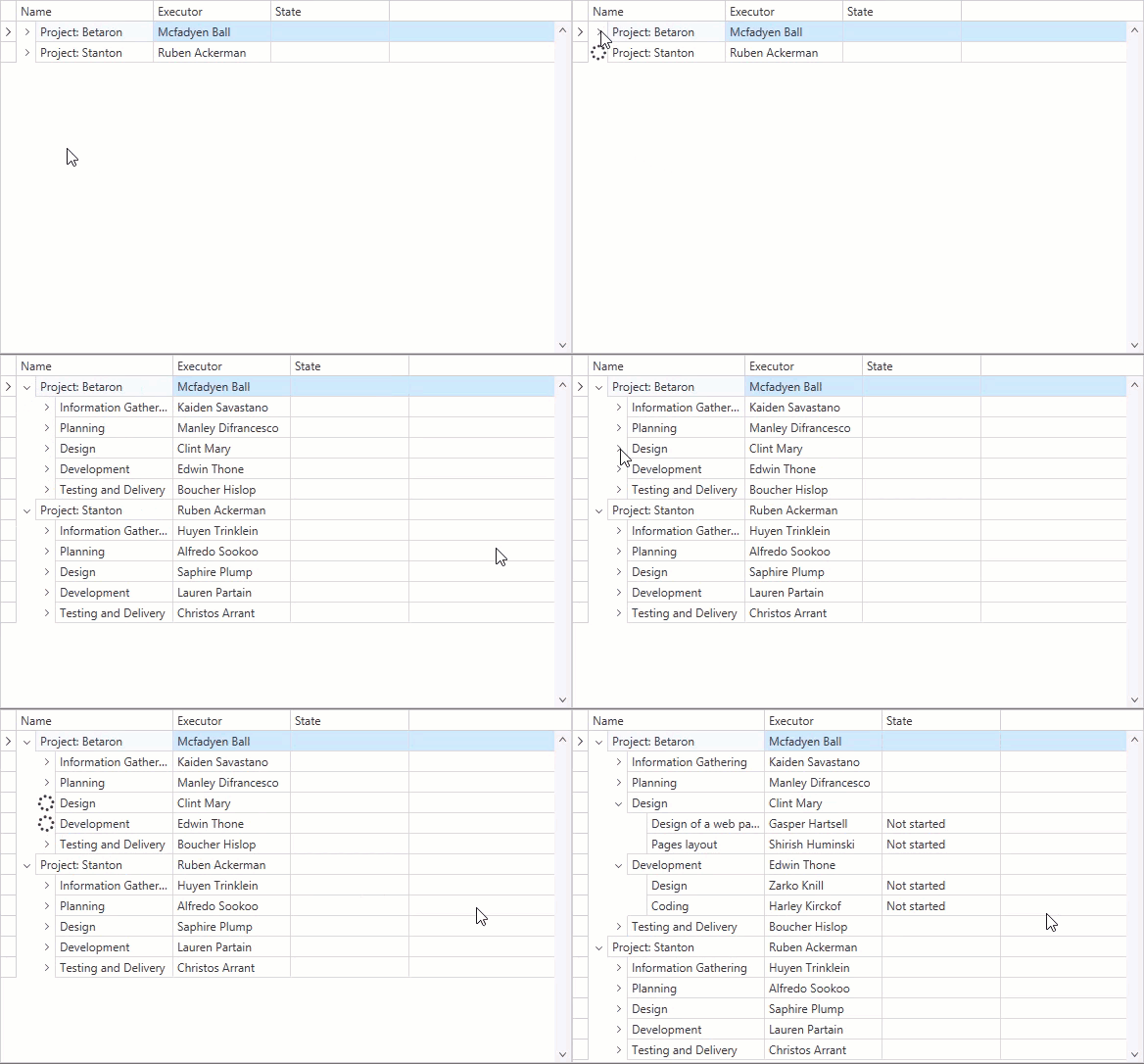
1. Create a selector that implements the [IAsyncChildNodesSelector](/WPF/DevExpress.Xpf.Grid.IAsyncChildNodesSelector) interface and override the [HasChildNode](/WPF/DevExpress.Xpf.Grid.IAsyncChildNodesSelector.HasChildNode%28System.Object-System.Threading.CancellationToken%29) and [SelectChildrenAsync](/WPF/DevExpress.Xpf.Grid.IAsyncChildNodesSelector.SelectChildrenAsync%28System.Object-System.Threading.CancellationToken%29) methods:
- C#
- VB.NET
public class CustomChildrenSelector : IAsyncChildNodesSelector {
    public Task<bool> HasChildNode(object item, CancellationToken token) {
        return Task.Run(async () => {
            await Task.Delay(250);
            return !(item is StageTask);
        });
    }
    public IEnumerable SelectChildren(object item) {
        throw new NotImplementedException();
    }
    public Task<IEnumerable> SelectChildrenAsync(object item, CancellationToken token) {
        return Task.Run(async () => {
            await Task.Delay(1000);
            return SelectChildNodes(item);
        });
    }
    public IEnumerable SelectChildNodes(object item) {
        if (item is ProjectStage)
            return (item as ProjectStage).StageTasks;
        else if (item is ProjectObject)
            return (item as ProjectObject).ProjectStages;
        return null;
    }
}
Public Class CustomChildrenSelector
    Implements IAsyncChildNodesSelector

    Public Function HasChildNode(ByVal item As Object, ByVal token As CancellationToken) As Task(Of Boolean) Implements IAsyncChildNodesSelector.HasChildNode
        Return Task.Run(Async Function()
            Await Task.Delay(250)
            Return Not(TypeOf item Is StageTask)
        End Function)
    End Function

    Public Function SelectChildren(ByVal item As Object) As IEnumerable Implements IChildNodesSelector.SelectChildren
        Throw New NotImplementedException()
    End Function

    Public Function SelectChildrenAsync(ByVal item As Object, ByVal token As CancellationToken) As Task(Of IEnumerable) Implements IAsyncChildNodesSelector.SelectChildrenAsync
        Return Task.Run(Async Function()
            Await Task.Delay(1000)
            Return SelectChildNodes(item)
        End Function)
    End Function

    Public Function SelectChildNodes(ByVal item As Object) As IEnumerable
        If TypeOf item Is ProjectStage Then
            Return TryCast(item, ProjectStage).StageTasks
        ElseIf TypeOf item Is ProjectObject Then
            Return TryCast(item, ProjectObject).ProjectStages
        End If
        Return Nothing
    End Function
End Class
2. Assign the Child Nodes Selector to the [TreeListView.ChildNodesSelector](/WPF/DevExpress.Xpf.Grid.TreeListView.ChildNodesSelector) property.
3. Set the [TreeListView.TreeDerivationMode](/WPF/DevExpress.Xpf.Grid.TreeListView.TreeDerivationMode) property to `ChildNodesSelector`.
- XAML
<dxg:TreeListControl ...>
    <dxg:TreeListControl.Resources>
        <local:CustomChildrenSelector x:Key="childrenSelector"/>
    </dxg:TreeListControl.Resources>
    <dxg:TreeListControl.View>
        <dxg:TreeListView TreeDerivationMode="ChildNodesSelector"
                          ChildNodesSelector="{StaticResource childrenSelector}"/>
    </dxg:TreeListControl.View>
</dxg:TreeListControl>
The asynchronous child nodes selector does not fetch nodes if the [TreeListView.EnableDynamicLoading](/WPF/DevExpress.Xpf.Grid.TreeListView.EnableDynamicLoading) property is set to `false`.
## Hierarchical Data Templates
[Run Demo: Hierarchical Data Templates](dxdemo://Wpf/DXTreeList/MainDemo/BuildTreeViaHierarchicalDataTemplate) [View Example: Use Hierarchical Data Templates to Build a Tree](https://github.com/DevExpress-Examples/wpf-treelist-use-hierarchical-data-templates-to-build-a-tree)
You can use templates to create a hierarchical data structure in the [TreeListView](/WPF/DevExpress.Xpf.Grid.TreeListView). An example of this structure is shown below:
- C#
- VB.NET
public class ProjectObject : BaseObject {
    public ObservableCollection<ProjectStage> Stages { get; set; }
}

public class ProjectStage : BaseObject {
    public ObservableCollection<Task> Tasks { get; set; }
}

public class Task : BaseObject {
    State state;
    // ...
}
Public Class ProjectObject
    Inherits BaseObject

    Public Property Stages As ObservableCollection(Of ProjectStage)
End Class

Public Class ProjectStage
    Inherits BaseObject

    Public Property Tasks As ObservableCollection(Of Task)
End Class

Public Class Task
    Inherits BaseObject

    Private state As State
    ' ...
End Class
If all objects have the same ***children*** field, create a hierarchical data template and assign it to the [TreeListView.DataRowTemplate](/WPF/DevExpress.Xpf.Grid.TreeListView.DataRowTemplate) property. You can put hierarchical data templates into resources. Specify the data type to which a template should be applied:
- XAML
<ResourceDictionary>
    <HierarchicalDataTemplate DataType="{x:Type local:ProjectObject}" ItemsSource="{Binding Path=Stages}" />
    <HierarchicalDataTemplate DataType="{x:Type local:ProjectStage}" ItemsSource="{Binding Path=Tasks}" />
</ResourceDictionary>

<dxg:TreeListControl.View>
    <dxg:TreeListView TreeDerivationMode="HierarchicalDataTemplate" />
</dxg:TreeListControl.View>
If all objects have different ***children*** fields:
1. Create a template selector that implements the ***System.Windows.Controls.DataTemplateSelector*** and overrides the **SelectTemplate** method.
- XAML
<Window.Resources>
    <ResourceDictionary>
        <local:CustomHierarchicalDataTemplateSelector x:Key="selector">
            <local:CustomHierarchicalDataTemplateSelector.ProjectDataTemplate>
                <HierarchicalDataTemplate ItemsSource="{Binding Path=Stages}" />
            </local:CustomHierarchicalDataTemplateSelector.ProjectDataTemplate>
            <local:CustomHierarchicalDataTemplateSelector.ProjectStageDataTemplate>
                <HierarchicalDataTemplate ItemsSource="{Binding Path=Tasks}" />
            </local:CustomHierarchicalDataTemplateSelector.ProjectStageDataTemplate>
        </local:CustomHierarchicalDataTemplateSelector>
    </ResourceDictionary>
</Window.Resources>
- C#
- VB.NET
public class CustomHierarchicalDataTemplateSelector : DataTemplateSelector {

    public HierarchicalDataTemplate ProjectDataTemplate { get; set; }
    public HierarchicalDataTemplate ProjectStageDataTemplate { get; set; }

    public override System.Windows.DataTemplate SelectTemplate(object item, System.Windows.DependencyObject container) {
        var rowData = item as TreeListRowData;
        var element = rowData.Row;
        if (element is ProjectObject)
            return ProjectDataTemplate;
        if (element is ProjectStage)
            return ProjectStageDataTemplate;
        return null;
    }
}
Public Class CustomHierarchicalDataTemplateSelector
    Inherits DataTemplateSelector

    Public Property ProjectDataTemplate As HierarchicalDataTemplate
    Public Property ProjectStageDataTemplate As HierarchicalDataTemplate

    Public Overrides Function SelectTemplate(ByVal item As Object, ByVal container As System.Windows.DependencyObject) As System.Windows.DataTemplate
        Dim rowData = TryCast(item, TreeListRowData)
        Dim element = rowData.Row
        If TypeOf element Is ProjectObject Then Return ProjectDataTemplate
        If TypeOf element Is ProjectStage Then Return ProjectStageDataTemplate
        Return Nothing
    End Function
End Class
2. Assign the template selector to the [TreeListView.DataRowTemplateSelector](/WPF/DevExpress.Xpf.Grid.TreeListView.DataRowTemplateSelector) property.
3. Set the [TreeListView.TreeDerivationMode](/WPF/DevExpress.Xpf.Grid.TreeListView.TreeDerivationMode) property to **HierarchicalDataTemplate**.
- XAML
<dxg:TreeListControl.View>
    <dxg:TreeListView DataRowTemplateSelector="{StaticResource selector}"
                      TreeDerivationMode="HierarchicalDataTemplate" />
</dxg:TreeListControl.View>
Note
- First, the [TreeListView](/WPF/DevExpress.Xpf.Grid.TreeListView) verifies its [TreeListView.DataRowTemplateSelector](/WPF/DevExpress.Xpf.Grid.TreeListView.DataRowTemplateSelector) property. If the specified node selector returns **null**, or the [TreeListView.DataRowTemplateSelector](/WPF/DevExpress.Xpf.Grid.TreeListView.DataRowTemplateSelector) property is not specified, it uses a template the [TreeListView.DataRowTemplate](/WPF/DevExpress.Xpf.Grid.TreeListView.DataRowTemplate) property specifies. If this property is not specified, an implicit hierarchical data template is used.
- If the **HierarchicalDataTemplate** is defined for a node, its **ItemTemplate** and **ItemTemplateSelector** properties take precedence over the [TreeListView.DataRowTemplate](/WPF/DevExpress.Xpf.Grid.TreeListView.DataRowTemplate) and [TreeListView.DataRowTemplateSelector](/WPF/DevExpress.Xpf.Grid.TreeListView.DataRowTemplateSelector) properties.
## Related API
### Sort and Filter in Hierarchical Binding Mode
When the [TreeListView](/WPF/DevExpress.Xpf.Grid.TreeListView) is in hierarchical binding mode, users can sort and filter values if object types are the same. Set the [TreeListView.AutoDetectColumnTypeInHierarchicalMode](/WPF/DevExpress.Xpf.Grid.TreeListView.AutoDetectColumnTypeInHierarchicalMode) property to **true** to allow sorting/filtering (enabled by default).
### Control whether to Create Child Nodes
You can control whether to create child nodes for a node. The following example shows how to prevent the [TreeListView](/WPF/DevExpress.Xpf.Grid.TreeListView) from creating child nodes for the **Information Gathering** node:

[View Example: Control whether to Create Child Nodes](https://github.com/DevExpress-Examples/wpf-tree-list-control-whether-to-create-child-nodes)
1. In a data source, create a field that determines whether a node has children (the **HasChildNodes** field in the code sample below):
- C#
- VB.NET
public class BaseObject {
    public string Name { get; set; }
    public string Executor { get; set; }
    public ObservableCollection<Task> Tasks { get; set; }
    public bool HasChildNodes { get; set; }
}

public class ProjectObject : BaseObject { }

public class Task : BaseObject {
    public string State { get; set; }
}

public class ViewModel {
    ObservableCollection<ProjectObject> InitData() {
        ObservableCollection<ProjectObject> projects = new ObservableCollection<ProjectObject>();

        ProjectObject betaronProject = new ProjectObject() { Name = "Project: Betaron", Executor = "Mcfadyen Ball", Tasks = new ObservableCollection<Task>(), HasChildNodes = true };

        Task Task11 = new Task() { Name = "Information Gathering", Executor = "Kaiden Savastano", Tasks = new ObservableCollection<Task>(), HasChildNodes = false };
        Task11.Tasks.Add(new Task() { Name = "Market research", Executor = "Carmine Then", State = "Completed", HasChildNodes = false });
        Task11.Tasks.Add(new Task() { Name = "Making specification", Executor = "Seto Kober", State = "In progress", HasChildNodes = false });

        Task Task12 = new Task() { Name = "Planning", Executor = "Manley Difrancesco", Tasks = new ObservableCollection<Task>(), HasChildNodes = true };
        Task12.Tasks.Add(new Task() { Name = "Documentation", Executor = "Martez Gollin", State = "Not started", HasChildNodes = true });

        // ...

        ProjectObject stantoneProject = new ProjectObject() { Name = "Project: Stanton", Executor = "Ruben Ackerman", Tasks = new ObservableCollection<Task>(), HasChildNodes = true };

        Task Task21 = new Task() { Name = "Information Gathering", Executor = "Huyen Trinklein", Tasks = new ObservableCollection<Task>(), HasChildNodes = false };
        Task21.Tasks.Add(new Task() { Name = "Market research", Executor = "Tanner Crittendon", State = "Completed", HasChildNodes = false });
        Task21.Tasks.Add(new Task() { Name = "Making specification", Executor = "Carmine Then", State = "Completed", HasChildNodes = false });

        Task Task22 = new Task() { Name = "Planning", Executor = "Alfredo Sookoo", Tasks = new ObservableCollection<Task>(), HasChildNodes = true };
        Task22.Tasks.Add(new Task() { Name = "Documentation", Executor = "Gorf Wobbe", State = "Completed", HasChildNodes = true });

        // ...
    }
}
Public Class BaseObject
    Public Property Name As String
    Public Property Executor As String
    Public Property Tasks As ObservableCollection(Of Task)
    Public Property HasChildNodes As Boolean
End Class

Public Class ProjectObject
    Inherits BaseObject
End Class

Public Class Task
    Inherits BaseObject

    Public Property State As String
End Class

Public Class ViewModel
    Private Function InitData() As ObservableCollection(Of ProjectObject)
        Dim projects As ObservableCollection(Of ProjectObject) = New ObservableCollection(Of ProjectObject)()

        Dim betaronProject As ProjectObject = New ProjectObject() With { .Name = "Project: Betaron", .Executor = "Mcfadyen Ball", .Tasks = New ObservableCollection(Of Task)(), .HasChildNodes = True }
        Dim Task11 As Task = New Task() With { .Name = "Information Gathering", .Executor = "Kaiden Savastano", .Tasks = New ObservableCollection(Of Task)(), .HasChildNodes = False }
        Task11.Tasks.Add(New Task() With { .Name = "Market research", .Executor = "Carmine Then", .State = "Completed", .HasChildNodes = False })
        Task11.Tasks.Add(New Task() With { .Name = "Making specification", .Executor = "Seto Kober", .State = "In progress", .HasChildNodes = False })
        Dim Task12 As Task = New Task() With { .Name = "Planning", .Executor = "Manley Difrancesco", .Tasks = New ObservableCollection(Of Task)(), .HasChildNodes = True }
        Task12.Tasks.Add(New Task() With { .Name = "Documentation", .Executor = "Martez Gollin", .State = "Not started", .HasChildNodes = True })

        ' ...

        Dim stantoneProject As ProjectObject = New ProjectObject() With { .Name = "Project: Stanton", .Executor = "Ruben Ackerman", .Tasks = New ObservableCollection(Of Task)(), .HasChildNodes = True }

        Dim Task21 As Task = New Task() With {.Name = "Information Gathering", .Executor = "Huyen Trinklein", .Tasks = New  .HasChildNodes = False }
        Task21.Tasks.Add(New Task() With { .Name = "Market research", .Executor = "Tanner Crittendon", .State = "Completed", .HasChildNodes = False })
        Task21.Tasks.Add(New Task() With { .Name = "Making specification", .Executor = "Carmine Then", .State = "Completed", .HasChildNodes = False })

        Dim Task22 As Task = New Task() With { .Name = "Planning", .Executor = "Alfredo Sookoo", .Tasks = New ObservableCollection(Of Task)(), .HasChildNodes = True }
        Task22.Tasks.Add(New Task() With { .Name = "Documentation", .Executor = "Gorf Wobbe", .State = "Completed", .HasChildNodes = True
        })

        ' ...
    End Function
End Class
2. Set the [TreeListView.HasChildNodesPath](/WPF/DevExpress.Xpf.Grid.TreeListView.HasChildNodesPath) property to this field’s name.
- Xaml
<dxg:GridControl Name="treeListView1" ItemsSource="{Binding DataItems}">
    <dxg:GridControl.Columns>
        <dxg:GridColumn FieldName="Name"/>
        <dxg:GridColumn FieldName="Executor"/>
        <dxg:GridColumn FieldName="State"/>
    </dxg:GridControl.Columns>
    <dxg:GridControl.View>
        <dxg:TreeListView TreeDerivationMode="ChildNodesSelector" ChildNodesPath="Tasks" HasChildNodesPath="HasChildNodes"/>
    </dxg:GridControl.View>
</dxg:GridControl>