# Custom Request Headers | Business Intelligence Dashboard | DevExpress Documentation
This topic describes how to pass custom request headers from the client to the server. It includes limitations, a general overview, and task-based examples.
## Limitations
- To use the approach described in this topic in applications with the [ASP.NET Web Forms Dashboard Control](/Dashboard/DevExpress.DashboardWeb.ASPxDashboard), set the control’s [UseDashboardConfigurator](/Dashboard/DevExpress.DashboardWeb.ASPxDashboard.UseDashboardConfigurator) property to `true`. For more information, refer to the following topic: [Server-Side API Overview](/Dashboard/12139/web-dashboard/integrate-dashboard-component/aspnet-web-forms-dashboard-control/server-side-api-overview#dashboardconfigurator-instance-api).
- In the case of the [Ajax remote service](/Dashboard/js-DevExpress.Dashboard.AjaxRemoteService), the Web Dashboard Control uses `form.submit` for export operations. You cannot add custom headers for `form.submit` - use the [Fetch remote service](/Dashboard/js-DevExpress.Dashboard.FetchRemoteService) to add custom headers for export operations instead. For more information, refer to the following breaking change document: [Web Dashboard — Export utilizes Fetch instead of jQuery Ajax](https://supportcenter.devexpress.com/ticket/details/t1166128/web-dashboard-export-utilizes-fetch-instead-of-jquery-ajax).
## Overview
To pass a value from the client to the server, use the [FetchRemoteService.headers](/Dashboard/js-DevExpress.Dashboard.FetchRemoteService#js_devexpress_dashboard_fetchremoteservice_headers) or [AjaxRemoteService.headers](/Dashboard/js-DevExpress.Dashboard.AjaxRemoteService#js_devexpress_dashboard_ajaxremoteservice_headers) property to add a record (a *key/value* object) to request headers:
```
onBeforeRender(e: DashboardControlArgs) {
this.dashboardControl = e.component;
this.dashboardControl.option('fetchRemoteService.headers', {
'Authorization': 'AuthToken123'
});
}
```
You can also use the [FetchRemoteService.beforeSend](/Dashboard/js-DevExpress.Dashboard.FetchRemoteService#js_devexpress_dashboard_fetchremoteservice_beforesend) or [AjaxRemoteService.beforeSend](/Dashboard/js-DevExpress.Dashboard.FetchRemoteService#js_devexpress_dashboard_fetchremoteservice_beforesend) callback to add a custom request header or modify predefined headers of the dashboard control.
The following snippets add a custom *Authorization* header to the request headers depending on the framework:
- Angular
- - app.component.html
- app.component.ts
<dx-dashboard-control endpoint='http://localhost:5000/api/dashboard'>
    <dxo-fetch-remote-service
        [headers] = "headers">
    </dxo-fetch-remote-service>
</dx-dashboard-control>
import { Component } from '@angular/core';
@Component({
selector: 'app-root',
templateUrl: './app.component.html',
styleUrls: ['./app.component.css']
})
export class AppComponent {
headers: { [key: string]: any } = { "Authorization": "AuthToken123" };
}
For more information on property binding in Angular applications, refer to the following topic: [Property Binding in Angular](/Dashboard/402095/web-dashboard/integrate-dashboard-component/dashboard-component-for-angular/property-binding).
- React
- ```
import React from 'react';
import './App.css';
import DashboardControl, { FetchRemoteService } from 'devexpress-dashboard-react';
const headerAuth = { "Authorization": "AuthToken123" };
function App() {
return (
);
}
export default App;
```
For more information on how to change control properties in React applications, refer to the following topic: [Change Control Properties](/Dashboard/402099/web-dashboard/integrate-dashboard-component/dashboard-component-for-react/change-control-properties).
- Vue
- ```
```
For more information on property binding in Vue applications, refer to the following topic: [Property Binding in Vue](/Dashboard/402491/web-dashboard/integrate-dashboard-component/dashboard-component-for-vue/property-binding).
## Examples
### How to Implement Authentication
[View Example](https://github.com/DevExpress-Examples/aspnet-core-dashboard-jwt-authentication)
The following example implements authentication based on JWT for ASP.NET Core Dashboard Control. The [FetchRemoteService.headers](/Dashboard/js-DevExpress.Dashboard.FetchRemoteService#js_devexpress_dashboard_fetchremoteservice_headers) property is used to pass authorization token from the client to the server:
```
const tokenKey = "accessToken";
function onBeforeRender(sender) {
var dashboardControl = sender;
const token = sessionStorage.getItem(tokenKey);
dashboardControl.remoteService.headers = { "Authorization": "Bearer " + token };
}
```
### How to Use Parameters to Update a Specific Dashboard Item Without Refreshing the Entire Dashboard
[View Example](https://github.com/DevExpress-Examples/asp-net-core-dashboard-refresh-item-on-parameter-change)
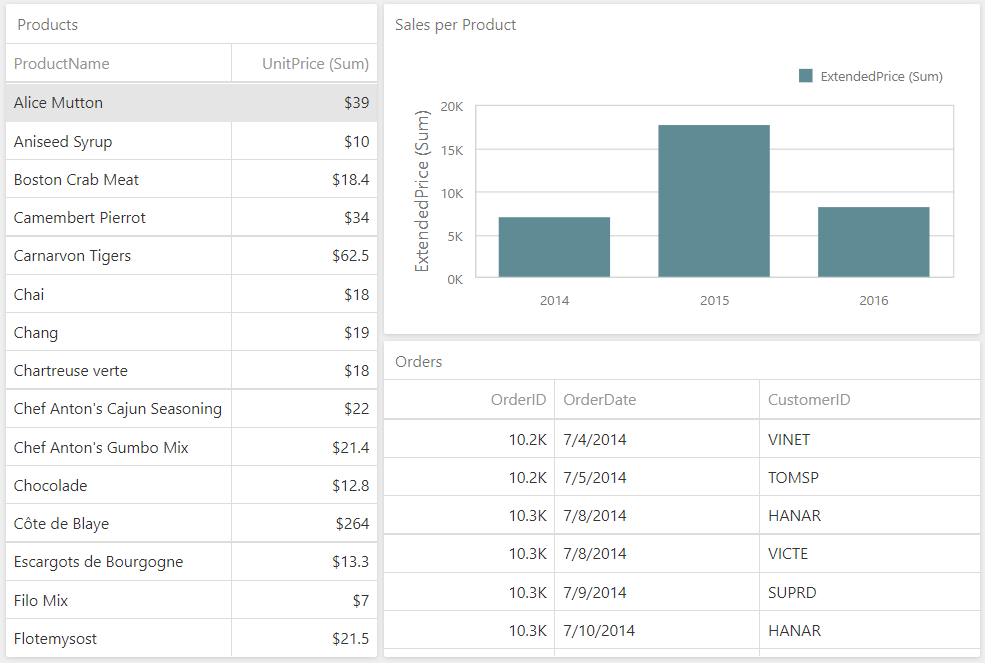
This example uses dashboard parameters to update data in a specific dashboard item without refreshing the entire dashboard. The approach allows you to avoid performance delays.
In this example, a user can select a row in the *Products* grid item. This product selection defines the filter criteria for the *Sales per Product* chart:
The [headers](/Dashboard/js-DevExpress.Dashboard.FetchRemoteService#js_devexpress_dashboard_fetchremoteservice_headers) property stores a *ProductId* value and sends it to the server:
```
function onItemMasterFilterStateChanged(dashboardControl, e) {
if (e.itemName === 'gridDashboardItem1') {
var viewerApi = dashboardControl.findExtension('viewerApi');
var filterValues = viewerApi.getCurrentFilterValues(e.itemName);
if (filterValues) {
var slice = viewerApi.getItemData(e.itemName).getSlice(filterValues[0].getAxisPoint());
var productIdMeasure = slice.getMeasures().filter(m => m.dataMember === 'ProductID')[0];
var productId = slice.getMeasureValue(productIdMeasure.id).getValue();
// Send a ProductId value to the server using Request Headers
dashboardControl.remoteService.headers = { 'ProductId': productId };
// Refresh the Chart Dashboard Item
dashboardControl.refresh(['chartDashboardItem1']);
}
}
}
```
On the server side, pass the obtained *ProductId* value to the dashboard parameter collection in the [CustomParameters](/Dashboard/DevExpress.DashboardWeb.DashboardConfigurator.CustomParameters) event handler. The change of the *ProductIdParameter* value results in requesting filtered data from the server:
```
// ...
configurator.SetConnectionStringsProvider(new DashboardConnectionStringsProvider(configuration));
// ...
var contextAccessor = serviceProvider.GetService();
configurator.CustomParameters += (s, e) => {
var value = Convert.ToInt32(contextAccessor?.HttpContext?.Request.Headers["ProductId"].FirstOrDefault());
e.Parameters.Add(new DashboardParameter("ProductIdParameter", typeof(int), value));
};
```
### How to Limit Data Displayed in Designer Mode
[View Example](https://github.com/DevExpress-Examples/asp-net-core-dashboard-limit-designer-data)
The following example filters data when the dashboard control operates in Designer mode. In this mode, the control displays only several records from the data source to improve performance.
On the client, the [onOptionChanged](/Dashboard/js-DevExpress.Dashboard.DashboardControlOptions#js_devexpress_dashboard_dashboardcontroloptions_onoptionchanged) event is handled to catch working mode changes. Pass the working mode to the server through the [FetchRemoteService.headers](/Dashboard/js-DevExpress.Dashboard.FetchRemoteService#js_devexpress_dashboard_fetchremoteservice_headers) property. The [DashboardControl.reloadData](/Dashboard/js-DevExpress.Dashboard.DashboardControl#js_devexpress_dashboard_dashboardcontrol_reloaddata) method call initiates data reloading:
```
function UpdateDashboardData() {
dashboardControl.remoteService.headers = { "DashboardWorkingMode": dashboardControl.option("workingMode") };
dashboardControl.reloadData();
}
```
The *DashboardWorkingMode* value from the request header is used to filter data when the dashboard control is in Designer mode:
```
// ...
// Applies dynamic filter in the Designer working mode for the DashboardObjectDataSource.
configurator.DataLoading += (s, e) => {
var contextAccessor = serviceProvider.GetService();
var workingMode = contextAccessor.HttpContext.Request.Headers["DashboardWorkingMode"];
if (e.DashboardId == "Object" && e.DataId == "odsInvoices") {
var data = Invoices.CreateData();
if (workingMode == "Designer")
e.Data = data.Where(item => item.Country == "USA");
else
e.Data = data;
}
};
```
### How to Change the Database Connection from the Web Dashboard UI
[View Example](https://github.com/DevExpress-Examples/asp-net-core-dashboard-change-database-connection)
The following example switches between database connections from the Web Dashboard UI using two custom buttons.
When a user clicks a button, use the [headers](/Dashboard/js-DevExpress.Dashboard.DashboardControlOptions#js_devexpress_dashboard_dashboardcontroloptions_fetchremoteservice) property to pass a custom header with the corresponding database connection ID (*nwind*/*nwind2*). After that, call the [DashboardControl.reloadData](/Dashboard/js-DevExpress.Dashboard.DashboardControl#js_devexpress_dashboard_dashboardcontrol_reloaddata) method to reload data:
```
e.items.unshift({
widget: 'dxButton',
options: {
text: 'DB1',
type: 'default'
},
onClick: () => {
dashboardControl.option('fetchRemoteService.headers', { "database": "nwind" });
dashboardControl.reloadData();
}
}, {
widget: 'dxButton',
options: {
text: 'DB2',
type: 'default'
},
onClick: () => {
dashboardControl.option('fetchRemoteService.headers', { "database": "nwind2" });
dashboardControl.reloadData();
}
});
```
On the server, use an [`IHttpContextAccessor`](https://learn.microsoft.com/en-us/dotnet/api/microsoft.aspnetcore.http.ihttpcontextaccessor?view=aspnetcore-8.0) object to access the passed parameter value (database connection ID) in the [ConfigureDataConnection](/Dashboard/DevExpress.DashboardWeb.DashboardConfigurator.ConfigureDataConnection) event handler:
```
// ...
configurator.ConfigureDataConnection += (s, e) => {
if (e.ConnectionName == "nwind") {
IHttpContextAccessor httpContextAccessor = serviceProvider.GetService();
IHeaderDictionary headers = httpContextAccessor.HttpContext.Request.Headers;
string dbKey = headers.ContainsKey("database") ? headers["database"] : "nwind";
string connectionString = dbKey switch {
"nwind" => "XpoProvider=InMemoryDataStore;Read Only=true;Data Source=Data\\nwind.xml",
"nwind2" => "XpoProvider=InMemoryDataStore;Read Only=true;Data Source=Data\\nwind2.xml",
_ => throw new ArgumentOutOfRangeException("Incorrect database name")
};
e.ConnectionParameters = new CustomStringConnectionParameters(connectionString);
}
};
```
See Also
[Request Header - MDN Web Docs Glossary](https://developer.mozilla.org/en-US/docs/Glossary/Request_header)