# Manage Exporting Capabilities in ASP.NET Core | Business Intelligence Dashboard | DevExpress Documentation
The Web Dashboard allows users to [export](/Dashboard/116694/web-dashboard/create-dashboards-on-the-web/exporting) an entire dashboard or individual dashboard items.
## Server-Side API
### Control’s Options
The ASP.NET Core Dashboard control’s server-side API allows you to customize the default export options, customize export documents at runtime, etc.
- [DashboardExportOptionBuilder.AllowExportDashboard](/Dashboard/DevExpress.DashboardAspNetCore.DashboardExportOptionBuilder.AllowExportDashboard%28System.Nullable-System.Boolean-%29)
- Specifies whether end-users can export a dashboard.
- [DashboardExportOptionBuilder.AllowExportDashboardItems](/Dashboard/DevExpress.DashboardAspNetCore.DashboardExportOptionBuilder.AllowExportDashboardItems%28System.Nullable-System.Boolean-%29)
- Specifies whether the dashboard items can be exported by end-users.
- [DashboardExportOptionBuilder.PdfExportOptions](/Dashboard/DevExpress.DashboardAspNetCore.DashboardExportOptionBuilder.PdfExportOptions%28System.Action-DevExpress.DashboardCommon.DashboardPdfExportOptions-%29)
- Contains options which define how the dashboard item is [exported](/Dashboard/116694/web-dashboard/create-dashboards-on-the-web/exporting) to the PDF format.
- [DashboardExportOptionBuilder.ImageExportOptions](/Dashboard/DevExpress.DashboardAspNetCore.DashboardExportOptionBuilder.ImageExportOptions%28System.Action-DevExpress.DashboardCommon.DashboardImageExportOptions-%29)
- Contains options which define how the dashboard item is [exported](/Dashboard/116694/web-dashboard/create-dashboards-on-the-web/exporting) to the Image format.
- [DashboardExportOptionBuilder.ExcelExportOptions](/Dashboard/DevExpress.DashboardAspNetCore.DashboardExportOptionBuilder.ExcelExportOptions%28System.Action-DevExpress.DashboardCommon.DashboardExcelExportOptions-%29)
- Contains options which define how the dashboard item is [exported](/Dashboard/116694/web-dashboard/create-dashboards-on-the-web/exporting) to the Excel format.
- [DashboardExportOptionBuilder.OnExportDialogHidden](/Dashboard/DevExpress.DashboardAspNetCore.DashboardExportOptionBuilder.OnExportDialogHidden%28System.String%29)
- A handler for the event that occurs when the export dialog is hidden.
- [DashboardExportOptionBuilder.OnExportDialogShowing](/Dashboard/DevExpress.DashboardAspNetCore.DashboardExportOptionBuilder.OnExportDialogShowing%28System.String%29)
- A handler for the event that occurs before the export dialog is shown.
- [DashboardExportOptionBuilder.OnExportDialogShown](/Dashboard/DevExpress.DashboardAspNetCore.DashboardExportOptionBuilder.OnExportDialogShown%28System.String%29)
- A handler for the event that occurs after the export dialog is shown.
### AspNetCoreDashboardExporter
The [AspNetCoreDashboardExporter](/Dashboard/DevExpress.DashboardAspNetCore.AspNetCoreDashboardExporter) class allows you to implement server export for the ASP.NET Core Dashboard Control. `AspNetCoreDashboardExporter` uses information stored in a [dashboard sate](/Dashboard/119997/web-dashboard/integrate-dashboard-component/aspnet-core-dashboard-control/manage-dashboard-state) to determine the currently selected filters, drill-down levels and parameter values. The state overrides default values specified in dashboard items and parameters. An empty state for the AspNetCoreDashboardExporter means that an end-user has cleared all filters and parameters, and canceled all drill-down operations. The `AspNetCoreDashboardExporter` inherits members of the [WebDashboardExporter](/Dashboard/DevExpress.DashboardWeb.WebDashboardExporter) class.
Pass the default instance of the [DashboardConfigurator](/Dashboard/DevExpress.DashboardWeb.DashboardConfigurator) to the [AspNetCoreDashboardExporter](/Dashboard/DevExpress.DashboardAspNetCore.AspNetCoreDashboardExporter.-ctor%28DevExpress.DashboardWeb.DashboardConfigurator-Microsoft.AspNetCore.Hosting.IWebHostEnvironment%29) constructor and call the inherited [WebDashboardExporter](/Dashboard/DevExpress.DashboardWeb.WebDashboardExporter) methods:
- [WebDashboardExporter.ExportDashboardItemToExcel](/Dashboard/DevExpress.DashboardWeb.WebDashboardExporter.ExportDashboardItemToExcel.overloads)
- Exports the dashboard item to the specified stream in Excel format.
- [WebDashboardExporter.ExportDashboardItemToImage](/Dashboard/DevExpress.DashboardWeb.WebDashboardExporter.ExportDashboardItemToImage.overloads)
- Exports the dashboard item to the specified stream in Image format.
- [WebDashboardExporter.ExportDashboardItemToPdf](/Dashboard/DevExpress.DashboardWeb.WebDashboardExporter.ExportDashboardItemToPdf.overloads)
- Exports the dashboard item to the specified stream in PDF format.
- [WebDashboardExporter.ExportToExcel](/Dashboard/DevExpress.DashboardWeb.WebDashboardExporter.ExportToExcel.overloads)
- Exports a dashboard to the specified stream in Excel format.
- [WebDashboardExporter.ExportToImage](/Dashboard/DevExpress.DashboardWeb.WebDashboardExporter.ExportToImage.overloads)
- Exports a dashboard to the specified stream in Image format.
- [WebDashboardExporter.ExportToPdf](/Dashboard/DevExpress.DashboardWeb.WebDashboardExporter.ExportToPdf.overloads)
- Exports a dashboard to the specified stream in PDF format.
### DashboardExporter
You can use the non-visual [DashboardExporter](/Dashboard/DevExpress.DashboardCommon.DashboardExporter) component to implement server-side export of a dashboard or dashboard items without referencing dashboard UI controls ( [DashboardDesigner](/Dashboard/DevExpress.DashboardWin.DashboardDesigner), [DashboardViewer](/Dashboard/DevExpress.DashboardWin.DashboardViewer), [ASPxDashboard](/Dashboard/DevExpress.DashboardWeb.ASPxDashboard), and so on) or [DashboardConfigurator](/Dashboard/DevExpress.DashboardWeb.DashboardConfigurator).
To integrate the `DashboardExporter` into a service, [install](/GeneralInformation/116042/installation/install-products) the `DevExpress.Dashboard.Core` package. See the [DashboardExporter](/Dashboard/DevExpress.DashboardCommon.DashboardExporter) class description for details.
[View Example: Export Dashboards in a Console Application](https://github.com/DevExpress-Examples/bi-dashboard-non-visual-exporter)
[View Example: How to Email a Dashboard](https://github.com/DevExpress-Examples/bi-dashboard-mailkit-export)
[View Example: Email a Dashboard with Different Data Depending on the Addressee](https://github.com/DevExpress-Examples/bi-dashboard-mailkit-export-console-app)
### Implement Server-Side Export
The [WebDashboardExporter](/Dashboard/DevExpress.DashboardWeb.WebDashboardExporter) class allows you to implement server export for the [ASP.NET MVC Dashboard extension](/Dashboard/16977/web-dashboard/integrate-dashboard-component/aspnet-mvc-dashboard-extension) and [ASP.NET Core Dashboard control](/Dashboard/115163/web-dashboard/integrate-dashboard-component/aspnet-core-dashboard-control). You can specify a dashboard state and export options to be applied to the resulting document. Refer to the [WebDashboardExporter](/Dashboard/DevExpress.DashboardWeb.WebDashboardExporter) class description for more information.
## Client-Side API
You can use the Web Dashboard’s [client-side](/Dashboard/119108/web-dashboard/integrate-dashboard-component/dashboard-control-for-javascript-applications-jquery-knockout-etc) API for exporting to various formats, customizing export options, etc. For this, use the members of the [DashboardExportExtension](/Dashboard/js-DevExpress.Dashboard.DashboardExportExtension):
- [exportToPdf](/Dashboard/js-DevExpress.Dashboard.DashboardExportExtension#js_devexpress_dashboard_dashboardexportextension_exporttopdf)
- Exports the entire dashboard to a PDF file.
- [exportToImage](/Dashboard/js-DevExpress.Dashboard.DashboardExportExtension#js_devexpress_dashboard_dashboardexportextension_exporttoimage)
- Exports the entire dashboard to an image.
- [exportToExcel](/Dashboard/js-DevExpress.Dashboard.DashboardExportExtension#js_devexpress_dashboard_dashboardexportextension_exporttoexcel)
- Exports the entire dashboard to an Excel file.
- [exportDashboardItemToPdf(itemName)](/Dashboard/js-DevExpress.Dashboard.DashboardExportExtension#js_devexpress_dashboard_dashboardexportextension_exportdashboarditemtopdf_itemname_)
- Exports a dashboard item to a PDF file.
- [exportDashboardItemToImage(itemName)](/Dashboard/js-DevExpress.Dashboard.DashboardExportExtension#js_devexpress_dashboard_dashboardexportextension_exportdashboarditemtoimage_itemname_)
- Exports a dashboard item to an image.
- [exportDashboardItemToExcel(itemName)](/Dashboard/js-DevExpress.Dashboard.DashboardExportExtension#js_devexpress_dashboard_dashboardexportextension_exportdashboarditemtoexcel_itemname_)
- Exports a dashboard item to an Excel file.
- [getPdfExportOptions](/Dashboard/js-DevExpress.Dashboard.DashboardExportExtension#js_devexpress_dashboard_dashboardexportextension_getpdfexportoptions)
- Returns options related to exporting a dashboard/dashboard item to PDF format.
- [getImageExportOptions](/Dashboard/js-DevExpress.Dashboard.DashboardExportExtension#js_devexpress_dashboard_dashboardexportextension_getimageexportoptions)
- Returns options related to exporting a dashboard/dashboard item to the Image format.
- [getExcelExportOptions](/Dashboard/js-DevExpress.Dashboard.DashboardExportExtension#js_devexpress_dashboard_dashboardexportextension_getexcelexportoptions)
- Returns options related to exporting a dashboard/dashboard item to Excel format.
- [setPdfExportOptions(options)](/Dashboard/js-DevExpress.Dashboard.DashboardExportExtension#js_devexpress_dashboard_dashboardexportextension_setpdfexportoptions_options_)
- Sets options related to exporting a dashboard/dashboard item to PDF format.
- [setImageExportOptions(options)](/Dashboard/js-DevExpress.Dashboard.DashboardExportExtension#js_devexpress_dashboard_dashboardexportextension_setimageexportoptions_options_)
- Sets options related to exporting a dashboard/dashboard item to the Image format.
- [setExcelExportOptions(options)](/Dashboard/js-DevExpress.Dashboard.DashboardExportExtension#js_devexpress_dashboard_dashboardexportextension_setexcelexportoptions_options_)
- Sets options related to exporting a dashboard/dashboard item to Excel format.
- [showExportDashboardDialog(format)](/Dashboard/js-DevExpress.Dashboard.DashboardExportExtension#js_devexpress_dashboard_dashboardexportextension_showexportdashboarddialog_format_)
- Invokes the dialog that allows end-users to export the entire dashboard to the specified format.
- [showExportDashboardItemDialog(itemComponentName, format)](/Dashboard/js-DevExpress.Dashboard.DashboardExportExtension#js_devexpress_dashboard_dashboardexportextension_showexportdashboarditemdialog_itemcomponentname_format_)
- Invokes the dialog that allows end users to export the dashboard item to the specified format.
[View Example: How to export all dashboard items into the same PDF document](https://github.com/DevExpress-Examples/asp-net-core-dashboard-export-all-items)
[View Example: How to Use MailKit to Send a Dashboard as a Document in PDF](https://github.com/DevExpress-Examples/asp-net-core-dashboard-mailkit-export)
## Exporting Specifics on Linux and MacOS
Refer to the following article for information about exporting specifics on a non-Windows platform: [ASP.NET Core Dashboard Control on Linux and MacOS](/Dashboard/402574/web-dashboard/integrate-dashboard-component/dashboard-backend/linux-and-mac-os-specifics).
## Custom Export
The Dashboard Control raises the [ASPxDashboard.CustomExport](/Dashboard/DevExpress.DashboardWeb.ASPxDashboard.CustomExport)/[DashboardConfigurator.CustomExport](/Dashboard/DevExpress.DashboardWeb.DashboardConfigurator.CustomExport) event before saving the exported document to the PDF and Image formats. The event allows you to customize the exported document.
- Use the [e.GetPrintableControl](/Dashboard/DevExpress.DashboardWeb.CustomExportWebEventArgs.GetPrintableControl%28System.String%29) and [e.GetPrintableControls](/Dashboard/DevExpress.DashboardWeb.CustomExportWebEventArgs.GetPrintableControls) methods to obtain a printable control(s) for a specific dashboard item or the entire dashboard.
- Use the [e.Report](/Dashboard/DevExpress.DashboardWeb.CustomExportWebEventArgs.Report) property to customize the underlying report.
The following table illustrates dashboard items and their corresponding printable XRControls:
| Dashboard Item | XRControl |
| --- | --- |
| [ChartDashboardItem](/Dashboard/DevExpress.DashboardCommon.ChartDashboardItem) | [XRChart](/XtraReports/DevExpress.XtraReports.UI.XRChart) |
| [ScatterChartDashboardItem](/Dashboard/DevExpress.DashboardCommon.ScatterChartDashboardItem) | [XRChart](/XtraReports/DevExpress.XtraReports.UI.XRChart) |
| [PieDashboardItem](/Dashboard/DevExpress.DashboardCommon.PieDashboardItem) | [XRChart](/XtraReports/DevExpress.XtraReports.UI.XRChart) |
| [PivotDashboardItem](/Dashboard/DevExpress.DashboardCommon.PivotDashboardItem) | [XRPivotGrid](/XtraReports/DevExpress.XtraReports.UI.XRPivotGrid) |
| [RangeFilterDashboardItem](/Dashboard/DevExpress.DashboardCommon.RangeFilterDashboardItem) (When [CustomExportBaseEventArgs.ExportMode](/Dashboard/DevExpress.DashboardCommon.CustomExportBaseEventArgs.ExportMode) is SingleItem) | [XRChart](/XtraReports/DevExpress.XtraReports.UI.XRChart) |
| [GaugeDashboardItem](/Dashboard/DevExpress.DashboardCommon.GaugeDashboardItem) | [XRGaugeDashboardItem](/Dashboard/DevExpress.DashboardCommon.XRGaugeDashboardItem) |
| [TextBoxDashboardItem](/Dashboard/DevExpress.DashboardCommon.TextBoxDashboardItem) | [XRTextBox](/Dashboard/DevExpress.DashboardCommon.XRTextBox) |
### Example: How to Customize Dashboard Items in the Exported Document
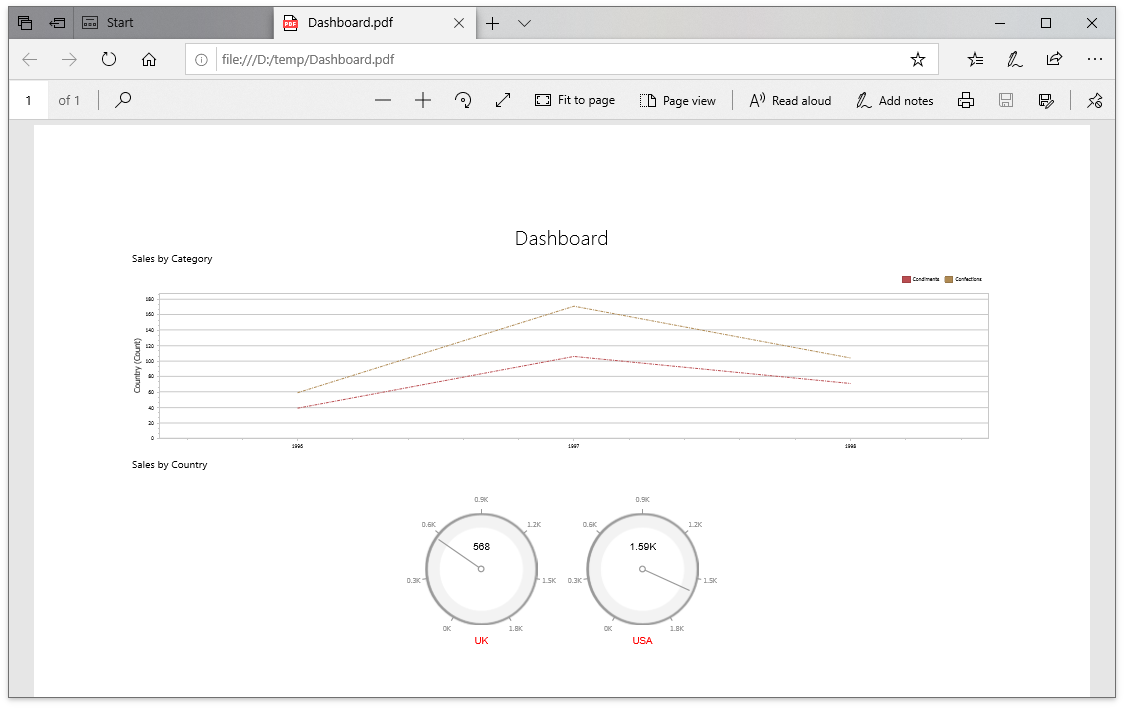
The following example shows how to customize dashboard items in the exported document when you handle the [ASPxDashboard.CustomExport](/Dashboard/DevExpress.DashboardWeb.ASPxDashboard.CustomExport) / [DashboardConfigurator.CustomExport](/Dashboard/DevExpress.DashboardWeb.DashboardConfigurator.CustomExport) events. You can use the [CustomExportWebEventArgs.GetPrintableControls](/Dashboard/DevExpress.DashboardWeb.CustomExportWebEventArgs.GetPrintableControls) method to obtain the printable controls.
- C#
- VB.NET
using DevExpress.DashboardCommon;
using DevExpress.DashboardWeb;
using DevExpress.XtraCharts;
using DevExpress.XtraReports.UI;
using System;
using System.Drawing;
using System.Linq;

protected void CustomizeExport(object sender, CustomExportWebEventArgs e) {
  foreach(var printControl in e.GetPrintableControls()) {
    if(printControl.Value is XRGaugeDashboardItem) {
      var gaugeItemName = printControl.Key;
      var gaugeDashboardItem = e.GetDashboardItem(gaugeItemName) as GaugeDashboardItem;
      foreach(var dashGaugeElement in gaugeDashboardItem.Gauges) {
        foreach(var gaugePanel in e.GetGaugeContext(gaugeItemName).GetPrintableGauges(dashGaugeElement).Cast<XRDashboardGauge>()) {
          if(gaugePanel != null) {
              gaugePanel.MainSeriesLabel.ForeColor = Color.Red;
          }
        }
      }
    }

    if(printControl.Value is XRChart) {
      var chartItemName = printControl.Key;
      var chartDashboardItem = e.GetDashboardItem(chartItemName) as ChartDashboardItem;
      foreach(var pane in chartDashboardItem.Panes) {
        if(pane.Series.Count > 0) {
          foreach(var dashSeries in pane.Series) {
            if(dashSeries != null) {
              var controlSeries = e.GetChartContext(chartItemName).GetControlSeries(dashSeries);
              if(controlSeries != null) {
                foreach(var ser in controlSeries) {
                  LineSeriesView view = ser.View as LineSeriesView;
                  if(view != null) {
                      view.LineStyle.DashStyle = DashStyle.DashDot;
                  }
                }
              }
            }
          }
        }
      }
    }
  }
}
Imports DevExpress.DashboardCommon
Imports DevExpress.DashboardWeb
Imports DevExpress.XtraCharts
Imports DevExpress.XtraReports.UI
Imports System
Imports System.Drawing
Imports System.Linq

Protected Sub ASPxDashboard1_CustomExport(ByVal sender As Object, ByVal e As CustomExportWebEventArgs)
  For Each printControl In e.GetPrintableControls()
    If TypeOf printControl.Value Is XRGaugeDashboardItem Then
      Dim gaugeItemName = printControl.Key
      Dim gaugeDashboardItem = TryCast(e.GetDashboardItem(gaugeItemName), GaugeDashboardItem)
      For Each dashGaugeElement In gaugeDashboardItem.Gauges
        For Each gaugePanel In e.GetGaugeContext(gaugeItemName).GetPrintableGauges(dashGaugeElement).Cast(Of XRDashboardGauge)()
          If gaugePanel IsNot Nothing Then
              gaugePanel.MainSeriesLabel.ForeColor = Color.Red
          End If
        Next gaugePanel
      Next dashGaugeElement
    End If

    If TypeOf printControl.Value Is XRChart Then
      Dim chartItemName = printControl.Key
      Dim chartDashboardItem = TryCast(e.GetDashboardItem(chartItemName), ChartDashboardItem)
      For Each pane In chartDashboardItem.Panes
        If pane.Series.Count > 0 Then
          For Each dashSeries In pane.Series
            If dashSeries IsNot Nothing Then
              Dim controlSeries = e.GetChartContext(chartItemName).GetControlSeries(dashSeries)
              If controlSeries IsNot Nothing Then
                For Each ser In controlSeries
                  Dim view As LineSeriesView = TryCast(ser.View, LineSeriesView)
                  If view IsNot Nothing Then
                      view.LineStyle.DashStyle = DashStyle.DashDot
                  End If
                Next ser
              End If
            End If
          Next dashSeries
        End If
      Next pane
    End If
  Next printControl
End Sub
### Example: How to Add Custom Information to the Exported Dashboard
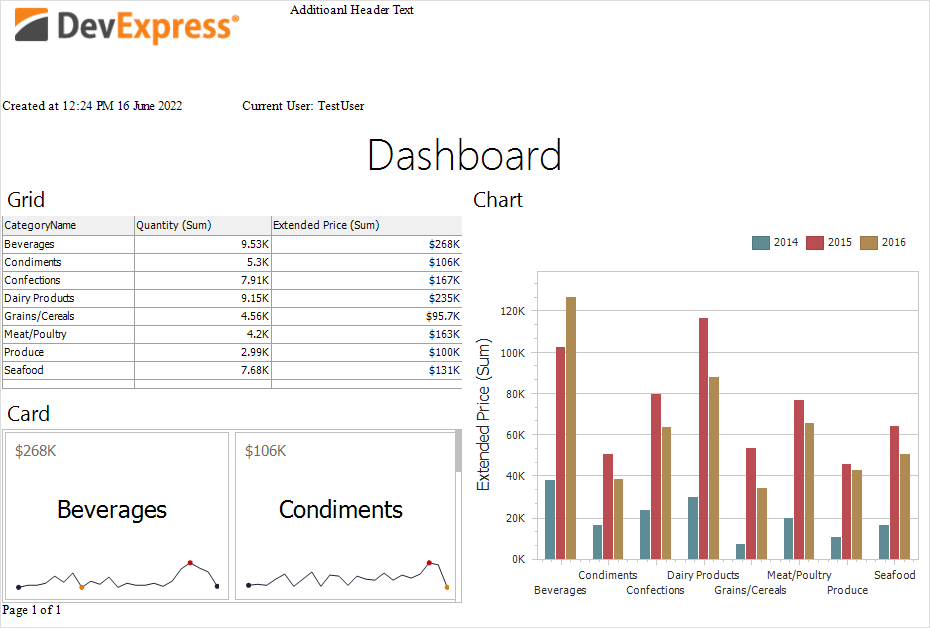
The following example shows how to specify header and footer content of an exported dashboard. For this, the [CustomExport](/Dashboard/DevExpress.DashboardWeb.ASPxDashboard.CustomExport) event is used.
[View Example: ASP.NET Web Forms](https://github.com/DevExpress-Examples/web-forms-dashboard-add-custom-information-to-exported-dashboard)
### Example: How to Add a Custom Header to Each Sheet
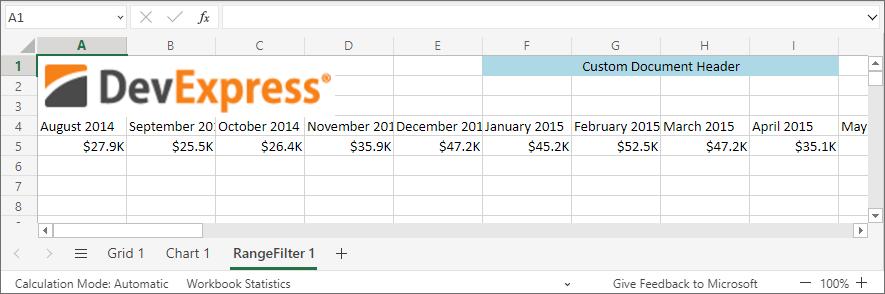
The following example shows how to add a custom header to each sheet for the exported Excel workbook. For this, the [CustomizeExportDocument](/Dashboard/DevExpress.DashboardWeb.ASPxDashboard.CustomizeExportDocument) event is used.
[View Example: ASP.NET Web Forms](https://github.com/DevExpress-Examples/web-dashboard-custom-info-exported-excel)
### Example: How to export the Dashboard to PDF with Different Filter Values on Different Pages
The following example shows how to export a dashboard with different dashboard states (different master filter value) to separate pages and join them to a single PDF document. Multiple exported documents are joined in a single file with the help of the [PdfDocumentProcessor](/OfficeFileAPI/DevExpress.Pdf.PdfDocumentProcessor) class.
[View Example: ASP.NET Web Forms](https://github.com/DevExpress-Examples/web-forms-dashboard-pdf-export-with-filter-values-on-different-pages)
### Example: Non-Visual Custom Export
This example shows how to use the [DashboardExporter](/Dashboard/DevExpress.DashboardCommon.DashboardExporter) component in a console application to export a dashboard with a custom Funnel item.
[View Example](https://github.com/DevExpress-Examples/bi-dashboard-non-visual-custom-export)
See Also
[Exporting in the Web Dashboard](/Dashboard/116694/web-dashboard/create-dashboards-on-the-web/exporting)