SummaryItemBase.CalculationMode Property
Gets or sets a mode that specifies by which rows the summary value is calculated.
Namespace: DevExpress.Xpf.Grid
Assembly: DevExpress.Xpf.Grid.v19.2.Core.dll
Declaration
Property Value
| Type | Description |
|---|---|
| Nullable<GridSummaryCalculationMode> | A mode that specifies by which rows the summary value is calculated. |
Available values:
| Name | Description |
|---|---|
| AllRows | The summary value is calculated against all rows. |
| SelectedRows | The summary value is calculated against selected rows. |
| Mixed | The summary value is calculated against selected rows if their number is more than one; otherwise, against all rows. |
Remarks
The GridControl can calculate summaries against selected rows and cells:
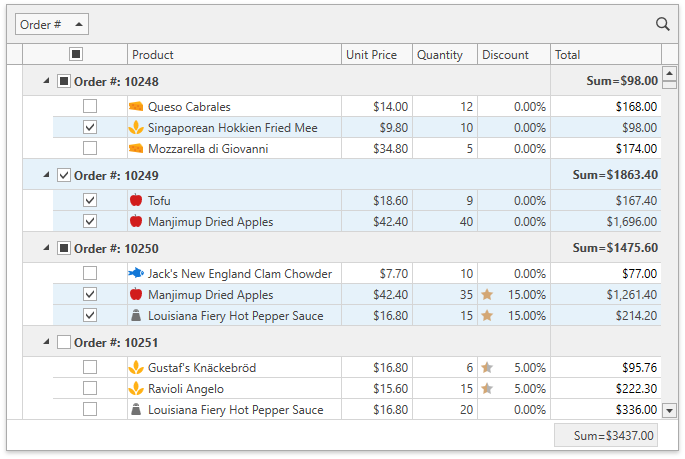
Set the DataViewBase.SummaryCalculationMode property to SelectedRows / Mixed to make the GridControl calculate all summaries within its view against selected rows:
<dxg:GridControl x:Name="grid" SelectionMode="Row">
    <dxg:GridControl.View>
        <dxg:TableView x:Name="view"
                       SummaryCalculationMode="SelectedRows"
                       ShowTotalSummary="True" />
    </dxg:GridControl.View>
    <dxg:GridControl.TotalSummary>
        <dxg:GridSummaryItem FieldName="Total" SummaryType="Sum" DisplayFormat="Sum={0:$0.00}" />
    </dxg:GridControl.TotalSummary>
    <dxg:GridControl.GroupSummary>
        <dxg:GridSummaryItem FieldName="Total" SummaryType="Sum" DisplayFormat="Sum={0:$0.00}" />
    </dxg:GridControl.GroupSummary>
</dxg:GridControl>
You can create an individual summary for selected rows/cells and set its SummaryItemBase.CalculationMode property to SelectedRows / Mixed:
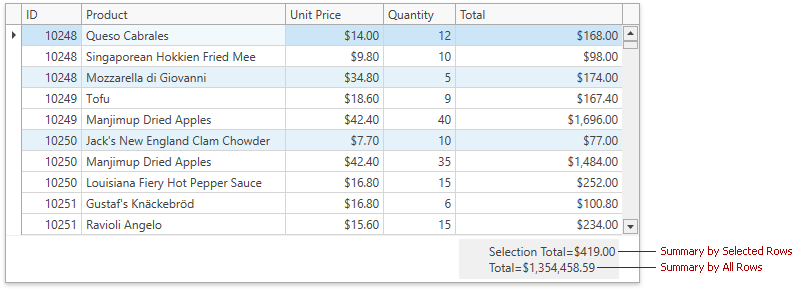
<dxg:GridControl x:Name="grid" SelectionMode="Row">
    <!-- -->
    <dxg:GridControl.View>
        <dxg:TableView x:Name="view" ShowTotalSummary="True" ShowGroupedColumns="True" />
    </dxg:GridControl.View>
    <dxg:GridControl.TotalSummary>
        <!-- The first summary against selected rows -->
        <dxg:GridSummaryItem FieldName="Total" SummaryType="Sum" ShowInColumn="Total"
                             DisplayFormat="Selection Total=${0:N}" CalculationMode="SelectedRows" />
        <!-- The second summary against all rows -->
        <dxg:GridSummaryItem FieldName="Total" SummaryType="Sum" ShowInColumn="Total"
                             DisplayFormat="Total=${0:N}" />
    </dxg:GridControl.TotalSummary>
    <dxg:GridControl.GroupSummary>
        <dxg:GridSummaryItem FieldName="Total" SummaryType="Sum"
                             DisplayFormat="Grand Total=${0:N}" CalculationMode="SelectedRows" />
    </dxg:GridControl.GroupSummary>
</dxg:GridControl>
Note
The GridControl in Server Mode or bound to ICollectionView does not calculate summaries for selection.